cancel
Showing results for 
Search instead for 
Did you mean: 

We've captured the moments from FabCon & SQLCon that everyone is talking about, and we are bringing them to the community, live and on-demand. Starts on April 14th. Register now

Reply
Syndicate_Admin
Administrator
Administrator

Column in Query refer to another row in the same query

Already thank you all very much for reading this message and helping the less experienced.

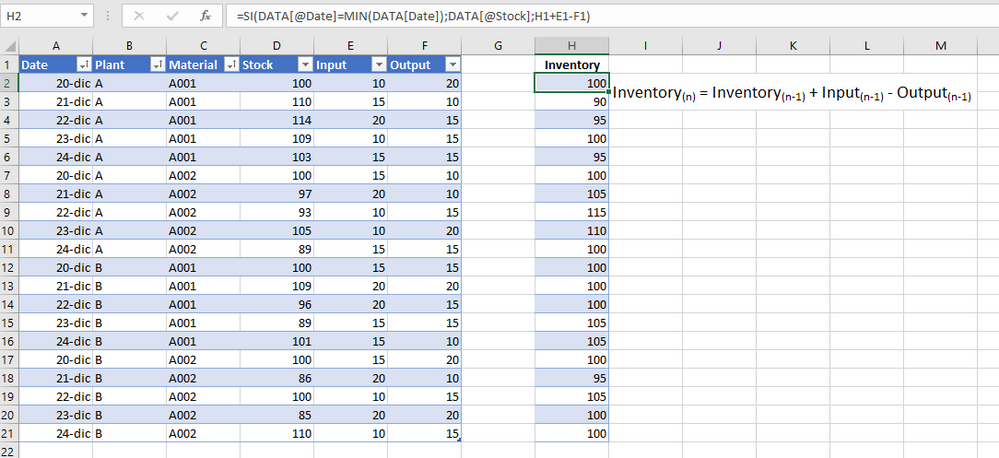
I have a table that has date, material, plant, Inventory, Inputs and Outputs. The inventory for the first day is correct, but for the following days it is wrong and I would like to make a new column that calculates the inventory by adding the inventory of the previous day, plus the entries of the previous day minus the departures of the previous day. Is it possible to do this in Power BI? I leave a picture of how I would solve it in Excel, but I don't know if something similar can be solved in PBI.

Help_PBI.png

Thanks a lot!

3 REPLIES 3
v-henryk-mstf
Community Support
Community Support

Hi @Syndicate_Admin ,


Would you be able to provide some more detailed descriptions so that I can answer your questions as soon as possible?


Looking forward to your reply.


Best Regards,
Henry


What I would like is to be able to replicate the calculation of the image of the "Inventory" column, that is, for the first day I have information, I leave the "Stock" column, but for the following days I calculate the inventory as the sum of the inventory of the previous day plus the entries of the previous day minus the outputs of the previous day (that also considering that in the table I have several materials and plants).

Thank you very much for the answer

I was finally able to figure it out. It may not be the best way, but it does work. In case anyone needs something similar, I leave the steps and share the sample file.

Steps to follow (I hope I don't forget any important ones):
1. Create a Calendar table, taking the dates of the table you want to treat
2. To the calendar table, add two new columns:

Rank = RANK. EQ([Date],Calendar[Date],ASC)

Add_INV =
WHERE _Current = [Date]
WHERE _Next = LOOKUPVALUE(Calendar[Date],Calendar[Rank],[Rank]-1)
RETURN _Next - _Current

3. In the table where we have the data, we will create new columns for the intermediate inventories, being the last column created the one that will have the 'real' inventory.

The formula for these inventories is:

Inv_i =
WHERE _rankingFecha = RELATED(Calendar[Rank])
WHERE _Days = RELATED(Calendar[Add_INV])
WHERE _Storing = CALCULATE(sum(DATA[Inv_i-1]), ALLEXCEPT(DATA,DATA[Plant], DATA[Material]), DATEADD(Calendar[Date],_Days,DAY))
WHERE _InputAnt = CALCULATE(sum(DATA[Input]), ALLEXCEPT(DATA,DATA[Plant], DATA[Material]), DATEADD(Calendar[Date],_Days,DAY))
WHERE _OutputAnt = CALCULATE(sum(DATA[Output]), ALLEXCEPT(DATA,DATA[Plant], DATA[Material]), DATEADD(Calendar[Date],_Days,DAY))

RETURN SWITCH(TRUE(),
_rankingFecha < i, [Inv_i-1],
_rankingFecha = i, _Storing + _InputAnt - _OutputAnt,
_rankingFecha > i, BLANK()
)
The above was a kind of pseudocode, where you have to replace the "i", by the column in question, for example for the second inventory we would have the formula:
Inv2 =
WHERE _rankingFecha = RELATED(Calendar[Rank])
WHERE _Days = RELATED(Calendar[Add_INV])
WHERE _Storing = CALCULATE(sum(DATA[Inv1]), ALLEXCEPT(DATA,DATA[Plant], DATA[Material]), DATEADD(Calendar[Date],_Days,DAY))
WHERE _InputAnt = CALCULATE(sum(DATA[Input]), ALLEXCEPT(DATA,DATA[Plant], DATA[Material]), DATEADD(Calendar[Date],_Days,DAY))
WHERE _OutputAnt = CALCULATE(sum(DATA[Output]), ALLEXCEPT(DATA,DATA[Plant], DATA[Material]), DATEADD(Calendar[Date],_Days,DAY))

RETURN SWITCH(TRUE(),
_rankingFecha < 2, [Inv1],
_rankingFecha = 2, _Storing + _InputAnt - _OutputAnt,
_rankingFecha > 2, BLANK()
)
Repeating this for all possible date values (in my case 5), inventory 5 will have the quantity I am looking for.
I leave the links in case someone helps you take the idea:

Helpful resources

Announcements
New to Fabric survey Carousel

New to Fabric Survey

If you have recently started exploring Fabric, we'd love to hear how it's going. Your feedback can help with product improvements.

Power BI DataViz World Championships carousel

Power BI DataViz World Championships - June 2026

A new Power BI DataViz World Championship is coming this June! Don't miss out on submitting your entry.

Join our Fabric User Panel

Join our Fabric User Panel

Share feedback directly with Fabric product managers, participate in targeted research studies and influence the Fabric roadmap.

March Power BI Update Carousel

Power BI Community Update - March 2026

Check out the March 2026 Power BI update to learn about new features.