FabCon is coming to Atlanta
Join us at FabCon Atlanta from March 16 - 20, 2026, for the ultimate Fabric, Power BI, AI and SQL community-led event. Save $200 with code FABCOMM.
Register now!- Power BI forums
- Get Help with Power BI
- Desktop
- Service
- Report Server
- Power Query
- Mobile Apps
- Developer
- DAX Commands and Tips
- Custom Visuals Development Discussion
- Health and Life Sciences
- Power BI Spanish forums
- Translated Spanish Desktop
- Training and Consulting
- Instructor Led Training
- Dashboard in a Day for Women, by Women
- Galleries
- Data Stories Gallery
- Themes Gallery
- Contests Gallery
- QuickViz Gallery
- Quick Measures Gallery
- Visual Calculations Gallery
- Notebook Gallery
- Translytical Task Flow Gallery
- TMDL Gallery
- R Script Showcase
- Webinars and Video Gallery
- Ideas
- Custom Visuals Ideas (read-only)
- Issues
- Issues
- Events
- Upcoming Events
Get Fabric Certified for FREE during Fabric Data Days. Don't miss your chance! Request now
- Power BI forums
- Forums
- Get Help with Power BI
- Desktop
- Re: Column headers in newspaper-style multi-column...
- Subscribe to RSS Feed
- Mark Topic as New
- Mark Topic as Read
- Float this Topic for Current User
- Bookmark
- Subscribe
- Printer Friendly Page

- Mark as New
- Bookmark
- Subscribe
- Mute
- Subscribe to RSS Feed
- Permalink
- Report Inappropriate Content
Column headers in newspaper-style multi-column tablix in Report Builder
This is a simple question and there must be a simple answer, but I can't find it anywhere: I have a 2-column tablix which needs to repeat across a page "newspaper style", top to bottom, right to left. But I can't for the life of me get the column headers to appear on columns 2 and 3. I have set column header to appear on all pages, but in this case it's all on the same page and they don't repeat across columns. How do you do this?
Here's the layout, just a simple group by a column and sum:

Here's how it renders:
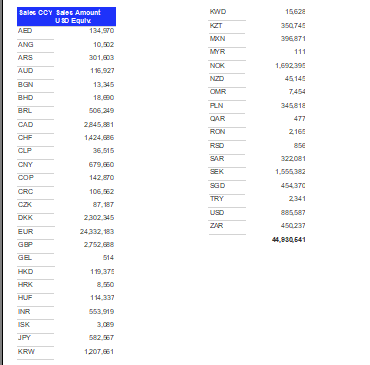
Thanks!
Solved! Go to Solution.


- Mark as New
- Bookmark
- Subscribe
- Mute
- Subscribe to RSS Feed
- Permalink
- Report Inappropriate Content
Hey @Anonymous ,
please excuse that it took me so long, but I'm currently on vacation with girlfriend celebrating her birthday, but ...
So, this is how to setup repeating column header for a paginated report 🙂
The following screenshot assumes that there is a tablix object available

0 - the tablix
1 - make sure the property pane is visible (view menu)
2 - switch on the "Advanced mode" at the Columns Groups
3 - choose the leftmost (in the tablix object) switching through the static objects (my exampls has just one)
4 - set the property "RepeatOnNewPage" to true and make sure that "KeepWithGroup" is set to after
and voila
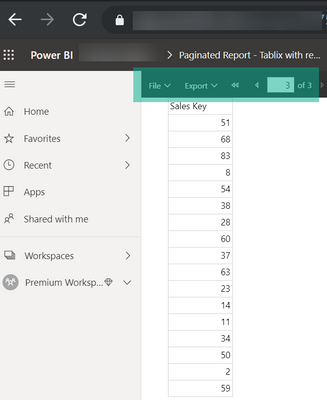
Hopefully this helps to tackle your challenge 🙂
Regards,
Tom
Did I answer your question? Mark my post as a solution, this will help others!
Proud to be a Super User!
I accept Kudos 😉
Hamburg, Germany
- Mark as New
- Bookmark
- Subscribe
- Mute
- Subscribe to RSS Feed
- Permalink
- Report Inappropriate Content
Hey @Anonymous ,
are you aware of this document: https://docs.microsoft.com/en-us/sql/reporting-services/report-design/display-row-and-column-headers-on-multiple-pages-report-builder-and-ssrs?view=sql-server-ver15
Regards,
Tom
Did I answer your question? Mark my post as a solution, this will help others!
Proud to be a Super User!
I accept Kudos 😉
Hamburg, Germany
- Mark as New
- Bookmark
- Subscribe
- Mute
- Subscribe to RSS Feed
- Permalink
- Report Inappropriate Content
@TomMartens Yes, I saw that last night and tried everything I could after reading it, but none of it lead to me having column headers on the other columns. Do you know what/where the setting is which would make this happen?
- Mark as New
- Bookmark
- Subscribe
- Mute
- Subscribe to RSS Feed
- Permalink
- Report Inappropriate Content
Hey,
i will test it tomorrow, as I current have no access to a Premium capacity.
Regards,
Tom
Did I answer your question? Mark my post as a solution, this will help others!
Proud to be a Super User!
I accept Kudos 😉
Hamburg, Germany
- Mark as New
- Bookmark
- Subscribe
- Mute
- Subscribe to RSS Feed
- Permalink
- Report Inappropriate Content
@TomMartens Thank you! I find it hard to believe it's not a simple thing to do, but I can't figure it out for the life of me.
- Mark as New
- Bookmark
- Subscribe
- Mute
- Subscribe to RSS Feed
- Permalink
- Report Inappropriate Content
Hey @Anonymous ,
please excuse that it took me so long, but I'm currently on vacation with girlfriend celebrating her birthday, but ...
So, this is how to setup repeating column header for a paginated report 🙂
The following screenshot assumes that there is a tablix object available
0 - the tablix
1 - make sure the property pane is visible (view menu)
2 - switch on the "Advanced mode" at the Columns Groups
3 - choose the leftmost (in the tablix object) switching through the static objects (my exampls has just one)
4 - set the property "RepeatOnNewPage" to true and make sure that "KeepWithGroup" is set to after
and voila
Hopefully this helps to tackle your challenge 🙂
Regards,
Tom
Did I answer your question? Mark my post as a solution, this will help others!
Proud to be a Super User!
I accept Kudos 😉
Hamburg, Germany
- Mark as New
- Bookmark
- Subscribe
- Mute
- Subscribe to RSS Feed
- Permalink
- Report Inappropriate Content
@TomMartens Thank you so much for the detailed response, I can't wait to try it!
Helpful resources

Power BI Monthly Update - November 2025
Check out the November 2025 Power BI update to learn about new features.

Fabric Data Days
Advance your Data & AI career with 50 days of live learning, contests, hands-on challenges, study groups & certifications and more!

FabCon Atlanta 2026
Join us at FabCon Atlanta, March 16-20, for the ultimate Fabric, Power BI, AI and SQL community-led event. Save $200 with code FABCOMM.


