Join us at FabCon Atlanta from March 16 - 20, 2026, for the ultimate Fabric, Power BI, AI and SQL community-led event. Save $200 with code FABCOMM.
Register now!Get Fabric Certified for FREE during Fabric Data Days. Don't miss your chance! Request now
Hi,
Now I have 2 slicers on my report.
* Slicer 1 : select the headcategory
* Slicer 2 : select the subcategory's from the selected headcategory
When I change the first slicers, my second slicer keeps the selected subcategory's from my previous selected headcategory.
Is it possible to clear my second slicer when changing the first one?
kind regards,
Davina
Hi @Anonymous ,
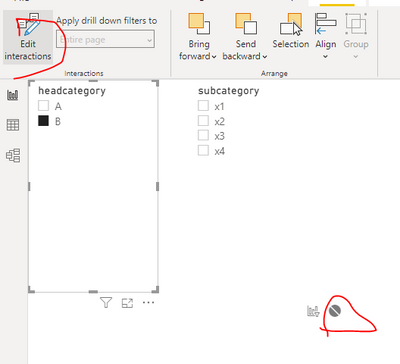
Or do like this.
Best regards,
Lionel Chen
If this post helps, then please consider Accept it as the solution to help the other members find it more quickly.
Hi @Anonymous ,
Has your problem been solved?
Best regards,
Lionel Chen
If this post helps, then please consider Accept it as the solution to help the other members find it more quickly.
@v-lionel-msftNo, my question did not answer like I wanted. Interaction works but do not deselect my previous selection in my second slicer.
At the moment I fixed it with a clear all button.
HI @Anonymous ,
Check this video from Reza Rad.
https://www.youtube.com/watch?v=cyOquvfhzNM
Regards,
Harsh Nathani
@Anonymous , You can do that using bookmark.
https://radacad.com/bookmarks-and-buttons-making-power-bi-charts-even-more-interactive
Explore if Hierarchy slicer works better - https://powerbi.microsoft.com/en-us/blog/power-bi-desktop-february-2020-feature-summary/#_Hierarchical_slicer
Hi @Anonymous ,
Two ways of doing this:
Thanks,
Pragati
Check out the November 2025 Power BI update to learn about new features.
Advance your Data & AI career with 50 days of live learning, contests, hands-on challenges, study groups & certifications and more!