FabCon is coming to Atlanta
Join us at FabCon Atlanta from March 16 - 20, 2026, for the ultimate Fabric, Power BI, AI and SQL community-led event. Save $200 with code FABCOMM.
Register now!- Power BI forums
- Get Help with Power BI
- Desktop
- Service
- Report Server
- Power Query
- Mobile Apps
- Developer
- DAX Commands and Tips
- Custom Visuals Development Discussion
- Health and Life Sciences
- Power BI Spanish forums
- Translated Spanish Desktop
- Training and Consulting
- Instructor Led Training
- Dashboard in a Day for Women, by Women
- Galleries
- Data Stories Gallery
- Themes Gallery
- Contests Gallery
- Quick Measures Gallery
- Notebook Gallery
- Translytical Task Flow Gallery
- TMDL Gallery
- R Script Showcase
- Webinars and Video Gallery
- Ideas
- Custom Visuals Ideas (read-only)
- Issues
- Issues
- Events
- Upcoming Events
Join the Fabric FabCon Global Hackathon—running virtually through Nov 3. Open to all skill levels. $10,000 in prizes! Register now.
- Power BI forums
- Forums
- Get Help with Power BI
- Desktop
- Re: Changing a parameter based on a slicer
- Subscribe to RSS Feed
- Mark Topic as New
- Mark Topic as Read
- Float this Topic for Current User
- Bookmark
- Subscribe
- Printer Friendly Page

- Mark as New
- Bookmark
- Subscribe
- Mute
- Subscribe to RSS Feed
- Permalink
- Report Inappropriate Content
Changing a parameter based on a slicer
Can I change a parameter based on the selected slicer value?
The parameter then is used to calculate a column displayed on the report in a table
Solved! Go to Solution.


- Mark as New
- Bookmark
- Subscribe
- Mute
- Subscribe to RSS Feed
- Permalink
- Report Inappropriate Content
Hi @Anonymous
You will be able to create a numeric range parameter with which you can change the value with a slicer.
You can use that value within a measure or calculated column.
Here is an example:
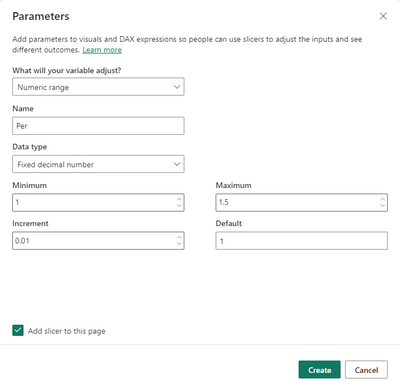
This table is automatically created (with one column and one measure):
This measure returns the selected value of the slicer which you will use in your formula.

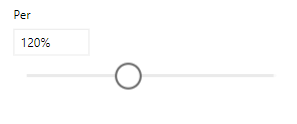
Hope this helps you.
Hugh
- Mark as New
- Bookmark
- Subscribe
- Mute
- Subscribe to RSS Feed
- Permalink
- Report Inappropriate Content
Hi @Anonymous
You will be able to create a numeric range parameter with which you can change the value with a slicer.
You can use that value within a measure or calculated column.
Here is an example:
This table is automatically created (with one column and one measure):
This measure returns the selected value of the slicer which you will use in your formula.
Hope this helps you.
Hugh
- Mark as New
- Bookmark
- Subscribe
- Mute
- Subscribe to RSS Feed
- Permalink
- Report Inappropriate Content
Hi @HughLa ,
I tried your above method and got the default value of the slicer sorted, but when i change th evalue of slicer, it does not change the SELECTEDVALUE part of the parameter. I have set the default value as 465000.

The selected value still remains to be 465000:
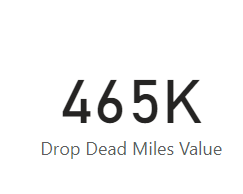
Why is it not changing to the current slicer value? Am i missing something?
Thanks!
- Mark as New
- Bookmark
- Subscribe
- Mute
- Subscribe to RSS Feed
- Permalink
- Report Inappropriate Content
Hi @Anonymous
That is strange that it is not changing.
I just tested it on my side and it changes to the selected value in the slicer. Maybe try playing around with the default value.
Hugh
- Mark as New
- Bookmark
- Subscribe
- Mute
- Subscribe to RSS Feed
- Permalink
- Report Inappropriate Content
Ok I dont know how or why but, the parameter value is updating now.
But I'm using this value to calculate a measure (For a new column), this does not change though. Is there something I need to do? Refreshing after changing the slicer does not help either.
- Mark as New
- Bookmark
- Subscribe
- Mute
- Subscribe to RSS Feed
- Permalink
- Report Inappropriate Content
Hey @Anonymous
Are you using that measure in a Calculated column or a Measure? If you are using it in a calculated column it will have a static value and the slicers will not have any effect on the data.
Regards
Hugh
- Mark as New
- Bookmark
- Subscribe
- Mute
- Subscribe to RSS Feed
- Permalink
- Report Inappropriate Content
Currently using as a calculated column and yes its taking the static value (the default value)
Will it helpo if I use it as a measure and do the calculated column based on the measure?
- Mark as New
- Bookmark
- Subscribe
- Mute
- Subscribe to RSS Feed
- Permalink
- Report Inappropriate Content
What is it exactly that you are trying to achieve with the calculated column? Would you not be able to use a measure instead?
- Mark as New
- Bookmark
- Subscribe
- Mute
- Subscribe to RSS Feed
- Permalink
- Report Inappropriate Content
I cant really say the exact thing I'm calculating, but for simplecity sake, say the table has columns A, B (a numeric), C and so on..
I want the calculated column to be = Slicer Value - Column B
- Mark as New
- Bookmark
- Subscribe
- Mute
- Subscribe to RSS Feed
- Permalink
- Report Inappropriate Content
I would suggest using a measure here, because you are using a what if parameter which is meant to change, and a calculated column which is static won't work.
- Mark as New
- Bookmark
- Subscribe
- Mute
- Subscribe to RSS Feed
- Permalink
- Report Inappropriate Content
Thank you so much
Helpful resources

Power BI Monthly Update - September 2025
Check out the September 2025 Power BI update to learn about new features.

FabCon Atlanta 2026
Join us at FabCon Atlanta, March 16-20, for the ultimate Fabric, Power BI, AI and SQL community-led event. Save $200 with code FABCOMM.


