cancel
Showing results for 
Search instead for 
Did you mean: 

The Power BI Data Visualization World Championships is back! Get ahead of the game and start preparing now! Learn more

Reply
DouweMeer
Impactful Individual

Changed behavior shift+enter

Apparently they changed the behavior of Shift + ENTER. 

Before, it would always jump to the first position on the new line, but now it depends on the line from which you use the combination where the cursor will be starting.

Can I change that back to what it was, always starting from the first position? 

I blame the new generation. Always thinking they can know things better...
4 REPLIES 4
Anonymous
Not applicable

Hi @DouweMeer ,

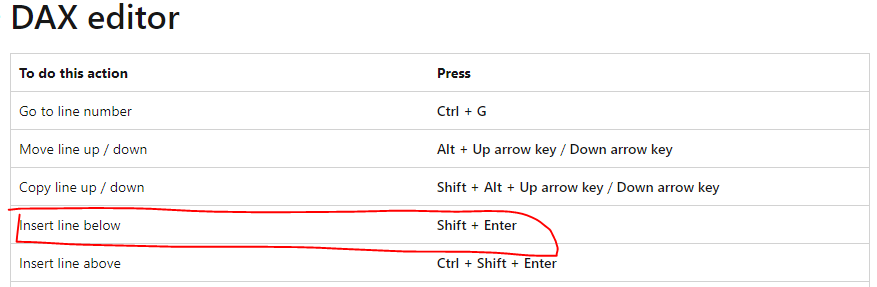
The keyboard shortcuts "Shift + Enter" is to insert line below, and the keyboard shortcuts "Alt+ Enter" has the same behavior as the previous one as I tested in my side(Version: 2.110.1161.0 64-bit (October 2022)). You can review the following official documentation to get more details about the keyboard shortcuts...

Keyboard shortcuts in Power BI Desktop

yingyinr_1-1669625715903.png

And base on my research, there is no property or option to disable that. You can raise a new idea and add your comments there to make this feature coming soon.

Best Regards

DouweMeer
Impactful Individual

Feels a bit silly to propose an idea on something Microsoft changed on purpose. I'm not looking for a tug of war. 

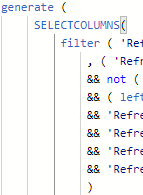
Previously I always had my code written like this:

DouweMeer_2-1669734965259.png

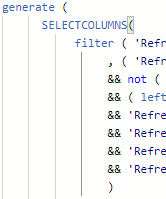
But the most recent update turned it into this:

DouweMeer_1-1669734932053.png

An extra space on every line of code per layer. For me it feels like someone took a baseball bat to my administration under the guise he believes it looks better that way. I want to tear that bat from his hands and beat him up with it.

I put a lot of effort in making my code as efficient and readable as possible, and now it lies in tatters. 

What is the best approach to raise my complaint? 


amitchandak
Super User
Super User

@DouweMeer , I do not see a change. If you are entering when the last line does not have a tab, it goes to the start position. But if the last has a tab (for indentation) then it keeps that in the next like

Share with Power BI Enthusiasts: Full Power BI Video (20 Hours) YouTube
Microsoft Fabric Series 60+ Videos YouTube
Microsoft Fabric Hindi End to End YouTube

Yea, that. Or at least, my muscle memory does it and whether it was Shift or Alt plus ENTER, I can't recall :), but they behave the same now. 

How do you disable that? It wasn't there.

Helpful resources

Announcements
Power BI DataViz World Championships

Power BI Dataviz World Championships

The Power BI Data Visualization World Championships is back! Get ahead of the game and start preparing now!

December 2025 Power BI Update Carousel

Power BI Monthly Update - December 2025

Check out the December 2025 Power BI Holiday Recap!

FabCon Atlanta 2026 carousel

FabCon Atlanta 2026

Join us at FabCon Atlanta, March 16-20, for the ultimate Fabric, Power BI, AI and SQL community-led event. Save $200 with code FABCOMM.