cancel
Showing results for 
Search instead for 
Did you mean: 

The Power BI Data Visualization World Championships is back! Get ahead of the game and start preparing now! Learn more

Reply
Anonymous
Not applicable

Change tracking table to Monthly summary table

Hi,


I have my dataset in the following format:

AssetIDTypeStatusCountDate
A1SalesActive11/01/2018
A2RentalActive15/01/2018
A3SalesActive110/01/2018
A1SalesInactive015/02/2018
A4RentalActive115/02/2018
A3SalesInactive011/03/2018
A5RentalActive110/04/2018
A6SalesActive110/06/2018
A2SalesActive110/07/2018


I would like to turn this into following format, so I can do month on month comparision:

MonthTypeCount
Jan-18Sales2
Jan-18Rental1
Feb-18Sales1
Feb-18Rental2
Mar-18Sales0
Mar-18Rental2
Apr-18Sales0
Apr-18Rental3
May-18Sales0
May-18Rental3
Jun-18Sales1
Jun-18Rental3
Jul-18Sales2
Jul-18Rental2


I am failry new to DAX. I would like to know if this is possible with DAX.


Note that there may be gaps in the data,, i.e. no changes happened for entire month, however we still need to report on that month. Also Asset type can also change over time (last record).


Thanks,

Navap

2 REPLIES 2
TomMartens
Super User
Super User

Hey, 


just create a dedicated Calendar table, this is a simple example (using DAX):

Calendar = 
var datestart = MIN('Table2'[Date])
var dateend = MAX('Table2'[Date])
return
ADDCOLUMNS(
    CALENDAR(datestart , dateend)
    , "Year" , FORMAT(''[Date] , "YYYY")
    , "Year - Month" , FORMAT(''[Date] , "YYYY-MM")
)

Here you will find much more detailed guidance how to create a very detailed calendar table: https://www.sqlbi.com/tools/dax-date-template/

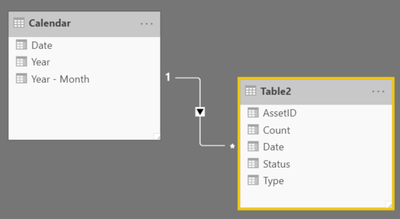
Nevertheless, just create a relationship between your table like so:

image.png

Now it becomes quite simple to create the table visual you are looking for, just by using the columns from the tables.


Regards,
Tom


Did I answer your question? Mark my post as a solution, this will help others!

Proud to be a Super User!
I accept Kudos 😉
Hamburg, Germany
Anonymous
Not applicable

Thanks Tom.

I have created the date table and linked to data table. Should I create a calculated table or just calculated columns for what I need?

Any chance you can share pbi file if you have it.

Thanks.


Helpful resources

Announcements
Power BI DataViz World Championships

Power BI Dataviz World Championships

The Power BI Data Visualization World Championships is back! Get ahead of the game and start preparing now!

December 2025 Power BI Update Carousel

Power BI Monthly Update - December 2025

Check out the December 2025 Power BI Holiday Recap!

FabCon Atlanta 2026 carousel

FabCon Atlanta 2026

Join us at FabCon Atlanta, March 16-20, for the ultimate Fabric, Power BI, AI and SQL community-led event. Save $200 with code FABCOMM.