Forum Discussion

Change report name in Power BI Designer
- 11 years ago
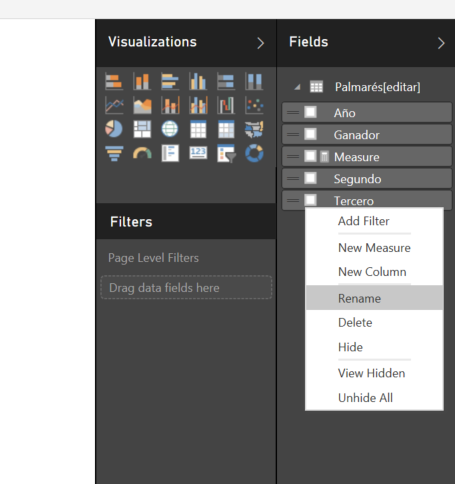
If you want to change the name of your columns, you can do that in different ways, but if you are working on your report and want to change the name directly from there, using right click on your column and then click on rename
If you want to change the name of your dataset, you can also use the same way but with the right click on your dataset
Now, if you want to change the name of your report, you can do that from your powerbi portal, just right click on your report and click on Rename
Regards


 Resolver II
If you want to change the name of your columns, you can do that in different ways, but if you are working on your report and want to change the name directly from there, using right click on your column and then click on rename
If you want to change the name of your dataset, you can also use the same way but with the right click on your dataset
Now, if you want to change the name of your report, you can do that from your powerbi portal, just right click on your report and click on Rename
Regards
 jajindri8 years agoNew Member
Renaming report in PowerBI portal is not right way. Very often you have some internal name of report (powerbi desktop file name) and some user friendly public name. I suggest to add name of report into publish procedure.