cancel
Showing results for 
Search instead for 
Did you mean: 

The FabCon + SQLCon recap series starts April 14th at 8am Pacific. If you’re tracking where AI is going inside Fabric, this first session is a can't miss. Register now

Reply
gauri
Helper III
Helper III

Change in value after exporting table visual to excel in Power BI

Hello all,


I am working on a report where i have a Table Visual , when i export the Table Visual into Excel the values which i see on the visual does not match with the excel. What can be the reason for this situation.

Appretiate for your help.


Thanks,

Gauri Pawse

3 REPLIES 3
v-easonf-msft
Community Support
Community Support

Hi , @gauri 

Is the number of rows the same?Ensure that no data is lost during the export process.

In addition, please consider whether it may be caused by statistical errors in the original total line in PowerBI Desktop.


Best Regards,
Community Support Team _ Eason


PhilipTreacy
Super User
Super User

Hi @gauri 

Could be rounding or formatting in PBI.  Can you give some examples of the data, maybe link to your PBIX file.

regards

Phil


Did I answer your question? Then please mark my post as the solution.
If I helped you, click on the Thumbs Up to give Kudos.


Blog :: YouTube Channel :: Connect on Linkedin


Proud to be a Super User!


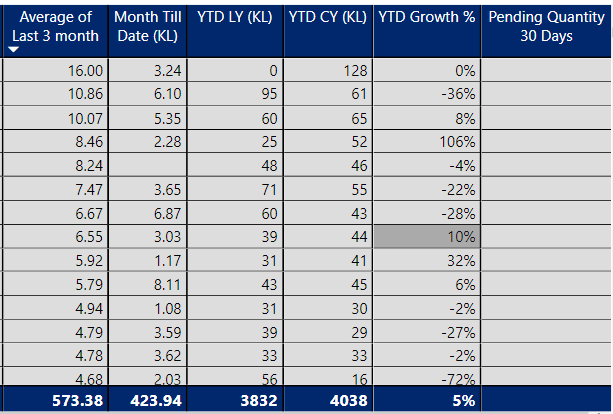
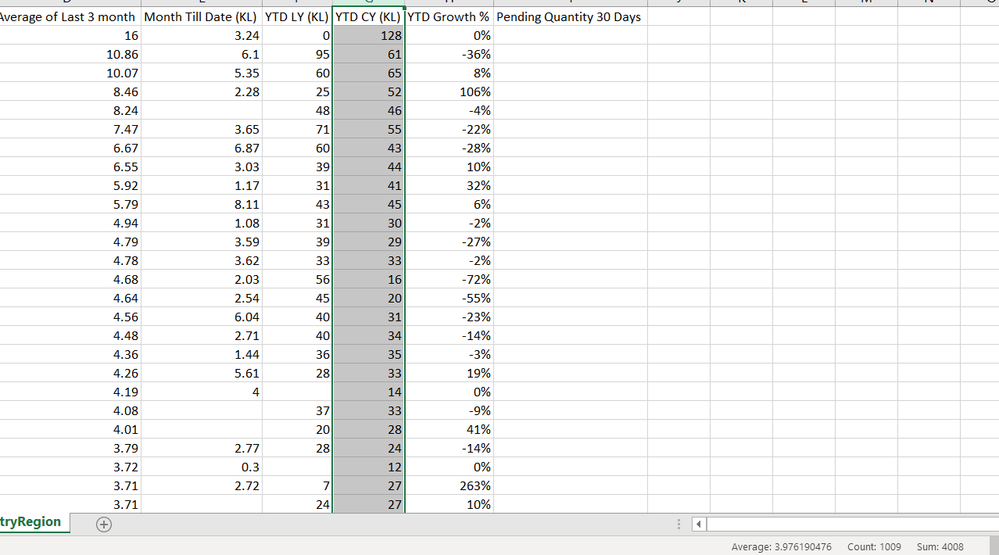
@PhilipTreacy  it is not a rounding or formatting error. Please check the screen shots for more details.


Here YTD CY (KL) is 4038Here YTD CY (KL) is 4038Here the same field is 4008Here the same field is 4008


Same fields in the report and when exported to excel show different number. what can be the reason ?


Thanks

Helpful resources

Announcements
New to Fabric survey Carousel

New to Fabric Survey

If you have recently started exploring Fabric, we'd love to hear how it's going. Your feedback can help with product improvements.

Power BI DataViz World Championships carousel

Power BI DataViz World Championships - June 2026

A new Power BI DataViz World Championship is coming this June! Don't miss out on submitting your entry.

Join our Fabric User Panel

Join our Fabric User Panel

Share feedback directly with Fabric product managers, participate in targeted research studies and influence the Fabric roadmap.

March Power BI Update Carousel

Power BI Community Update - March 2026

Check out the March 2026 Power BI update to learn about new features.