cancel
Showing results for 
Search instead for 
Did you mean: 

The FabCon + SQLCon recap series starts April 14th at 8am Pacific. If you’re tracking where AI is going inside Fabric, this first session is a can't miss. Register now

Reply
konradmd
Regular Visitor

Change connection/server

Hi,

I created a small demo of charts etc. using an SQL Server connection and the desktop version of Power BI.

Now I want to re-use the "pbix" file on another connection (another server, same DB name, same tables,views etc.).

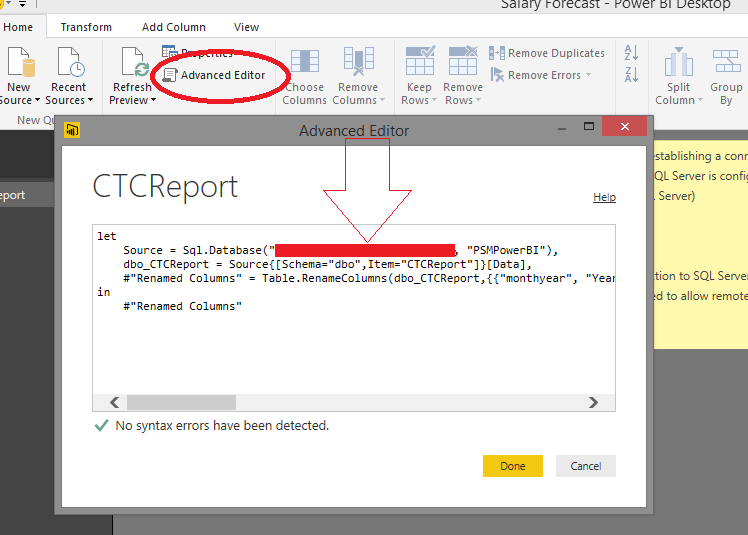
How can I achieve this? The "pbix" files seems to be not editable so that I cannot replace the connection string this way.


Or is this not possible at all?


Thanks

Konrad

9 REPLIES 9
ashishrj
Power Participant
Power Participant

@konradmd For more detailed step in changing credentials and server name, you can find the blog written by me on our company website in below link

http://www.cloudfronts.com/change-users-and-environment-in-power-bi-desktop-for-crm-online-data-sour...


Greg_Deckler
Community Champion
Community Champion

Home tab, "Edit Queries", pick your query, click on the gear next to the Source step and edit the source.


Follow on LinkedIn
@ me in replies or I'll lose your thread!!!
Instead of a Kudo, please vote for this idea
Become an expert!: Enterprise DNA
External Tools: MSHGQM
YouTube Channel!: Microsoft Hates Greg
Latest book!:
DAX For Humans

DAX is easy, CALCULATE makes DAX hard...

@konradmd After clicking on edit queries in top ribbon. Find the steps as shown below. Hope this helps!


SQL.png

Anonymous
Not applicable

This doesn't work for tables in DirectQuery mode. Is there another way to do this for DQ?

Thank you both for your help. This worked as a first step for me.


But can I change the datasource/credentials in a pbix-file without any user interaction, e.g., via command line or a startup parameter of the desktop version of PowerBI?

This works great if you have one data source.  I have several queries from the same SQL Server that I need to change the connection to.


I also need a way to do a "replace" for the database server/database.

You most likely know this by now:


Create a Blank Query 


//CRMServiceURl//

   let
       Source = "https://<tenant>.api.crm.dynamics.com/api/data/v8.1"
   in
       Source


Note: Uncheck Enable on Load (So that it does not appear as a table (You can aslo use a parameter


Update All Other Queries

let
Source = OData.Feed(CRMServiceURL),

Hi,


I even have several tables from the same SQL server. I want to update the Database name and Server name at a glance for all the tables. 


Please help me on this.


Thanks

Satya

Bjoern
Continued Contributor

@v-sadadi


Well, I guess you either have to

a) change all the advanced settings to the right DB name + servername

or

b) use variables, as described in this blogpost.


http://businessintelligist.com/2015/05/12/power-bi-tutorial-how-to-parameterize-connection-variables...


... but in order to do that, you still have to touch all queries, i guess...

Helpful resources

Announcements
New to Fabric survey Carousel

New to Fabric Survey

If you have recently started exploring Fabric, we'd love to hear how it's going. Your feedback can help with product improvements.

Power BI DataViz World Championships carousel

Power BI DataViz World Championships - June 2026

A new Power BI DataViz World Championship is coming this June! Don't miss out on submitting your entry.

Join our Fabric User Panel

Join our Fabric User Panel

Share feedback directly with Fabric product managers, participate in targeted research studies and influence the Fabric roadmap.

March Power BI Update Carousel

Power BI Community Update - March 2026

Check out the March 2026 Power BI update to learn about new features.