Join us at FabCon Atlanta from March 16 - 20, 2026, for the ultimate Fabric, Power BI, AI and SQL community-led event. Save $200 with code FABCOMM.
Register now!View all the Fabric Data Days sessions on demand. View schedule
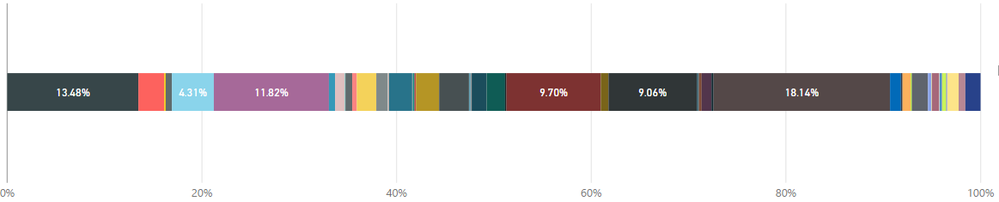
In my visualization I have a 100% stacked bar represetning YTD revenue. The bar is sorted by product name, not product % of revenue. How can sort this from highest to lowest?
Bonus question, is there a way to represent the percentage and dollar value of each product in a 100% bar?
Thanks!
Solved! Go to Solution.
Hi @Anonymous,
I have tested it and searched some documents. It seems sorting can't be done. Maybe you could vote or submit an idea here: power-bi-ideas.
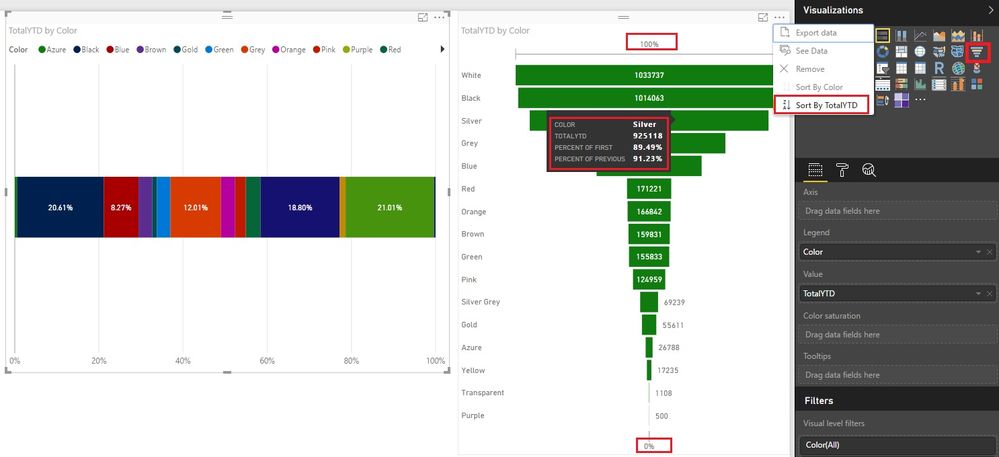
Maybe there is a workaround: Funnel, which has dollar values and % values. And also it can sort by values. The sizes of items are clear too.
Best Regards!
Dale
Hi @Anonymous,
I have tested it and searched some documents. It seems sorting can't be done. Maybe you could vote or submit an idea here: power-bi-ideas.
Maybe there is a workaround: Funnel, which has dollar values and % values. And also it can sort by values. The sizes of items are clear too.
Best Regards!
Dale
Thank you @v-jiascu-msft
I too though of the funnel, however visually I think it sends the wrong message.
Additionally, despite the size when you have an significant amount of categories it becomes less discerning.
I have voted for the suggested enhancement, surprised more people have not come across this as a limitation.
Appreciate the feedback.
Thanks!
Check out the November 2025 Power BI update to learn about new features.
Advance your Data & AI career with 50 days of live learning, contests, hands-on challenges, study groups & certifications and more!