Join us at FabCon Atlanta from March 16 - 20, 2026, for the ultimate Fabric, Power BI, AI and SQL community-led event. Save $200 with code FABCOMM.
Register now!The Power BI Data Visualization World Championships is back! Get ahead of the game and start preparing now! Learn more
Hello awesome community.
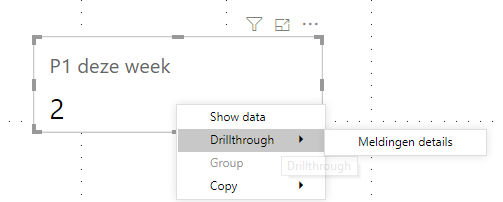
I have the following issue. I want to drillthrough on a card visual. This is the visual i currently have:
As you can see it shows the value for p1 for this week. well, you cant drillthrough on a card visual so i went creative and made a treemap visual with 1 value:
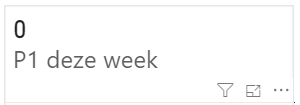
Works like a charm! Love it! this is the solution. That was my reaction atleast. Untill i found out that if the card shows 0
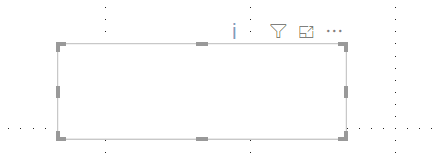
the treemap shows nothing
Is there a way to get a card looking visual that can show the 0 and get a drillthrough if there is data?
I thought also of using a treemap without a background with a card under it. Then i shows the 0 on the card and the rest on the treemap. But i could not get them to look exactly the same unfortuniatly.
Thanks in advance!
Solved! Go to Solution.
What about using synced slicers between your summary page and drill through page and having a button on the summary below the card with a bookmark to the detail. Something like "Go to detail >"?
You could even hide the slicers on the detail page if you don't want to see them.
What about using synced slicers between your summary page and drill through page and having a button on the summary below the card with a bookmark to the detail. Something like "Go to detail >"?
You could even hide the slicers on the detail page if you don't want to see them.
Possible, but i have 7 of those cards. so its not ideal. but thanks for the input!
What about on the measure you are displaying in the card adding +0 to the end. This should force it to show 0 instead of blank in the treemap.
This doesnt work, when value is 0 a treemap will not create a tile. i went with the bookmark and button option!
The Power BI Data Visualization World Championships is back! Get ahead of the game and start preparing now!
| User | Count |
|---|---|
| 40 | |
| 35 | |
| 34 | |
| 31 | |
| 28 |
| User | Count |
|---|---|
| 137 | |
| 102 | |
| 68 | |
| 66 | |
| 64 |