
cancel
Showing results for 
Search instead for 
Did you mean: 

Get Fabric Certified for FREE during Fabric Data Days. Don't miss your chance! Request now

Reply
ibtvek
New Member

Card to visually display any number less than 0 as 0

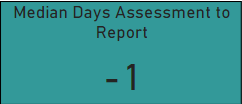
I have a quick measure (difference of X and Y) applied to a card visual and shown as median, with some results having negative values, depending on other selection on the page.

ibtvek_0-1690518535217.png

Is it at all possible to visually show any number on the card that is less than 0, to show as 0.
I don't want it to affect the data itself - for example, I don't want to exclude or suppress values that are less than 0. Just want them to display visually as 0 on this particular card.

Could anyone help me out please? Thank you.

1 ACCEPTED SOLUTION
Ritaf1983
Super User
Super User

Hi @ibtvek 
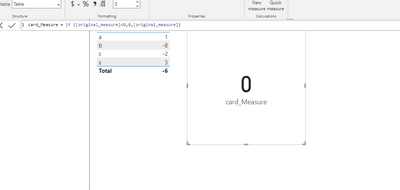
Yes, create a measure dedicated to this card with the condition
something like 
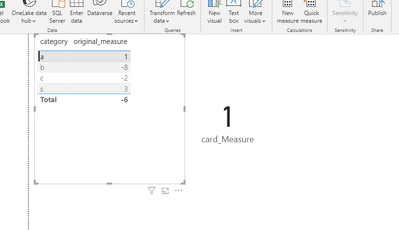
Cardmeasure = if ([original_measure] <0,0,[original_measure])

Ritaf1983_0-1690520484930.pngRitaf1983_1-1690520510800.png

Link to the demo file 

If this post helps, then please consider Accepting it as the solution to help the other members find it more quickly

Regards,
Rita Fainshtein | Microsoft MVP
https://www.linkedin.com/in/rita-fainshtein/
Blog : https://www.madeiradata.com/profile/ritaf/profile

View solution in original post

3 REPLIES 3
Ritaf1983
Super User
Super User

Hi @ibtvek 
Yes, create a measure dedicated to this card with the condition
something like 
Cardmeasure = if ([original_measure] <0,0,[original_measure])

Ritaf1983_0-1690520484930.pngRitaf1983_1-1690520510800.png

Link to the demo file 

If this post helps, then please consider Accepting it as the solution to help the other members find it more quickly

Regards,
Rita Fainshtein | Microsoft MVP
https://www.linkedin.com/in/rita-fainshtein/
Blog : https://www.madeiradata.com/profile/ritaf/profile

Hi there.
Thank you for your response. When I try to create a new measure, it won't recognise the original measure name [Diff Plan to Ax] for some reason

ibtvek_0-1690523385385.png


But this works fine as a new column, any ideas?

It seems that it is not measure ,  may be it column name.

You need to create a measure

Regards,
Rita Fainshtein | Microsoft MVP
https://www.linkedin.com/in/rita-fainshtein/
Blog : https://www.madeiradata.com/profile/ritaf/profile

Helpful resources

Announcements
November Power BI Update Carousel

Power BI Monthly Update - November 2025

Check out the November 2025 Power BI update to learn about new features.

Fabric Data Days Carousel

Fabric Data Days

Advance your Data & AI career with 50 days of live learning, contests, hands-on challenges, study groups & certifications and more!

FabCon Atlanta 2026 carousel

FabCon Atlanta 2026

Join us at FabCon Atlanta, March 16-20, for the ultimate Fabric, Power BI, AI and SQL community-led event. Save $200 with code FABCOMM.

Top Solution Authors
Top Kudoed Authors