FabCon is coming to Atlanta
Join us at FabCon Atlanta from March 16 - 20, 2026, for the ultimate Fabric, Power BI, AI and SQL community-led event. Save $200 with code FABCOMM.
Register now!- Power BI forums
- Get Help with Power BI
- Desktop
- Service
- Report Server
- Power Query
- Mobile Apps
- Developer
- DAX Commands and Tips
- Custom Visuals Development Discussion
- Health and Life Sciences
- Power BI Spanish forums
- Translated Spanish Desktop
- Training and Consulting
- Instructor Led Training
- Dashboard in a Day for Women, by Women
- Galleries
- Data Stories Gallery
- Themes Gallery
- Contests Gallery
- Quick Measures Gallery
- Notebook Gallery
- Translytical Task Flow Gallery
- TMDL Gallery
- R Script Showcase
- Webinars and Video Gallery
- Ideas
- Custom Visuals Ideas (read-only)
- Issues
- Issues
- Events
- Upcoming Events
To celebrate FabCon Vienna, we are offering 50% off select exams. Ends October 3rd. Request your discount now.
- Power BI forums
- Forums
- Get Help with Power BI
- Desktop
- Re: Cannot have individual values in a chart. Valu...
- Subscribe to RSS Feed
- Mark Topic as New
- Mark Topic as Read
- Float this Topic for Current User
- Bookmark
- Subscribe
- Printer Friendly Page


- Mark as New
- Bookmark
- Subscribe
- Mute
- Subscribe to RSS Feed
- Permalink
- Report Inappropriate Content
Cannot have individual values in a chart. Values are always aggregate.
Hello,
I am going through this tutorial https://support.powerbi.com/knowledgebase/articles/471597
The problem is that the UnitsInStock is always an aggregate. I cannot have individual values in the report. Only cout or sum etc. What step am I missing?

Solved! Go to Solution.


- Mark as New
- Bookmark
- Subscribe
- Mute
- Subscribe to RSS Feed
- Permalink
- Report Inappropriate Content
Hi Allan
I have not got time to look at your file. But what I suggest is you do this
Go into ----> Home / Edit Queries / Transform / Data Types
And see what Data Type your relevant columns have been set to
What I think is one is set as Text (UnitsInStock) and the other one as a value
You can see the difference below. One lineNumber I have set as text (Line Number) and one as a number (Line NumCopy). This is clearly shown by the symbol verse missing symbol between the tick box and the file name)
THE ONLY THING POWER BI CAN DO WITH TEXT IS A COUNT or countdistinct if its dragged into a value box. Thats why it shows as count'
Whereas a column set as a number format can be summed Averaged etc as shown below. (For some reason this does not show in the box as SumLineNumCopy. I assume the reason for this is to clealry show Text entries as opposed to non text entries)
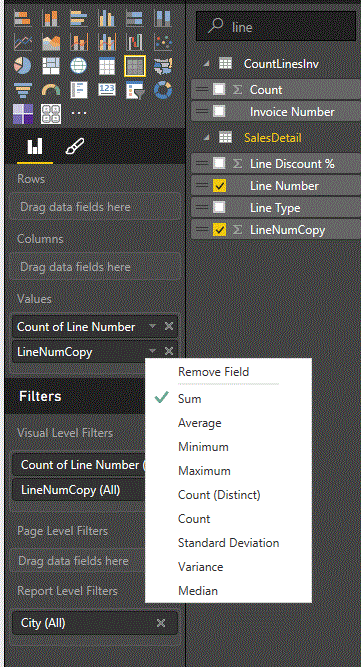
So what you might need to do is change the UnitsInStock to a number format
If this isn't the issue someone else will have to help you out

- Mark as New
- Bookmark
- Subscribe
- Mute
- Subscribe to RSS Feed
- Permalink
- Report Inappropriate Content
I am having the same problem, did you figure this out?


- Mark as New
- Bookmark
- Subscribe
- Mute
- Subscribe to RSS Feed
- Permalink
- Report Inappropriate Content
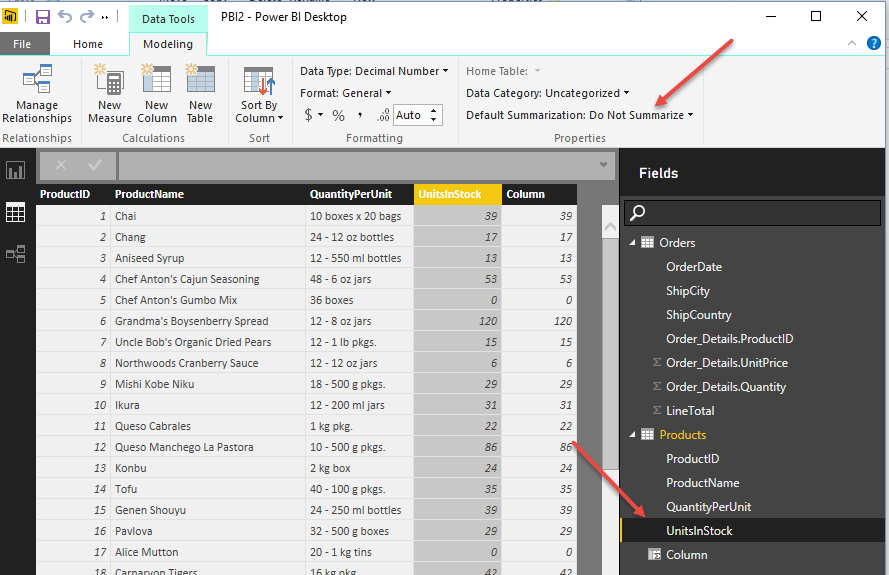
I believe what you want to do is that in the data model in the Desktop set the column to "Do not summarize".
Follow on LinkedIn
@ me in replies or I'll lose your thread!!!
Instead of a Kudo, please vote for this idea
Become an expert!: Enterprise DNA
External Tools: MSHGQM
YouTube Channel!: Microsoft Hates Greg
Latest book!: DAX For Humans
DAX is easy, CALCULATE makes DAX hard...
- Mark as New
- Bookmark
- Subscribe
- Mute
- Subscribe to RSS Feed
- Permalink
- Report Inappropriate Content
Do not summerize is the exact setup:
- Mark as New
- Bookmark
- Subscribe
- Mute
- Subscribe to RSS Feed
- Permalink
- Report Inappropriate Content
I wish I could post the .pbix file here ...
- Mark as New
- Bookmark
- Subscribe
- Mute
- Subscribe to RSS Feed
- Permalink
- Report Inappropriate Content
One other thought here, why wouldn't the sum aggregation work for this? I haven't looked at the data itself, but in theory, if you only have a single value for units in stock per product, then the sum aggregation is summing 1 value for each product, which would be the value you want. x*1=x?
If you had mulitple entries for that product, then wouldn't you want the sum as well so that you know about all of your units in stock? The filters you put in place would allow you to only get a single location, etc.??
Follow on LinkedIn
@ me in replies or I'll lose your thread!!!
Instead of a Kudo, please vote for this idea
Become an expert!: Enterprise DNA
External Tools: MSHGQM
YouTube Channel!: Microsoft Hates Greg
Latest book!: DAX For Humans
DAX is easy, CALCULATE makes DAX hard...
- Mark as New
- Bookmark
- Subscribe
- Mute
- Subscribe to RSS Feed
- Permalink
- Report Inappropriate Content
Here is the link to a pbix file that reporoduces the issue.
The goal here is underestand why PBI is not behaving the way that the tutorial explains. I like to underestand the root of the problem.
Thank you,
- Mark as New
- Bookmark
- Subscribe
- Mute
- Subscribe to RSS Feed
- Permalink
- Report Inappropriate Content
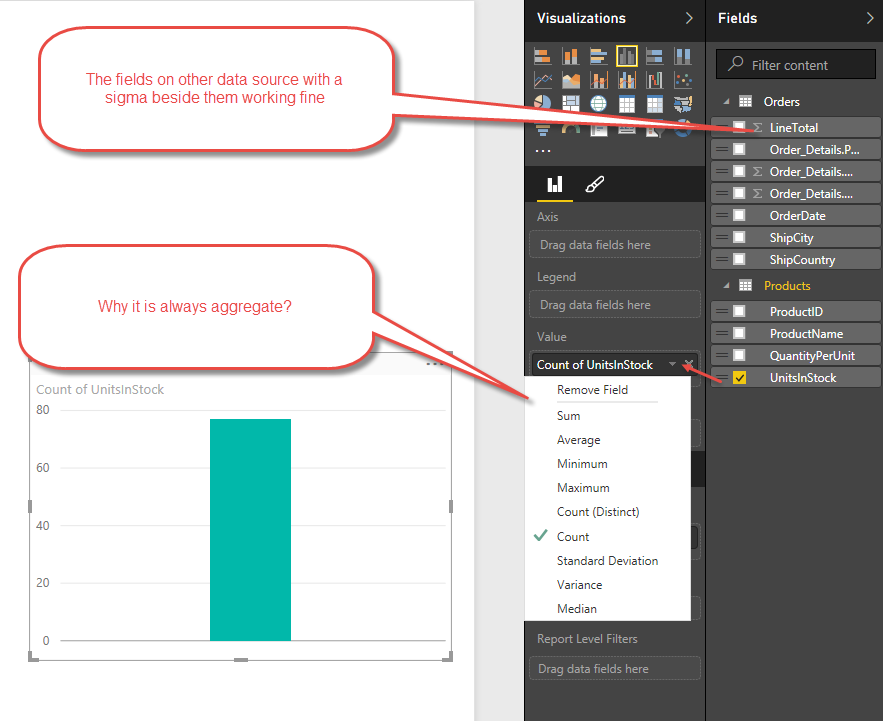
Here is more information. I just need to underestand what is wrong with the field "UnitsInStock"

- Mark as New
- Bookmark
- Subscribe
- Mute
- Subscribe to RSS Feed
- Permalink
- Report Inappropriate Content
1 Are you saying if you drag unitinstock to the box under Value ("drag data field here" box) it appears in Visual level filter instead?
2 The linevalue is in the value box. Surely it would be an aggrgation
- Mark as New
- Bookmark
- Subscribe
- Mute
- Subscribe to RSS Feed
- Permalink
- Report Inappropriate Content
Hi RJ,
The lazer focus of this post is that why UnitsInStock behaves different than other numeric columns such as LineTotal. Is this a bug in PBI or a feature that I don't know?
>>1 Are you saying if you drag unitinstock to the box under Value ("drag data field here" box) it appears in Visual level filter instead?
No. I am saying when I drag unitinstock into the bar chart, it appears in Visual level filter instead. This behavior is different than LineTotal. LineTotal appears in Values
2 The linevalue is in the value box. Surely it would be an aggregation
That is not true. What it is not the same as LineTotal?
- Mark as New
- Bookmark
- Subscribe
- Mute
- Subscribe to RSS Feed
- Permalink
- Report Inappropriate Content
Hi RJ,
The lazer focus of this post is that why UnitsInStock behaves different than other numeric columns such as LineTotal. Is this a bug in PBI or a feature that I don't know?
>>1 Are you saying if you drag unitinstock to the box under Value ("drag data field here" box) it appears in Visual level filter instead?
No. I am saying when I drag unitinstock into the bar chart, it appears in Visual level filter instead. This behavior is different than LineTotal. LineTotal appears in Values
.
OK but what happens when you drag it to the value box --> "drag data field here" ?
2 The linevalue is in the value box. Surely it would be an aggregation
That is not true. What it is not the same as LineTotal?
Any field whatsover in the VALUE box will always be an aggregation
- Mark as New
- Bookmark
- Subscribe
- Mute
- Subscribe to RSS Feed
- Permalink
- Report Inappropriate Content
RJ,
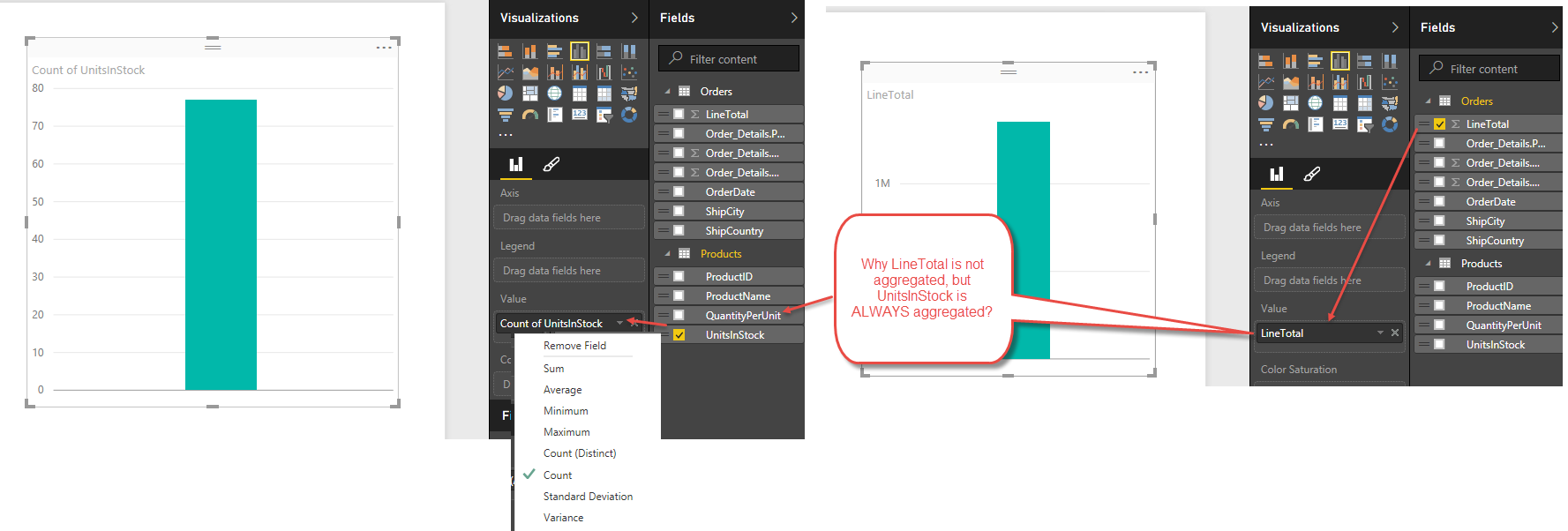
Your statement "Any field whatsover in the VALUE box will always be an aggregation" is not correct. See the example below. There is someting special about "UnitsInStock" field that I am trying to underestand and learn.
As mentioned earlier in the this post, I posted the link to the file download, so you can download the actual .pbix file and experiment it yourself.
- Mark as New
- Bookmark
- Subscribe
- Mute
- Subscribe to RSS Feed
- Permalink
- Report Inappropriate Content
So if you think you know the answer already why are you asking the forum?
In my view value is always an aggregation. And your example clearly backs this viewpoint.
But rather than politely asking me to explain why you state that it's not
"is not correct".
Fair enough.
- Mark as New
- Bookmark
- Subscribe
- Mute
- Subscribe to RSS Feed
- Permalink
- Report Inappropriate Content
Hi RJ,
I do appreciate you are taking the time and helping me. I thank you for that.
I think the issues is that I am bringing the above example a proof that two numeric fields appear differently in the value. One of them is aggregation, the other of is not.
So the statement "Any field whatsover in the VALUE box will always be an aggregation" does not align with the example above. That is why I posted this question and obviously I am missing something.
I uploaded a PBI file that reproduces the problem. Also, I spent time to bring a number of annotated screenshots that elaborate the question. I suggest the screenshots and the PowerBI file should not be disregarded. They clearly show a symptom that proofs “VALUE box will NOT always be an aggregation”
If I am missing any point, please let me know. That is why I posted this question. I like to know Why (and how) VALUE box will NOT always be an aggregation accoding to the downloadable example and the screenshots in this post? What am I missing here?
Thank you,
- Mark as New
- Bookmark
- Subscribe
- Mute
- Subscribe to RSS Feed
- Permalink
- Report Inappropriate Content
Hi Allan
I have not got time to look at your file. But what I suggest is you do this
Go into ----> Home / Edit Queries / Transform / Data Types
And see what Data Type your relevant columns have been set to
What I think is one is set as Text (UnitsInStock) and the other one as a value
You can see the difference below. One lineNumber I have set as text (Line Number) and one as a number (Line NumCopy). This is clearly shown by the symbol verse missing symbol between the tick box and the file name)
THE ONLY THING POWER BI CAN DO WITH TEXT IS A COUNT or countdistinct if its dragged into a value box. Thats why it shows as count'
Whereas a column set as a number format can be summed Averaged etc as shown below. (For some reason this does not show in the box as SumLineNumCopy. I assume the reason for this is to clealry show Text entries as opposed to non text entries)
So what you might need to do is change the UnitsInStock to a number format
If this isn't the issue someone else will have to help you out
- Mark as New
- Bookmark
- Subscribe
- Mute
- Subscribe to RSS Feed
- Permalink
- Report Inappropriate Content
Hi,
I had the same tutorial problem with 'UnitsInStock'. Thanks to all the posts I think I might have figured it out.
Setup (produced the error discussed):
1. The tutorial exercise has us change 'UnitsInStock' type to 'Whole Number' (Mine was set that way as the default).
2. Originally, the 'UnitsInStock' Default Summarization was set to 'Do Not Summarize'.*
* I'm not sure why this is the case since values in 'Orders' have the Default Summarization set to 'Sum'. Could the Excel data source have something to do with it (Format: General)?
Solution: Set the Default Summarization to: Sum.
Test:
1. Duplicate the 'UnitsInStock' field in the 'Products' table and rename it 'UIS'
2. Check to make sure the 'Type' is set to 'Whole Number'.
3.Set the Default Summarization to: Sum
4. Close & Apply
5. Test visualization described in the tutorial using UIS instead of 'UnitsInStock'.
Comment: Context is everything. I don't think anyone would consider 'UnitsInStock' as a field that one would normally aggregate. However, it seems as though the 'Default Summarization: Do Not Summarize' makes the field to act as though it were text rather than a value (Note: When UIS is plotted against UnitsInStock in a barchart, UnitsInStock are the default categories).

- Mark as New
- Bookmark
- Subscribe
- Mute
- Subscribe to RSS Feed
- Permalink
- Report Inappropriate Content

The result is an individuals scatterplot
- Mark as New
- Bookmark
- Subscribe
- Mute
- Subscribe to RSS Feed
- Permalink
- Report Inappropriate Content
It seems that Power BI is using aggregation by default therefore, requiring further steps in obtaining patterns of (raw) individual data. This is an inversion of what other software and good practices usually do. In my opinion it is wrong to use sufficient statistics before seeing the patterns in the raw data.
Here are the steps I took to obtain an individuals scatterplot chart with P BI:
1. Loaded generic data from a csv
2. Set data type to decimal
3. Added a row number column as integer
4. Selected scatterplot in report view
5. Selected the 2 decimal data columns as x and y columns aggregated to Sum by default
6. Selected the row number column as Details. This step desagregated the previous 2 columns and rendered an individuals scatteplot chart.
There are too many steps necessary to obtain something very basic. Default aggregation should be set as an option
- Mark as New
- Bookmark
- Subscribe
- Mute
- Subscribe to RSS Feed
- Permalink
- Report Inappropriate Content
OneDrive, put in the Everyone folder and post a link.
Follow on LinkedIn
@ me in replies or I'll lose your thread!!!
Instead of a Kudo, please vote for this idea
Become an expert!: Enterprise DNA
External Tools: MSHGQM
YouTube Channel!: Microsoft Hates Greg
Latest book!: DAX For Humans
DAX is easy, CALCULATE makes DAX hard...

Helpful resources

Power BI Monthly Update - September 2025
Check out the September 2025 Power BI update to learn about new features.

Fabric Community Update - August 2025
Find out what's new and trending in the Fabric community.


