Join us at FabCon Atlanta from March 16 - 20, 2026, for the ultimate Fabric, Power BI, AI and SQL community-led event. Save $200 with code FABCOMM.
Register now!The Power BI Data Visualization World Championships is back! Get ahead of the game and start preparing now! Learn more
Hello
I try to drag a measure to a page filter and it does not accept it.
How can I fix this please?
Thanks
Solved! Go to Solution.
Hi @Anonymous ,
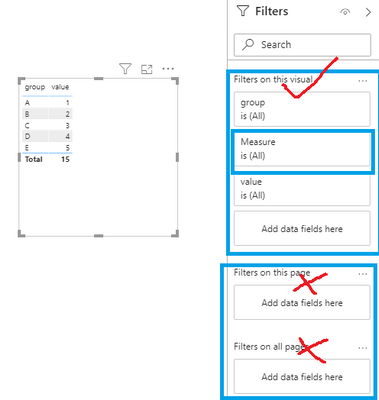
In power bi desktop, measure can only be put into the visual filter, page filter is not supported. The principle in page filter is the same as that you can also not put measures into a slicer. Measure is dynamic not static, we cannot use a dynamic value to control the whole page visuals.
Workaround is just like @Tahreem24 mentioned.
Best Regards,
Yingjie Li
If this post helps then please consider Accept it as the solution to help the other members find it more quickly.
Hi @Anonymous ,
In power bi desktop, measure can only be put into the visual filter, page filter is not supported. The principle in page filter is the same as that you can also not put measures into a slicer. Measure is dynamic not static, we cannot use a dynamic value to control the whole page visuals.
Workaround is just like @Tahreem24 mentioned.
Best Regards,
Yingjie Li
If this post helps then please consider Accept it as the solution to help the other members find it more quickly.
Filters accept only column value. You can not drag a measure into any filters.
If you want so convert your measure into calculated column and then drag into page level filter.
The Power BI Data Visualization World Championships is back! Get ahead of the game and start preparing now!
| User | Count |
|---|---|
| 40 | |
| 38 | |
| 36 | |
| 29 | |
| 28 |
| User | Count |
|---|---|
| 127 | |
| 88 | |
| 78 | |
| 66 | |
| 65 |