cancel
Showing results for 
Search instead for 
Did you mean: 

View all the Fabric Data Days sessions on demand. View schedule

Reply
Anonymous
Not applicable

Can't set conditional formating for colors in clustered column chart

If I have only one series of data I can chose a formula for the bar colors under "data colors". As soon as I add another data series to the chart this option is gone and I only can select a fixed color.

Is there no way to set the colors of multiple series by the value of fields?

Thanks!

6 REPLIES 6
Icey
Community Support
Community Support

Hi @Anonymous ,


Try to create a R visual.


library(ggplot2)
data<-dataset
data<-with(data,data[order(Category,ActualBudget),])
ggplot(data=data, aes(x=ActualBudget, y=Value,fill = ActualBudget)) 
       + geom_bar(stat="identity")
       +facet_grid(~Month)
       +scale_fill_manual(values=c("red","blue"))  -------- set the color you want

r.JPG


Best regards

Icey


If this post helps,then consider Accepting it as the solution to help other members find it faster.

Anonymous
Not applicable

Hi Icey

thanks, this is a good idea.

Still I can't build the chart I need.

Here the visual as it should look like:
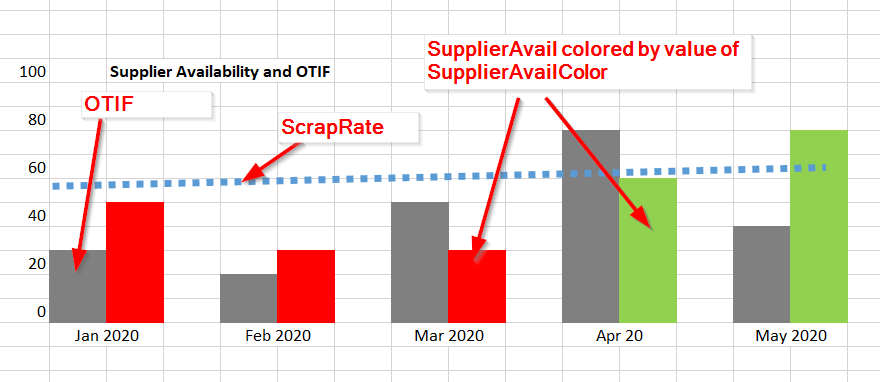
2020-10-28 13_59_30.xlsx.png

Here the data handed over to the visual:
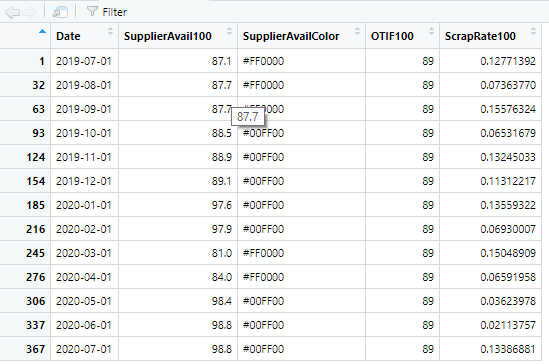
2020-10-28 13_48_50-RStudio.png

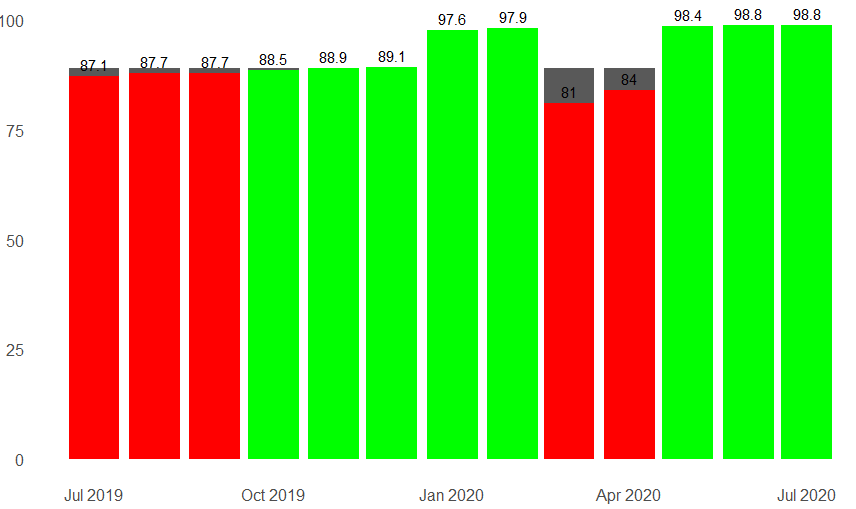
And what I'm able to create:

2020-10-28 13_50_58-RStudio.png

Here my code:

library(ggplot2)
theme_set(theme_classic())

dataCleaned <- subset(dataset, !is.na(SupplierAvail100))
dataCleaned$Date <- as.Date(dataCleaned$Date)
dataCleaned$SupplierAvail100 <- round(dataCleaned$SupplierAvail100, digits = 1)

labl = paste0(month.abb[strtoi(substr(dataCleaned$Date,6,7),10)], " ", substr(dataCleaned$Date,1,4))
brks = dataCleaned$Date

ggplot(data=dataCleaned, aes(x=Date))+
  geom_col(aes(y=OTIF100), show.legend = FALSE, position = "dodge") +
  geom_col(aes(y=SupplierAvail100), show.legend = FALSE, fill = dataCleaned$SupplierAvailColor, position = "dodge") +
  geom_text(aes(x = Date, y = SupplierAvail100, label = SupplierAvail100, vjust = -0.5)) +
  theme(axis.text.x = element_text(size = 12), axis.text.y = element_text(size = 12))+
  scale_x_continuous(labels = labl, breaks = brks, guide = guide_axis(check.overlap = TRUE))+
  theme(line = element_blank(), axis.title.x = element_blank(), axis.title.y = element_blank())

 I don't know if a such complex visual is doable.

I'm very interested in your opinion.


Thanks

Rolf

Icey
Community Support
Community Support

Hi @Anonymous ,


Could you share some smaple data with the same structure of your real data for test? And please remove sensitive information.


Best regards

Icey

Anonymous
Not applicable

Hi Icey

find attached a small demo of the problem. Everything works except that can have the colored bars (ColA) side-by-side with the other bar (ColC).


R Script demo 


Do you have me a hint?

Thanks!

amitchandak
Super User
Super User

@Anonymous , You can not use conditional formatting with more than one measure or legend as of now.


You can vote for an idea or log a new one -https://ideas.powerbi.com/ideas/

Share with Power BI Enthusiasts: Full Power BI Video (20 Hours) YouTube
Microsoft Fabric Series 60+ Videos YouTube
Microsoft Fabric Hindi End to End YouTube
Anonymous
Not applicable

Thanks for the fast answer.

Is is then at least possible to have one serie with a measure and all others with static colors?

Helpful resources

Announcements
November Power BI Update Carousel

Power BI Monthly Update - November 2025

Check out the November 2025 Power BI update to learn about new features.

Fabric Data Days Carousel

Fabric Data Days

Advance your Data & AI career with 50 days of live learning, contests, hands-on challenges, study groups & certifications and more!

FabCon Atlanta 2026 carousel

FabCon Atlanta 2026

Join us at FabCon Atlanta, March 16-20, for the ultimate Fabric, Power BI, AI and SQL community-led event. Save $200 with code FABCOMM.

Top Solution Authors
Top Kudoed Authors