cancel
Showing results for 
Search instead for 
Did you mean: 

Level up your Power BI skills this month - build one visual each week and tell better stories with data! Get started

Reply
Syndicate_Admin
Administrator
Administrator

Can't Connect To Multiple Power BI Datasets in Power BI

Good day Power BI Community.

My name is Luis Segrera.

First to all, I want to thankful all of you for the help that you can provide me.

We are trying to connect multiple Power BI Datasets but when we connect the first one, it set up the report in Live Connection and when we try to change the connection mode to DirectQuery we receive this message:
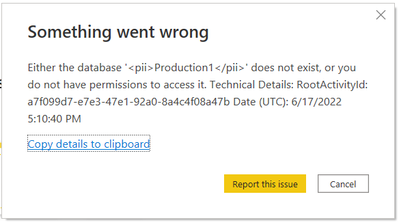
segreral_0-1655485860331.png

All of us have permissions to access to these Power BI Datasets, I am the Power BI Server Admin and have access to the admin portal, I reviewed the configure of the server, the next option is enabled, I tried disabling and enabling the option and didn't work.
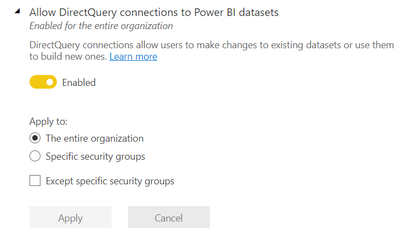
segreral_1-1655486201187.png

When we try to connect other Power BI Dataset, it replaced the first connection with the second one. It's important to say that both Datasets are in the same workspace.

I tried disabling the "Allow Live Connections" options and didn't work neither.

I really appreciate every help that anyone can provide me, have a nice day and weekend.

Let me know if you need more information from my side.

1 ACCEPTED SOLUTION
Anonymous
Not applicable

Hi @segreral ,


Please kindely refer to this official document:

Upgrade classic workspaces to the new workspaces - Power BI | Microsoft Docs


Best Regards,

Stephen Tao


If this post helps, then please consider Accept it as the solution to help the other members find it more quickly.

View solution in original post

3 REPLIES 3
Anonymous
Not applicable

Hi @segreral ,


Are your datasets in the classic workspace? Try upgrading the classic workspace to the new workspace before connecting the dataset.

You may have encountered some other considerations and limitations, please refer to

Using DirectQuery for datasets and Analysis Services (preview) - Power BI | Microsoft Docs


Best Regards,

Stephen Tao


If this post helps, then please consider Accept it as the solution to help the other members find it more quickly.

Good day @Syndicate_Admin

How can I know what version the workspace has?, The workspace is set it up as a Premium per Capacity.

How can I update the workspace?, in case that I need it.

Anonymous
Not applicable

Hi @segreral ,


Please kindely refer to this official document:

Upgrade classic workspaces to the new workspaces - Power BI | Microsoft Docs


Best Regards,

Stephen Tao


If this post helps, then please consider Accept it as the solution to help the other members find it more quickly.

Helpful resources

Announcements
April Power BI Update Carousel

Power BI Monthly Update - April 2026

Check out the April 2026 Power BI update to learn about new features.

Fabric SQL PBI Data Days

Data Days 2026 coming soon!

Sign up to receive a private message when registration opens and key events begin.

New to Fabric survey Carousel

New to Fabric Survey

If you have recently started exploring Fabric, we'd love to hear how it's going. Your feedback can help with product improvements.

Power BI DataViz World Championships carousel

Power BI DataViz World Championships - June 2026

A new Power BI DataViz World Championship is coming this June! Don't miss out on submitting your entry.