cancel
Showing results for 
Search instead for 
Did you mean: 

The Power BI Data Visualization World Championships is back! Get ahead of the game and start preparing now! Learn more

Reply
bbsin
New Member

Can advise how to show the total budget vs spending by month and quarter and yearly?

hi


the budget cost I have is in this table format,

May I know how to show in the dashboard 

by it's sub cat and detail breakdown to

1) Qtr total Budget vs total spending

2) Monthly - 

3) yearly as it will few yeards


bbsin_0-1659074452705.png


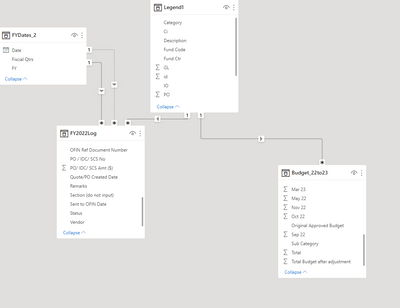
not sure how to link into the date as the budget dates are in SUM?  Thanks


bbsin_1-1659074573248.png


1 ACCEPTED SOLUTION
Anonymous
Not applicable

Hi @bbsin ,


Please try following the steps.

1# Unpivot the yearmonth columns.

2# Create Year, Quarter and Month Columns.

3# Create measures like below:

Qtr =
DIVIDE (
    CALCULATE (
        SUM ( [value] ),
        ALLEXCEPT ( 'table', [category], [subcategory], [Year], [Quarter] )
    ),
    CALCULATE (
        MAX ( [total] ),
        ALLEXCEPT ( 'table', [category], [subcategory], [Year] )
    )
)

Monthly =
DIVIDE (
    CALCULATE (
        SUM ( [value] ),
        ALLEXCEPT ( 'table', [category], [subcategory], [Year], [Month] )
    ),
    CALCULATE (
        MAX ( [total] ),
        ALLEXCEPT ( 'table', [category], [subcategory], [Year] )
    )
)

Yearly = 
DIVIDE (
    CALCULATE (
        SUM ( [value] ),
        ALLEXCEPT ( 'table', [category], [subcategory], [Year] )
    ),
    CALCULATE (
        MAX ( [total] ),
        ALLEXCEPT ( 'table', [category], [subcategory] )
    )
)


Best Regards,

Jay

View solution in original post

2 REPLIES 2
Anonymous
Not applicable

Hi @bbsin ,


Please try following the steps.

1# Unpivot the yearmonth columns.

2# Create Year, Quarter and Month Columns.

3# Create measures like below:

Qtr =
DIVIDE (
    CALCULATE (
        SUM ( [value] ),
        ALLEXCEPT ( 'table', [category], [subcategory], [Year], [Quarter] )
    ),
    CALCULATE (
        MAX ( [total] ),
        ALLEXCEPT ( 'table', [category], [subcategory], [Year] )
    )
)

Monthly =
DIVIDE (
    CALCULATE (
        SUM ( [value] ),
        ALLEXCEPT ( 'table', [category], [subcategory], [Year], [Month] )
    ),
    CALCULATE (
        MAX ( [total] ),
        ALLEXCEPT ( 'table', [category], [subcategory], [Year] )
    )
)

Yearly = 
DIVIDE (
    CALCULATE (
        SUM ( [value] ),
        ALLEXCEPT ( 'table', [category], [subcategory], [Year] )
    ),
    CALCULATE (
        MAX ( [total] ),
        ALLEXCEPT ( 'table', [category], [subcategory] )
    )
)


Best Regards,

Jay

amitchandak
Super User
Super User

@bbsin , You have to unpivot the months. remove the total months.

https://radacad.com/pivot-and-unpivot-with-power-bi


Create date using month

Date = datevalue("01 "& [Month] )


Join sales and budget table with common date table and analyze

Share with Power BI Enthusiasts: Full Power BI Video (20 Hours) YouTube
Microsoft Fabric Series 60+ Videos YouTube
Microsoft Fabric Hindi End to End YouTube

Helpful resources

Announcements
November Power BI Update Carousel

Power BI Monthly Update - November 2025

Check out the November 2025 Power BI update to learn about new features.

Fabric Data Days Carousel

Fabric Data Days

Advance your Data & AI career with 50 days of live learning, contests, hands-on challenges, study groups & certifications and more!

FabCon Atlanta 2026 carousel

FabCon Atlanta 2026

Join us at FabCon Atlanta, March 16-20, for the ultimate Fabric, Power BI, AI and SQL community-led event. Save $200 with code FABCOMM.