Join us at FabCon Atlanta from March 16 - 20, 2026, for the ultimate Fabric, Power BI, AI and SQL community-led event. Save $200 with code FABCOMM.
Register now!Get Fabric Certified for FREE during Fabric Data Days. Don't miss your chance! Request now
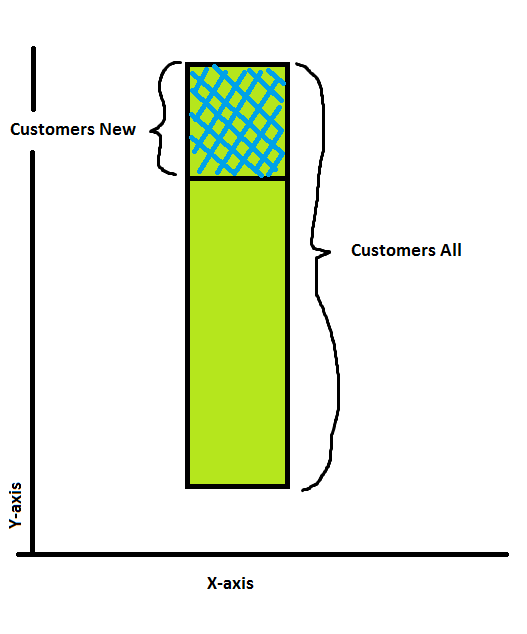
I have two columns: "All Customers" and "Customers New". "All Customers" consists of old customers and new customers. Can I display the "Customers New" column nested inside the "All Customers" in a stacked column visual (or any other for that matter)?
I've attached an illustration on what I want to do:
Solved! Go to Solution.
Hi @carlosDash,
In this scenario, I would suggest you create a new measure/column for "Customers Old" first, then show "Customers New" and "Customers Old" on the stacked column chart. The formula to create the new measure/column should be similar like below.![]()
Customers Old = [Customers All] - [Customers New]
Regards
Hi @Anonymous,
I know, but as the name states, it's "stacked", not "nested". The "Customers New" is actually contained within "Customers All", not a separate entity. Creating a stacked column would display the total value incorrectly.
Hi @carlosDash,
In this scenario, I would suggest you create a new measure/column for "Customers Old" first, then show "Customers New" and "Customers Old" on the stacked column chart. The formula to create the new measure/column should be similar like below.![]()
Customers Old = [Customers All] - [Customers New]
Regards
Yeah, I guess this is the best solution to this problem. I was just hoping to avoid another calculated column ![]()
Thanks!
Check out the November 2025 Power BI update to learn about new features.
Advance your Data & AI career with 50 days of live learning, contests, hands-on challenges, study groups & certifications and more!