FabCon is coming to Atlanta
Join us at FabCon Atlanta from March 16 - 20, 2026, for the ultimate Fabric, Power BI, AI and SQL community-led event. Save $200 with code FABCOMM.
Register now!- Power BI forums
- Get Help with Power BI
- Desktop
- Service
- Report Server
- Power Query
- Mobile Apps
- Developer
- DAX Commands and Tips
- Custom Visuals Development Discussion
- Health and Life Sciences
- Power BI Spanish forums
- Translated Spanish Desktop
- Training and Consulting
- Instructor Led Training
- Dashboard in a Day for Women, by Women
- Galleries
- Data Stories Gallery
- Themes Gallery
- Contests Gallery
- QuickViz Gallery
- Quick Measures Gallery
- Visual Calculations Gallery
- Notebook Gallery
- Translytical Task Flow Gallery
- TMDL Gallery
- R Script Showcase
- Webinars and Video Gallery
- Ideas
- Custom Visuals Ideas (read-only)
- Issues
- Issues
- Events
- Upcoming Events
The Power BI Data Visualization World Championships is back! Get ahead of the game and start preparing now! Learn more
- Power BI forums
- Forums
- Get Help with Power BI
- Desktop
- Can I have a tooltip per entry to a table?
- Subscribe to RSS Feed
- Mark Topic as New
- Mark Topic as Read
- Float this Topic for Current User
- Bookmark
- Subscribe
- Printer Friendly Page

- Mark as New
- Bookmark
- Subscribe
- Mute
- Subscribe to RSS Feed
- Permalink
- Report Inappropriate Content
Can I have a tooltip per entry to a table?
Hi there,
I am relatively new to Power BI and I am looking for a bit of help with Tooltips.
I have managed to set up a tooltip to show another variable when an entry in the table is moused over.
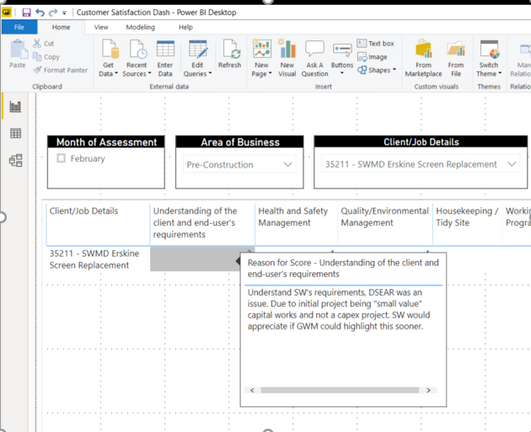
However, I am looking to see if its possible to have another variable when I mouse over another column in the table?

Each column in the table is a different variable which is a score out of 5
The information in the tooltip is the reason why that score was given and comes from another variable
Any help would be greatly appreciated
Thanks,
Chris
Solved! Go to Solution.


- Mark as New
- Bookmark
- Subscribe
- Mute
- Subscribe to RSS Feed
- Permalink
- Report Inappropriate Content
Hi @Anonymous ,
If your data is similar with the following:
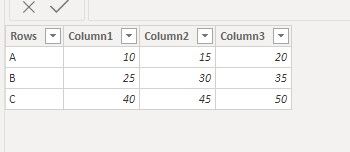
we can create a column header table, then use matrix visual to meet your requirement:
column header table:
ColumnHeaderTable = {"Column1","Column2","Column3"}
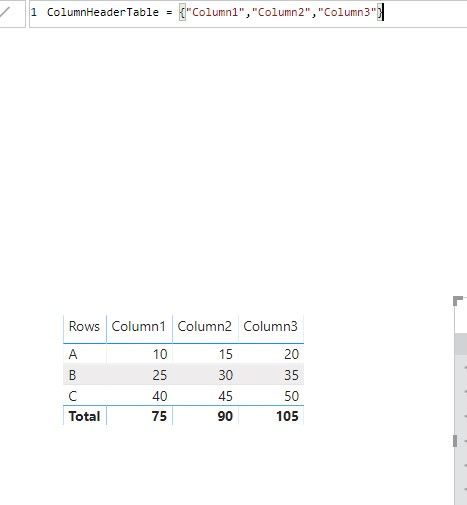
Value measure in matrix visual:
MeasureInMatrix = SWITCH(SELECTEDVALUE(ColumnHeaderTable[Value]),"Column1",SUM('Table'[Column1]),"Column2",SUM('Table'[Column2]),"Column3",SUM('Table'[Column3]))

Tooltips measure which will output different value depens on the value column header:
Tooltips = SWITCH(SELECTEDVALUE(ColumnHeaderTable[Value]),"Column1","Tooltip for Column1","Column2","Tooltip for Column2","Column3","Tooltip for Column3")

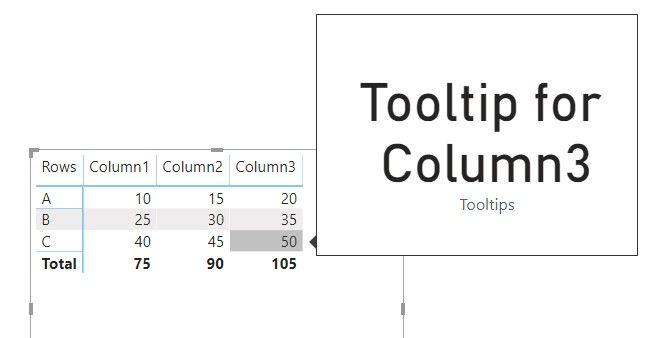
Best regards,
If this post helps, then please consider Accept it as the solution to help the other members find it more quickly.


- Mark as New
- Bookmark
- Subscribe
- Mute
- Subscribe to RSS Feed
- Permalink
- Report Inappropriate Content
Here i one use case if i have rows columns in slicer, i need tooltip for only "C" value not when hover on A or B.
Only when i select C value from slicer and i need tooltip on column.
- Mark as New
- Bookmark
- Subscribe
- Mute
- Subscribe to RSS Feed
- Permalink
- Report Inappropriate Content
Hi @Anonymous ,
If your data is similar with the following:
we can create a column header table, then use matrix visual to meet your requirement:
column header table:
ColumnHeaderTable = {"Column1","Column2","Column3"}
Value measure in matrix visual:
MeasureInMatrix = SWITCH(SELECTEDVALUE(ColumnHeaderTable[Value]),"Column1",SUM('Table'[Column1]),"Column2",SUM('Table'[Column2]),"Column3",SUM('Table'[Column3]))
Tooltips measure which will output different value depens on the value column header:
Tooltips = SWITCH(SELECTEDVALUE(ColumnHeaderTable[Value]),"Column1","Tooltip for Column1","Column2","Tooltip for Column2","Column3","Tooltip for Column3")
Best regards,
If this post helps, then please consider Accept it as the solution to help the other members find it more quickly.

- Mark as New
- Bookmark
- Subscribe
- Mute
- Subscribe to RSS Feed
- Permalink
- Report Inappropriate Content
Thanks, i loved this. It lets you display data on a matrix without unpivot data, and use some of the advantages of a matrix.
I used it to show previous month value on certain columns, and on others that says if it the values were below the target, what that target value was.

- Mark as New
- Bookmark
- Subscribe
- Mute
- Subscribe to RSS Feed
- Permalink
- Report Inappropriate Content
I have a matrix visual, each column must show different tooltips, however columns here are described as a result of measures (not table columns). In this case how to create tooltips that will show different information for different columns?
- Mark as New
- Bookmark
- Subscribe
- Mute
- Subscribe to RSS Feed
- Permalink
- Report Inappropriate Content
My data is similar to that format, so I will give it a shot.
From the images I posted, there is a slicer which reduces the entries into the table.
For this method that you explained, I assume that I should only have one entry in the table for the tooltip to work?
Thanks,
Chris
- Mark as New
- Bookmark
- Subscribe
- Mute
- Subscribe to RSS Feed
- Permalink
- Report Inappropriate Content
Hi @Anonymous ,
How about the result after you follow the suggestions mentioned in my original post?Could you please provide more details about it If it doesn't meet your requirement?
Best regards,
If this post helps, then please consider Accept it as the solution to help the other members find it more quickly.
- Mark as New
- Bookmark
- Subscribe
- Mute
- Subscribe to RSS Feed
- Permalink
- Report Inappropriate Content
Hi @Anonymous ,
It can work for multi columns and rows, each columns can show different tooltips, if you want show different tooltips for each row, we need to modify the measure for tooltips
Best regards,
If this post helps, then please consider Accept it as the solution to help the other members find it more quickly.
- Mark as New
- Bookmark
- Subscribe
- Mute
- Subscribe to RSS Feed
- Permalink
- Report Inappropriate Content
Hi @v-lid-msft
Thanks for your solution. I have replicated it and it is working as you indicated. However, I am looking for similar solution, but for different tooltips for each column and row. Do you please have the modified version of the measure for tooltips in such case?
On the other hand, as my matrix is quite big, is it possible to get the tooltip texts from another variable(s) in the data, but each column and row have different texts as mentioned above?
Hope to hear from you soon,
With thanks in advance
Helpful resources

Power BI Dataviz World Championships
The Power BI Data Visualization World Championships is back! Get ahead of the game and start preparing now!

Power BI Monthly Update - December 2025
Check out the December 2025 Power BI Holiday Recap!

FabCon Atlanta 2026
Join us at FabCon Atlanta, March 16-20, for the ultimate Fabric, Power BI, AI and SQL community-led event. Save $200 with code FABCOMM.

| User | Count |
|---|---|
| 41 | |
| 38 | |
| 36 | |
| 30 | |
| 28 |


| User | Count |
|---|---|
| 128 | |
| 88 | |
| 79 | |
| 67 | |
| 62 |


