Forum Discussion

Olifer's avatar
Olifer
Frequent Visitor
4 years ago
Solved

Calculating time difference does not deliver the expected result

Dear community,


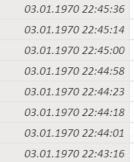
I need to calculate the time difference between a column named "time_val" (formatted as date/time) as provided in the image below and "1/1/1970 0:00:00". The result should be provided in hours. 

 Input Data


So I created a new column and tried to calculate the time difference with the following expression: 

duration = DATEDIFF(DateValue("1/1/1970"),SomeTable[time_val].[Date],HOUR)


Unfortunately, this only provides the duration in multiples of 24, so it basically seems to calculate the days and multiply the result with 24. What I would need, however, is the exact number of hours.


To give an example: For an entry "01.01.1970 14:20:00" I would expect a response of 14 (hours). What I get, however, is 0.


I'd highly appreciate any help.


Thanks and best regards

Oliver

  • Olifer 

    Don't use the .date extension on the field.  That invokes the hidden auto time intelligence date field.  Try this.

    duration = DATEDIFF(DateValue("1/1/1970"),SomeTable[time_val],HOUR)


2 Replies

  • Olifer 

    Don't use the .date extension on the field.  That invokes the hidden auto time intelligence date field.  Try this.

    duration = DATEDIFF(DateValue("1/1/1970"),SomeTable[time_val],HOUR)


    • Olifer's avatar
      Olifer
      Frequent Visitor

      jdbuchanan71 


      that did the trick! Thanks a lot for your quick support!


      Best regards

      Oliver