Join us at FabCon Atlanta from March 16 - 20, 2026, for the ultimate Fabric, Power BI, AI and SQL community-led event. Save $200 with code FABCOMM.
Register now!Get Fabric Certified for FREE during Fabric Data Days. Don't miss your chance! Request now
Hi,
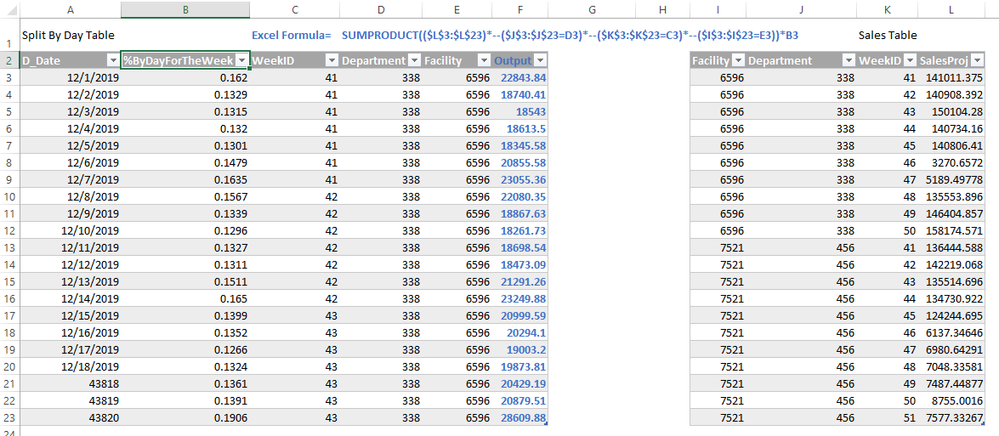
I am trying to calculate daily projection from the total weekly amount, the %ByDayForTheWeek is a calculated value. Below is an example of how I would do this in excel. Please help
Solved! Go to Solution.
Hi @zibster ,
We can try to create a calculated column in “Split By Day Table” Table using following dax to meet your requirement:
Ounput =
[%ByDayForTheWeek]
* CALCULATE (
SUM ( 'Sales Table'[SalesProj] ),
FILTER (
'Sales Table',
'Sales Table'[Facility] = EARLIER ( 'Split By Day Table'[Facility] )
&& 'Sales Table'[Department] = EARLIER ( 'Split By Day Table'[Department] )
&& 'Sales Table'[WeekID] = EARLIER ( 'Split By Day Table'[WeekID] )
)
)
If it doesn't meet your requirement, kindly share your sample data and expected result to me if you don't have any Confidential Information. Please upload your files to One Drive and share the link here.
Best regards,
Hi @zibster ,
We can try to create a calculated column in “Split By Day Table” Table using following dax to meet your requirement:
Ounput =
[%ByDayForTheWeek]
* CALCULATE (
SUM ( 'Sales Table'[SalesProj] ),
FILTER (
'Sales Table',
'Sales Table'[Facility] = EARLIER ( 'Split By Day Table'[Facility] )
&& 'Sales Table'[Department] = EARLIER ( 'Split By Day Table'[Department] )
&& 'Sales Table'[WeekID] = EARLIER ( 'Split By Day Table'[WeekID] )
)
)
If it doesn't meet your requirement, kindly share your sample data and expected result to me if you don't have any Confidential Information. Please upload your files to One Drive and share the link here.
Best regards,
This was very helpful
Thanks
If possible please share the Excel and sample pbix file after removing sensitive information.Thanks.
My Recent Blog -
https://community.powerbi.com/t5/Community-Blog/HR-Analytics-Active-Employee-Hire-and-Termination-tr...
Check out the November 2025 Power BI update to learn about new features.
Advance your Data & AI career with 50 days of live learning, contests, hands-on challenges, study groups & certifications and more!