Get certified for free when you join Fabric Data Days 2026 and dive into Fabric, Power BI, SQL, AI, and other essential data skills.
Join nowData Days is here! Join us now for 60+ days of learning, challenges, and connection. Learn more
Hello there,
I am stuck with one scenario and having tough time figuring out the running total of averages using DAX expression, i would be glad if anyone could help me out on this,
below is the scenarios,
| YEAR | OVC_Value | Average of OVC_Value | ExpectedColumn: Cumulative Average |
| 2015 | 1055603.6 | 1466.116111 | 1466.116111 |
| 2016 | 51279418.59 | 26763.78841 | 28229.90452 |
| 2017 | 409404085.2 | 145799.1756 | 175495.1963 |
| 2018 | 798181874.5 | 264473.7822 | 438502.8623 |
| 2019 | 1243794804 | 412125.5151 | 850628.3774 |
| 2020 | 2303576361 | 763279.1124 | 1613907.49 |
| 2021 | 3163317748 | 1048150.347 | 2662057.837 |
| 2022 | 3198071221 | 1059665.746 | 3721723.583 |
| 2023 | 2824829664 | 935993.9244 | 4657717.507 |
| 2024 | 1342139881 | 451898.9497 | 5109616.457 |
| 2025 | 17620535.63 | 7667.770073 | 5117284.227 |
as we can see there are different OVC_Value for different years, 3rd column 'Average of OVC_Value' is the instance of first OVC_VALUE and i have applied Average Data operation on it, what i need is 4th Column, i.e. ExpectedColumn: Cumulative Average which will calculate the values of average cumulatively as displayed in column,
is there any way to figure this out with DAX expression, i am sure there should be one but i am having hard time to figure that out,
any help would be greatly appreciated, Thanks alot in advance,
Regards,
Malav
Solved! Go to Solution.
Hi @Anonymous,
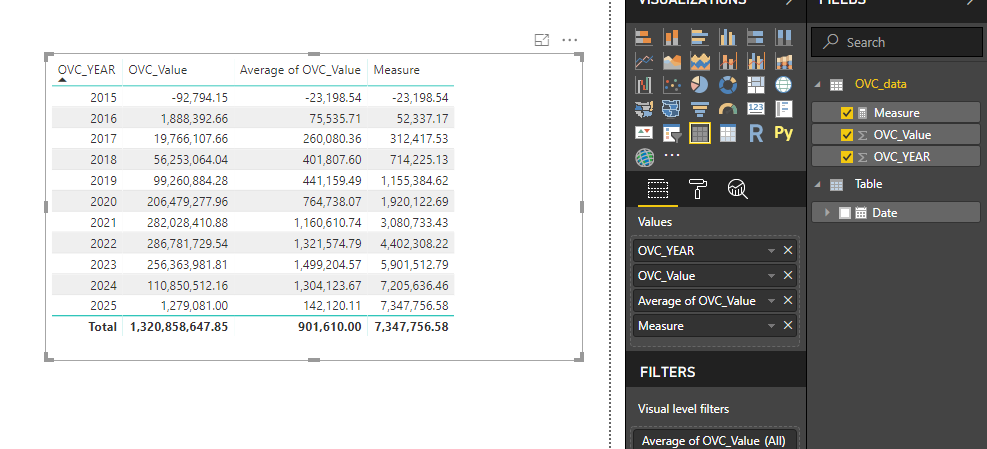
After play with your data, I create a measure to calculate cumulative average:
Measure =
VAR currYear =
MAX ( OVC_data[OVC_YEAR] )
RETURN
SUMX (
FILTER (
SUMMARIZE (
ALLSELECTED ( OVC_data ),
[OVC_YEAR],
"Total Value", SUM ( OVC_data[OVC_Value] ),
"AVG Value", AVERAGE ( OVC_data[OVC_Value] )
),
[OVC_YEAR] <= currYear
),
[AVG Value]
)
Regards,
Xiaoxin Sheng
HI @Anonymous,
You can try to use below column formula to get cumulative average value from summary table.
Column formula:
Calculate column =
SUMX (
FILTER (
SUMMARIZE (
Table,
[Year],
"Total Value", SUM ( Table[OVC_Value] ),
"AVG Value", AVERAGE ( Table[OVC_Value] )
),
[Year] <= Table[Year]
),
[AVG Value]
)
If above not help, please share some sample data for test and coding formula.
Regards,
Xiaoxin Sheng
Hi Xiaoxin Sheng,
I tried the given solution but it did not work because i belive that while adding cumulative average it is also adding the cumulative counts of values and as a result the cumulative average keeps in decreasing, i am attaching the database, thank you very much for helping me on this...
Regards,
Malav
Hi @Anonymous,
After play with your data, I create a measure to calculate cumulative average:
Measure =
VAR currYear =
MAX ( OVC_data[OVC_YEAR] )
RETURN
SUMX (
FILTER (
SUMMARIZE (
ALLSELECTED ( OVC_data ),
[OVC_YEAR],
"Total Value", SUM ( OVC_data[OVC_Value] ),
"AVG Value", AVERAGE ( OVC_data[OVC_Value] )
),
[OVC_YEAR] <= currYear
),
[AVG Value]
)
Regards,
Xiaoxin Sheng
Don't miss out on Data Days, June 15 through August 7. Learn Fabric, Power BI, SQL, AI and more.
Check out the May 2026 Power BI update to learn about new features.
| User | Count |
|---|---|
| 23 | |
| 23 | |
| 21 | |
| 17 | |
| 14 |
| User | Count |
|---|---|
| 58 | |
| 50 | |
| 37 | |
| 29 | |
| 24 |