Forum Discussion

Calculated measure impacting Waterfall Chart
Good afternoon,
I have been trying with my colleague to solve this seemingly simple problem for the last two days and it is absolutely driving us crazy.
The problem:
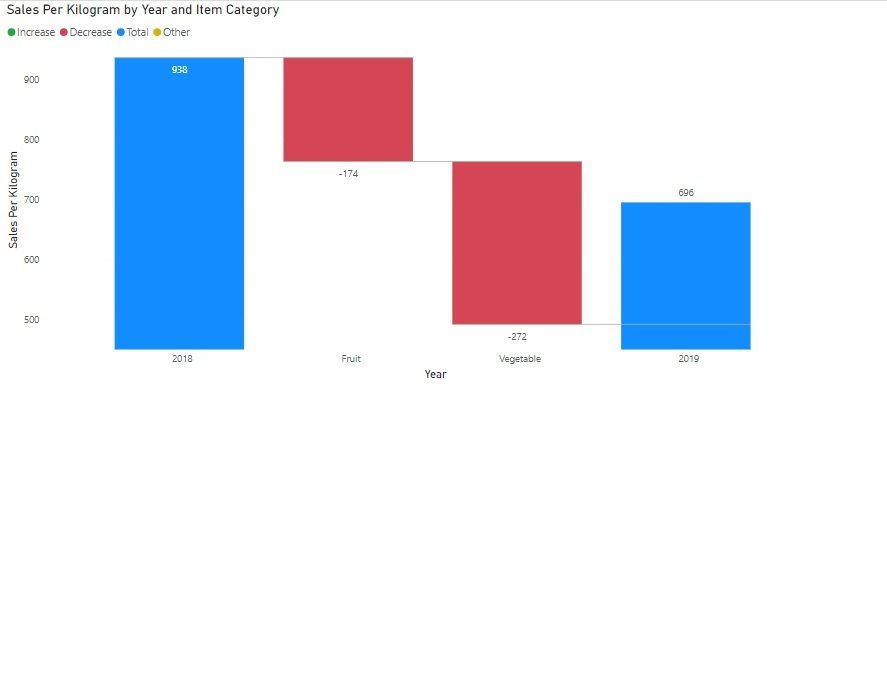
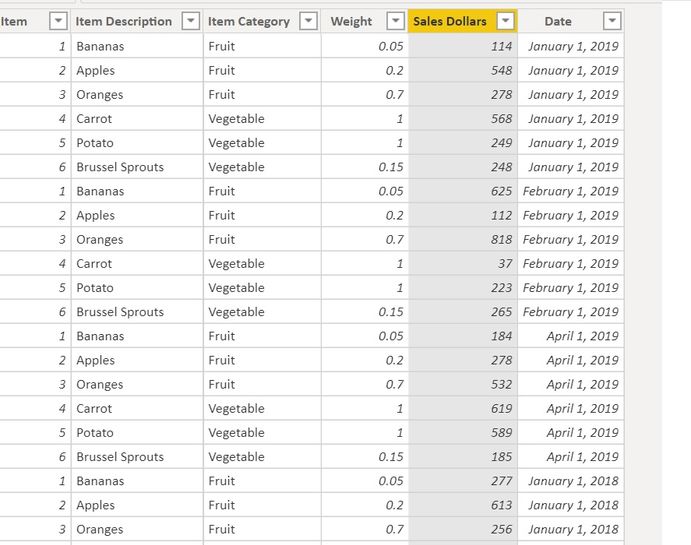
I am trying to create a Watefall chart which shows the difference between Total Sales by KG for Year over Year by Item Category. I have included links and screenshots below.
I'm trying to show how much of an impact Fruit/KG and Vegetables/KG is having on Total Sales KG. In the screenshot below I show that the gap between 2018 and 2019 is 242 (938-696). I'd like the breakdown to show how much of that difference is due to Fruits and how much is due to Vegetables.
Instead, because Total Sales KG is a calculated measure:
Sales Per Kilogram = DIVIDE(SUM(Sheet1[Sales Dollars]),SUM(Sheet1[Weight]))
The waterfall is showing Fruit Year over Year difference and Vegetables Year over Year difference without weighting it on the impact on total.
Links to the report:
Thank you if anyone is able to help us!
Regards,
Gareth.
Hi jazking123 ,
After my testing, you could edit your measure like the following DAX:
Sales Per Kilogram =
CALCULATE (
    DIVIDE (
        CALCULATE (
            SUM ( Sheet1[Sales Dollars] ),
            ALLSELECTED ( Sheet1[Item Description] )
        ),
        CALCULATE ( SUM ( Sheet1[Weight] ), ALLSELECTED ( Sheet1[Item Category] ) )
    )
)
Here is the result.

4 Replies
 jazking123Frequent Visitor
Good afternoon,
I have been trying with my colleague to solve this seemingly simple problem for the last two days and it is absolutely driving us crazy.
The problem:
I am trying to create a Watefall chart which shows the difference between Total Sales by KG for Year over Year by Item Category. I have included links and screenshots below.
I'm trying to show how much of an impact Fruit/KG and Vegetables/KG is having on Total Sales KG. In the screenshot below I show that the gap between 2018 and 2019 is 242 (938-696). I'd like the breakdown to show how much of that difference is due to Fruits and how much is due to Vegetables.Instead, because Total Sales KG is a calculated measure:
Sales Per Kilogram = DIVIDE(SUM(Sheet1[Sales Dollars]),SUM(Sheet1[Weight]))
The waterfall is showing Fruit Year over Year difference and Vegetables Year over Year difference without weighting it on the impact on total.
Links to the report:
Thank you if anyone is able to help us!
Regards,
Gareth.
- v-eachen-msftCommunity Support
Hi jazking123 ,
After my testing, you could edit your measure like the following DAX:
Sales Per Kilogram =
CALCULATE (
    DIVIDE (
        CALCULATE (
            SUM ( Sheet1[Sales Dollars] ),
            ALLSELECTED ( Sheet1[Item Description] )
        ),
        CALCULATE ( SUM ( Sheet1[Weight] ), ALLSELECTED ( Sheet1[Item Category] ) )
    )
)
Here is the result.
- jazking123Frequent Visitor
Thank you so much!
The solution works well. You have saved our sanity.
- jazking123Frequent Visitor
v-eachen-msft Thank you very much for your help, it works perfectly. Quick question, I've now set up my sheet so that Sales Dollars and Weight are now attributes in the same column rather than seperate columns. I thought I could use the following filters, but it doesn't seem compatible with ALLEXCEPT.
Sales Per KG =
VAR FilteredSales =
FILTER (
'Sheet1', [Attribute] = "Sales Dollars"
)VAR FilteredWeight =
FILTER (
'Sheet1', [Attribute] = "Weight"
)RETURN
CALCULATE (
DIVIDE (
CALCULATE (
SUM ( 'Sheet1'[Value] ),
ALLSELECTED ( Sheet1[Attribute]),FilteredSales),
CALCULATE (
SUM ( 'Sheet1'[Value] ),
ALLSELECTED ( Sheet1[Item Category] ),
FilteredWeight
)
)
)I hate to ask again, but I've spent all day trying to figure this out. Do you happen to know how I should approach this?