Forum Discussion
Calculate with Mutliple Filters Not working
Hi,
I have a table which I am trying to summarize into another table using a series of calculate functions which apply various filters, however the filters appear to not be working.
My current code:
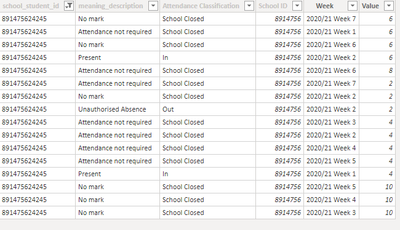
Table 1:
Code for Table 2:
STD Attendance % =
SUMMARIZE('Attendance Calcs',
'Attendance Calcs'[school_student_id],
"Total Pos Days HT 1 20/21", CALCULATE(
SUM('Attendance Calcs'[Value]), FILTER('Attendance Calcs', 'Attendance Calcs'[Attendance Classification] = "In" || 'Attendance Calcs'[Attendance Classification] = "Out" && 'Attendance Calcs'[Week] = "2020/21 Week 1" || 'Attendance Calcs'[Week] = "2020/21 Week 2" || 'Attendance Calcs'[Week] = "2020/21 Week 3" || 'Attendance Calcs'[Week] = "2020/21 Week 4" || 'Attendance Calcs'[Week] = "2020/21 Week 5" || 'Attendance Calcs'[Week] = "2020/21 Week 6" || 'Attendance Calcs'[Week] = "2020/21 Week 7" || 'Attendance Calcs'[Week] = "2020/21 Week 8")),
"Total Days In HT 1 20/21", CALCULATE(
SUM('Attendance Calcs'[Value]), FILTER('Attendance Calcs', 'Attendance Calcs'[Attendance Classification] = "In" && 'Attendance Calcs'[Week] = "2020/21 Week 1" || 'Attendance Calcs'[Week] = "2020/21 Week 2" || 'Attendance Calcs'[Week] = "2020/21 Week 3" || 'Attendance Calcs'[Week] = "2020/21 Week 4" || 'Attendance Calcs'[Week] = "2020/21 Week 5" || 'Attendance Calcs'[Week] = "2020/21 Week 6" || 'Attendance Calcs'[Week] = "2020/21 Week 7" || 'Attendance Calcs'[Week] = "2020/21 Week 8")))
Out put of table 2:
So it is clear the functions are disregarding the filters and just summing the entire table but I'm not sure why this is happening?
Advice would be greatly appreciated!
Thanks,
- Anonymous5 years ago
Hi Anonymous ,
You can create two measures as below to get them:
Total Pos Days HT 1 20/21 = CALCULATE ( SUM ( 'Attendance Calcs'[Value] ), FILTER ( 'Attendance Calcs', 'Attendance Calcs'[Attendance Classification] in { "In", "Out"} && 'Attendance Calcs'[Week] IN { "2020/21 Week 1", "2020/21 Week 2", "2020/21 Week 3", "2020/21 Week 4", "2020/21 Week 5", "2020/21 Week 6", "2020/21 Week 7", "2020/21 Week 8" } ) )Total Days HT 1 20/21 = CALCULATE ( SUM ( 'Attendance Calcs'[Value] ), FILTER ( 'Attendance Calcs', 'Attendance Calcs'[Attendance Classification] = "In" && 'Attendance Calcs'[Week] IN { "2020/21 Week 1", "2020/21 Week 2", "2020/21 Week 3", "2020/21 Week 4", "2020/21 Week 5", "2020/21 Week 6", "2020/21 Week 7", "2020/21 Week 8" } ) )Best Regards
Rena
4 Replies
- AnonymousNot applicable
Hi Anonymous ,
What's the correct value of field [Total Pos Days HT 1 20/21] and [Total Days In HT 1 20/21]? Could you please provide their calcuation logic?
Total Pos Days HT 1 20/21= the total values which the attendance classification is ( "IN" or "OUT") and week in 2020/21 week 1~week 8 ? Total Days In HT 1 20/21= the total values which the attendance classification is "IN" and week in 2020/21 week 1~week 8 ? Best Regards
Rena
- AnonymousNot applicable
Hi Rena,
Yes you've got that correct.
The logic is that 'Total Pos Days HT 1 20/21' would equal the sum of the value column for all rows where 'Attendance Classification' = IN or OUT and 'Week' = 2020/21 Week 1 to Week 8.
Then 'Total Days In HT 1 20/21' would be the same but 'Attendance Classification' = IN only.
So in this scenario:
' Total Pos Days HT 1 20/21' = 12
'Total Days HT 1 20/21' = 10Hope that makes sense,
Thanks,
- AnonymousNot applicable
Hi Anonymous ,
You can create two measures as below to get them:
Total Pos Days HT 1 20/21 = CALCULATE ( SUM ( 'Attendance Calcs'[Value] ), FILTER ( 'Attendance Calcs', 'Attendance Calcs'[Attendance Classification] in { "In", "Out"} && 'Attendance Calcs'[Week] IN { "2020/21 Week 1", "2020/21 Week 2", "2020/21 Week 3", "2020/21 Week 4", "2020/21 Week 5", "2020/21 Week 6", "2020/21 Week 7", "2020/21 Week 8" } ) )Total Days HT 1 20/21 = CALCULATE ( SUM ( 'Attendance Calcs'[Value] ), FILTER ( 'Attendance Calcs', 'Attendance Calcs'[Attendance Classification] = "In" && 'Attendance Calcs'[Week] IN { "2020/21 Week 1", "2020/21 Week 2", "2020/21 Week 3", "2020/21 Week 4", "2020/21 Week 5", "2020/21 Week 6", "2020/21 Week 7", "2020/21 Week 8" } ) )Best Regards
Rena