- Power BI forums
- Updates
- News & Announcements
- Get Help with Power BI
- Desktop
- Service
- Report Server
- Power Query
- Mobile Apps
- Developer
- DAX Commands and Tips
- Custom Visuals Development Discussion
- Health and Life Sciences
- Power BI Spanish forums
- Translated Spanish Desktop
- Power Platform Integration - Better Together!
- Power Platform Integrations (Read-only)
- Power Platform and Dynamics 365 Integrations (Read-only)
- Training and Consulting
- Instructor Led Training
- Dashboard in a Day for Women, by Women
- Galleries
- Community Connections & How-To Videos
- COVID-19 Data Stories Gallery
- Themes Gallery
- Data Stories Gallery
- R Script Showcase
- Webinars and Video Gallery
- Quick Measures Gallery
- 2021 MSBizAppsSummit Gallery
- 2020 MSBizAppsSummit Gallery
- 2019 MSBizAppsSummit Gallery
- Events
- Ideas
- Custom Visuals Ideas
- Issues
- Issues
- Events
- Upcoming Events
- Community Blog
- Power BI Community Blog
- Custom Visuals Community Blog
- Community Support
- Community Accounts & Registration
- Using the Community
- Community Feedback
Earn a 50% discount on the DP-600 certification exam by completing the Fabric 30 Days to Learn It challenge.
- Power BI forums
- Forums
- Get Help with Power BI
- Desktop
- Calculate total rows based on slicer selection
- Subscribe to RSS Feed
- Mark Topic as New
- Mark Topic as Read
- Float this Topic for Current User
- Bookmark
- Subscribe
- Printer Friendly Page


- Mark as New
- Bookmark
- Subscribe
- Mute
- Subscribe to RSS Feed
- Permalink
- Report Inappropriate Content
Calculate total rows based on slicer selection
Hi All,
I have the following table where I have list of Item.
To calculate weight , i need to count rows of table which is 14 and divide it by 100 as mentioned below.
Also I have a slicer for BLs/subsidiaries , so my count should change bsed on BLs/subsidiaries slicer selection for example for below BLs/subsidiaries as "One" I have total row count as 14 , if i change slicer to another selection my row count also changes.
Can someone help here.Thanks.
| weight =100/14 | |||
| Total row count =14 | |||
| Item | Source | BLs/subsidiaries | Weight |
| Asset | Initiatives | One | 7.142857 |
| Overall | BL | One | 7.142857 |
| Energy | BL | One | 7.142857 |
| Availability | BL | One | 7.142857 |
| RE | Initiatives | One | 7.142857 |
| Emissions | BL | One | 7.142857 |
| Conversion | Initiatives | One | 7.142857 |
| Fuel | BL | One | 7.142857 |
| Energy | BL | One | 7.142857 |
| Reliability | Initiatives | One | 7.142857 |
| 3E’s | Initiatives | One | 7.142857 |
| Reliability | Initiatives | One | 7.142857 |
| Thermal | BL | One | 7.142857 |
| Reliability | Initiatives | One | 7.142857 |


- Mark as New
- Bookmark
- Subscribe
- Mute
- Subscribe to RSS Feed
- Permalink
- Report Inappropriate Content
Hi, @binayjethwa
You can try the following methods.
Measure =
Var _N1= CALCULATE(COUNT('Table'[BLs/subsidiaries]),ALLEXCEPT('Table','Table'[BLs/subsidiaries]))
Return
DIVIDE(100,_N1)
Two is four rows.
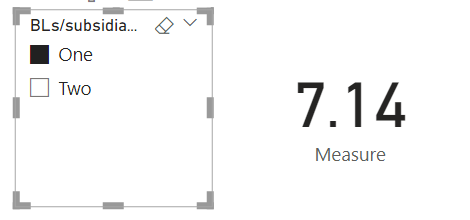
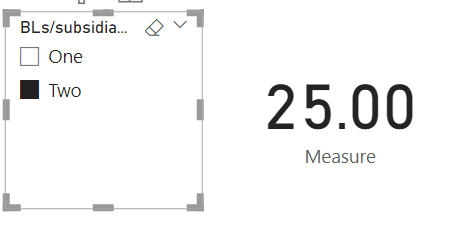
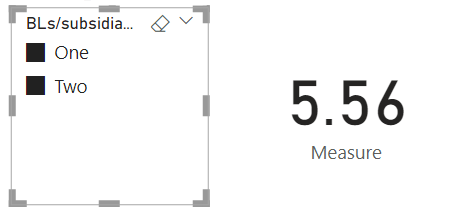
Is this the result you expect?
Best Regards,
Community Support Team _Charlotte
If this post helps, then please consider Accept it as the solution to help the other members find it more quickly.
- Mark as New
- Bookmark
- Subscribe
- Mute
- Subscribe to RSS Feed
- Permalink
- Report Inappropriate Content
- Mark as New
- Bookmark
- Subscribe
- Mute
- Subscribe to RSS Feed
- Permalink
- Report Inappropriate Content
Hi, @binayjethwa
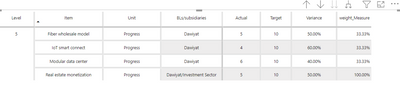
Based on the screenshots you provided, what do you expect the result to be?
Best Regards,
Community Support Team _Charlotte
- Mark as New
- Bookmark
- Subscribe
- Mute
- Subscribe to RSS Feed
- Permalink
- Report Inappropriate Content
@FreemanZ here count of weight =14 is just given for reference, it will change based on slicer selection and its dynamic. In above table there are 14 rows hence count is 14 , if there are 4 rows i should see weight as 25% for each row.


- Mark as New
- Bookmark
- Subscribe
- Mute
- Subscribe to RSS Feed
- Permalink
- Report Inappropriate Content
Hi @binayjethwa
Not sure if i fully get you, then try
Measure =
VAR _bl =SELECTEDVALUE(TableName[ BLs/subsidiaries])
VAR _count =
COUNTROWS(
    FILTER(
        ALL(TableName),
        TableName[BLs/subsidiaries] = _bl
    )
)
RETURN
DVIDE(100, _count)- Mark as New
- Bookmark
- Subscribe
- Mute
- Subscribe to RSS Feed
- Permalink
- Report Inappropriate Content
@FreemanZ The above measure is working fine with single selection , but if i do multiple selections i see weight is calculated sepatately. even if i do multiple selections , for example 2 BL/subsidaries , it should take total count of selected BL/s and divide by 100 as a whole. can you please suggest how we can achieve this.
- Mark as New
- Bookmark
- Subscribe
- Mute
- Subscribe to RSS Feed
- Permalink
- Report Inappropriate Content
hi @binayjethwa
try like:


if it doesn't work, please consider expand your data sample to fully represent the issue and expectation. And continue @me, if furthere suggest is needed.
- Mark as New
- Bookmark
- Subscribe
- Mute
- Subscribe to RSS Feed
- Permalink
- Report Inappropriate Content
Hi @binayjethwa
try to write a measure like this:

Helpful resources

Power BI Monthly Update - April 2024
Check out the April 2024 Power BI update to learn about new features.

| User | Count |
|---|---|
| 100 | |
| 89 | |
| 78 | |
| 71 | |
| 68 |


| User | Count |
|---|---|
| 106 | |
| 96 | |
| 90 | |
| 72 | |
| 70 |


