cancel
Showing results for 
Search instead for 
Did you mean: 

The Power BI Data Visualization World Championships is back! Get ahead of the game and start preparing now! Learn more

Reply
Power_BI_306
New Member

Calculate the difference between two percentage columns

Hi Everyone,


I’m new to Power BI and need some help trying to figure out how to calculate the difference between columns set as a percentage.


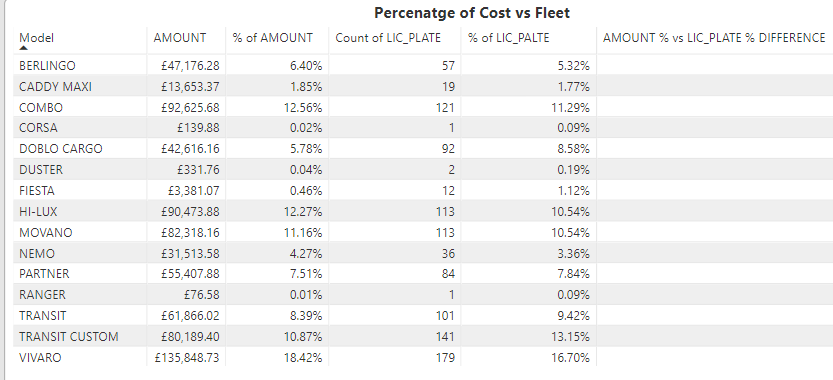
% of AMOUNT = is simply the sum of all cost by Model set to show as a percentage

% of LIC_PLATE = is a disticnt count of all licence plates by model set as a percentage


AMOUNT % vs LIC_PLATE  % DIFFERENCE = This is where I need help. I would like this column to show the difference between % of AMOUNT and % of LIC_PLATE. Essentially (LIC_PLATE  %  - AMOUNT %)


For example, BERLINGO would be -1.80, TRANSIT would be 1.03.


Table.png


Any help would be greatly appreciated!


Thanks

1 ACCEPTED SOLUTION

Thanks Greg, your solution gave me a good starting place. I eventually created three measures which worked perfectly.


Amount% = SUM(Query1[AMOUNT]) / SUMX(ALLSELECTED(Query1),(Query1[AMOUNT]))

Fleet% = VAR LP = SUMMARIZE(ALLSELECTED(Query1),Query1[LIC_PLATE],"count",DISTINCTCOUNT(Query1[LIC_PLATE]))
RETURN
DIVIDE(CALCULATE(DISTINCTCOUNT(Query1[LIC_PLATE]),ALLSELECTED(Query1[LIC_PLATE])),SUMX(LP,[count]))

Fleet vs Amount = [Fleet%] - [Amount%]

View solution in original post

4 REPLIES 4
Greg_Deckler
Community Champion
Community Champion

Are % of AMOUNT and % of LIC_PLATE calculated columns or measures?


Follow on LinkedIn
@ me in replies or I'll lose your thread!!!
Instead of a Kudo, please vote for this idea
Become an expert!: Enterprise DNA
External Tools: MSHGQM
YouTube Channel!: Microsoft Hates Greg
Latest book!:
DAX For Humans

DAX is easy, CALCULATE makes DAX hard...

No, '% Amount' is a column containing costs set to show as percentage and '% of LIC_PLATE' is a column showing a distinct count of licence plates set to show as a percentage.

OK, it would help to have example source data, but I'll give it whirl:


Measure = 
// This is your first percentage
VAR __%amount = SUM([Amount]) / SUMX(ALL('Table'),[Amount]))
// This is your second percentage
VAR __%lic = DISTINCT('Table'[Lic_Plate]) / DISTINCT(SELECTCOLUMNS(ALL('Table'),"__licPlate",[Lic_Plate]))
RETURN
__%amount - __%lic


Follow on LinkedIn
@ me in replies or I'll lose your thread!!!
Instead of a Kudo, please vote for this idea
Become an expert!: Enterprise DNA
External Tools: MSHGQM
YouTube Channel!: Microsoft Hates Greg
Latest book!:
DAX For Humans

DAX is easy, CALCULATE makes DAX hard...

Thanks Greg, your solution gave me a good starting place. I eventually created three measures which worked perfectly.


Amount% = SUM(Query1[AMOUNT]) / SUMX(ALLSELECTED(Query1),(Query1[AMOUNT]))

Fleet% = VAR LP = SUMMARIZE(ALLSELECTED(Query1),Query1[LIC_PLATE],"count",DISTINCTCOUNT(Query1[LIC_PLATE]))
RETURN
DIVIDE(CALCULATE(DISTINCTCOUNT(Query1[LIC_PLATE]),ALLSELECTED(Query1[LIC_PLATE])),SUMX(LP,[count]))

Fleet vs Amount = [Fleet%] - [Amount%]

Helpful resources

Announcements
November Power BI Update Carousel

Power BI Monthly Update - November 2025

Check out the November 2025 Power BI update to learn about new features.

Fabric Data Days Carousel

Fabric Data Days

Advance your Data & AI career with 50 days of live learning, contests, hands-on challenges, study groups & certifications and more!

FabCon Atlanta 2026 carousel

FabCon Atlanta 2026

Join us at FabCon Atlanta, March 16-20, for the ultimate Fabric, Power BI, AI and SQL community-led event. Save $200 with code FABCOMM.

Top Solution Authors
Top Kudoed Authors