cancel
Showing results for 
Search instead for 
Did you mean: 

Get Fabric Certified for FREE during Fabric Data Days. Don't miss your chance! Request now

Reply
Anonymous
Not applicable

Calculate sum of previous month and show the difference with line chart

Hello everyone,


I am trying to replicate the chart for sessions by Day like the one on Google Analytics. My goal is to be able to show the difference in session for month selected and previous month using a line chart.


I have 2 tables, one that contains the GA data, sessions, channel and date and a second table that contains dates, which i am using to create relationships with other tables by using the Date column which has unique values.


Currently, I use a bar chart to display the sessions by Month, as you can see below.
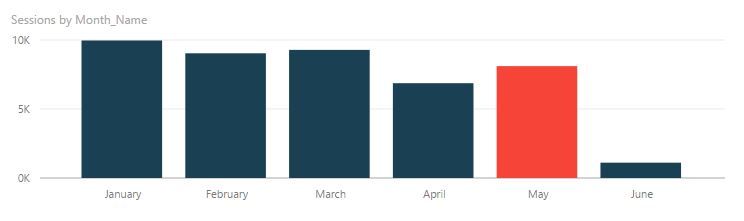
Sessions by month.JPG


I am using the bars as a filter to display the session by day using a line chart.
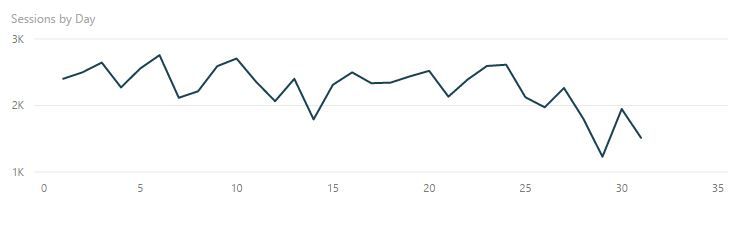
 

Sessions by day.JPG


When none of the bars are selected, the line chart shows the total sessions by day since the beginning of 2017.


What I am trying to achieve is when I am selecting a month from the bar chart to have the line chart to display a line for the sessions of the month selected and a second line that will show the sessions by day for the previous month.


So it will look something like that


Sessions by day with previous month.JPG


My tables have the columns below


GA Sessions [Date]

GA Sessions [Sessions]

GA Sessions [Channel]


Date Series [Date] which is related to the date column of the GA Session table.


Any ideas on how this can be done?


Thank you in advance


Regards

George

1 ACCEPTED SOLUTION
Anonymous
Not applicable

Solution found!


It seems that it was a lot easier that I expected. I used the formula below


Previous Month = CALCULATE(SUM('GA Sessions'[Sessions]), DATEADD('Date Series'[Date],-1,MONTH))


Now based on the month selected from the bar chart, the measure Previous month shows a line for sessions per day for the previous month of the month selected.


Regards

George


View solution in original post

3 REPLIES 3
ceebu
Advocate I
Advocate I

As far as I know this is not directly possible with PowerBI, but if you are enterprising you might be able to hack your way through something like this..


https://community.powerbi.com/t5/Webinars-and-Video-Gallery/Turn-Measures-On-and-Off-Inside-a-Chart-...


This idea uses a disconnected table to evaluate what filters are turned on and then display various values.

Anonymous
Not applicable

Hello ceebu,


Thank you very much for taking the time to share the video with me. It is a very interesting approach. I just don't see how it can help with the issue I have which is to calculate the sessions of the previous month based on month selected. 


I see how I can use the approach described in the video to add an extra filter which can say for example "Compare with previous month".


Regards
George

Anonymous
Not applicable

Solution found!


It seems that it was a lot easier that I expected. I used the formula below


Previous Month = CALCULATE(SUM('GA Sessions'[Sessions]), DATEADD('Date Series'[Date],-1,MONTH))


Now based on the month selected from the bar chart, the measure Previous month shows a line for sessions per day for the previous month of the month selected.


Regards

George


Helpful resources

Announcements
November Power BI Update Carousel

Power BI Monthly Update - November 2025

Check out the November 2025 Power BI update to learn about new features.

Fabric Data Days Carousel

Fabric Data Days

Advance your Data & AI career with 50 days of live learning, contests, hands-on challenges, study groups & certifications and more!

FabCon Atlanta 2026 carousel

FabCon Atlanta 2026

Join us at FabCon Atlanta, March 16-20, for the ultimate Fabric, Power BI, AI and SQL community-led event. Save $200 with code FABCOMM.

Top Solution Authors
Top Kudoed Authors