

cancel
Showing results for 
Search instead for 
Did you mean: 

Vote for your favorite vizzies from the Power BI Dataviz World Championship submissions. Vote now!

Reply
Anonymous
Not applicable

Calculate (subtract) total value result in Matrix visual with another value

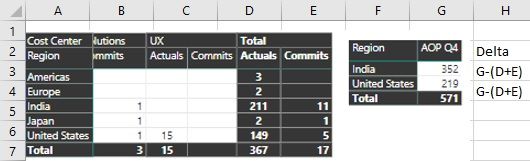
Sorry for making a mockup data in excel. But I have column and row total in one Matrix visual (Actuals). Would like to calculate (Subtract) data from another dataset (Forcast). And get Delta (Actuals total - Forcast total) 


Appreciate any help.


PowerBI-Delta.jpg

1 ACCEPTED SOLUTION
Icey
Community Support
Community Support

Hi @Anonymous,

If I understand correctly, you want to get the matrix visual like the screenshot below.

Calculate (subtract) total value result in Matrix visual with another value.png

If so, you can write your measures like so:

  1. Create relationship between table ‘Actual’ and ‘Forcast’ based on Region.
  2. Create measures like so:
Actual Row Total =
SUMX ( Actual, Actual[Department 1] ) + SUMX ( Actual, Actual[Department 2] )

Forcast Row Total =
SUMX ( Forcast, Forcast[Department 1] )
    + SUMX ( Forcast, Forcast[Department 2] )

Forcast Row Total - Actual Row Total =
Forcast[Forcast Row Total] - Actual[Actual Row Total]


Best Regards,

Icey Zhang


If this post helps, then please consider Accept it as the solution to help the other members find it more quickly.

View solution in original post

3 REPLIES 3
Icey
Community Support
Community Support

Hi @Anonymous,

If I understand correctly, you want to get the matrix visual like the screenshot below.

Calculate (subtract) total value result in Matrix visual with another value.png

If so, you can write your measures like so:

  1. Create relationship between table ‘Actual’ and ‘Forcast’ based on Region.
  2. Create measures like so:
Actual Row Total =
SUMX ( Actual, Actual[Department 1] ) + SUMX ( Actual, Actual[Department 2] )

Forcast Row Total =
SUMX ( Forcast, Forcast[Department 1] )
    + SUMX ( Forcast, Forcast[Department 2] )

Forcast Row Total - Actual Row Total =
Forcast[Forcast Row Total] - Actual[Actual Row Total]


Best Regards,

Icey Zhang


If this post helps, then please consider Accept it as the solution to help the other members find it more quickly.

Anonymous
Not applicable

There is a relationship between both the tables via region


I just want to calculate difference between a fixed value (AOP Q4) & Matrix calculated values of Total (Actuals + Commits). But a simple formula in excel is a complicated one in PowerBI Smiley Indifferent 


PowerBI-Delta2.jpg

Icey
Community Support
Community Support

Hi @Anonymous ,

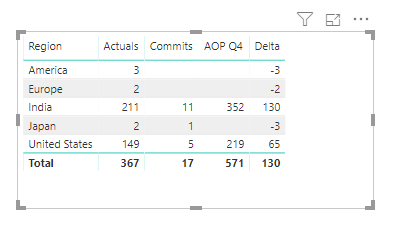
You can create your measure like so:

Delta =
MAX ( 'Table 2'[AOP Q4] )
    - ( MAX ( 'Table 1'[Actuals] ) + MAX ( 'Table 1'[Commits] ) )

Calculate (subtract) total value result in Matrix visual with another value - follow.PNG

In this DAX expression, [Actuals], [Commits] and [AOP Q4] are all columns. If they are measures in your file, 'MAX' is not needed.


Best Regards,

Icey


If this post helps, then please consider Accept it as the solution to help the other members find it more quickly.


Helpful resources

Announcements
Power BI DataViz World Championships

Power BI Dataviz World Championships

Vote for your favorite vizzies from the Power BI World Championship submissions!

Sticker Challenge 2026 Carousel

Join our Community Sticker Challenge 2026

If you love stickers, then you will definitely want to check out our Community Sticker Challenge!

January Power BI Update Carousel

Power BI Monthly Update - January 2026

Check out the January 2026 Power BI update to learn about new features.

FabCon Atlanta 2026 carousel

FabCon Atlanta 2026

Join us at FabCon Atlanta, March 16-20, for the ultimate Fabric, Power BI, AI and SQL community-led event. Save $200 with code FABCOMM.