Forum Discussion
Calculate rows for financial data / ratio calculation
- 9 years ago
Hi Anonymous,
I try to reproduce your scenario and get expected result as the following steps.
1. Create new table.New Table1 = SUMMARIZE(Table1,Table1[Company],Table1[Category],Table1[Year],"1",CALCULATE(SUM(Table1[Value]),FILTER(Table1,Table1[Fields]="Net Claims Incurred")),"2",CALCULATE(SUM(Table1[Value]),FILTER(Table1,Table1[Fields]="Net Premium Earned")))
Create calculated column to get ratio and add a fields column.Fields = "Net Loss Ratio" Value = 'New Table1'[Net Claims Incurred]/'New Table1'[Net Premium Earned]
You will get the following table.
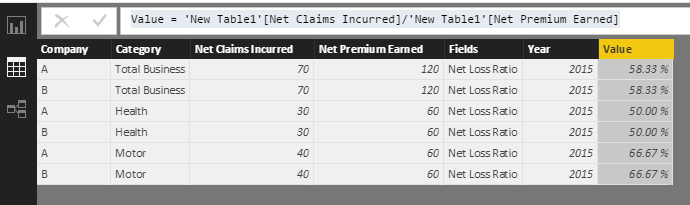
2. Please right click the new table->Copy Tbale, then click Enter Data->Paste, delete the third and forth column, you will get the following table(Table3).3. Click Raw data table(Table1)->Edit Query, click the Append Queries. Select the Table3, you will get the expected result.
The desired result.If you have other issues, don't hesitate to let me know.
Best Regards,
Angelia
Hi Anonymous,
I try to reproduce your scenario and get expected result as the following steps.
1. Create new table.
New Table1 = SUMMARIZE(Table1,Table1[Company],Table1[Category],Table1[Year],"1",CALCULATE(SUM(Table1[Value]),FILTER(Table1,Table1[Fields]="Net Claims Incurred")),"2",CALCULATE(SUM(Table1[Value]),FILTER(Table1,Table1[Fields]="Net Premium Earned")))
Create calculated column to get ratio and add a fields column.
Fields = "Net Loss Ratio" Value = 'New Table1'[Net Claims Incurred]/'New Table1'[Net Premium Earned]
You will get the following table.
2. Please right click the new table->Copy Tbale, then click Enter Data->Paste, delete the third and forth column, you will get the following table(Table3).
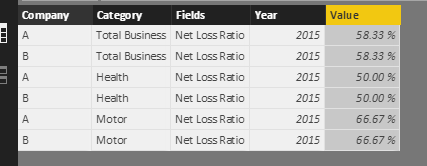
3. Click Raw data table(Table1)->Edit Query, click the Append Queries. Select the Table3, you will get the expected result.

The desired result.
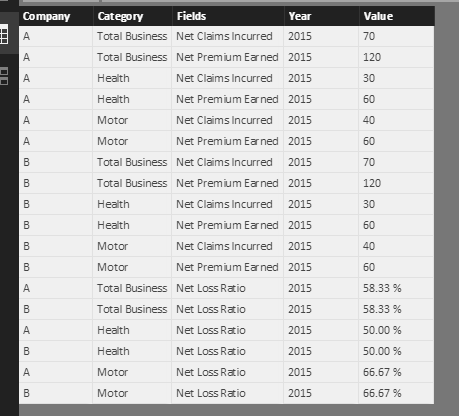
If you have other issues, don't hesitate to let me know.
Best Regards,
Angelia
Hi Angelia,
we have more or less the same issue. The lowest level is the profit center level and above we have two/three higher levels, where profit centers are summarized. The highest level is in the end the whole company.
Means we would do the same steps like you have described above to calculate a new KPI (in this case Net Loss Ratio).
On the lowest level (profit center level) the results are fine (each profit center has the value which is shown in the table) but as soon as we choose the next level (for example sum of 10 profit centers) the calculation for this measure is not working.
Can you help us here to fix this issue? I guess the issue is that in our hierarchy we have several levels.
Thanks for your help.
Regards
Benjamin