cancel
Showing results for 
Search instead for 
Did you mean: 

Next up in the FabCon + SQLCon recap series: The roadmap for Microsoft SQL and Maximizing Developer experiences in Fabric. All sessions are available on-demand after the live show. Register now

Reply
M4R10
Frequent Visitor

Calculate last day with condition

Dear all,


I have a data set where:
Items are audited, reporting 0 or 1 as a result.

But not all items are audited every day, the frequency is random. So some days, where the item was not audited, the result is reported as NA (not available)

See an example below for 3 items since March 7th until March 19th:

Audit date07-03-201708-03-201709-03-201710-03-201711-03-201712-03-201713-03-201714-03-201715-03-201716-03-201717-03-201718-03-201719-03-2017
Item ANANA0011NA10NA0NANA
Item B0011NA1NA0NA0000
Item C1110111NA10NA00


What I'm trying to create are 5 DAX formulas:

DAX FORMULASLast audit datePrevious audit to last audit datelast audited "0" datelast audited "1" dateConsequtive days audited "0" since last audited "0" date
Item A17-03-201715-03-201717-03-201714-03-20171
Item B19-03-201718-03-201719-03-201712-03-20174
Item C19-03-201718-03-201719-03-201715-03-20172


Where,
1. Last audit date = It is the last date different to "NA"

2. Previous audit to last audit date = It is the penultimate date different to "NA"

3. Last audited "0" date = It is the last date equal to "0"

4. Last audited "1" date = It is the last date equal to "1"

5. Consequtive days audited "0" since last audited "0" date = How many consequtive days were "0" since the last day equal to "0"


Anyone could help me?

thanks in advance!


regards

1 ACCEPTED SOLUTION

@M4R10


In this scenario, you apply the filter to limit the table context into "Answer = 0", the measure will not return result when the current context is "Answer =1". You may apply IF condition to combine the "last audit 0" and "last audit 1" into one measure.


To calculate the consecutive appearance, please refer to my expression in following thread:


http://community.powerbi.com/t5/Desktop/Count-last-actual-consecutive-sorted-rows/m-p/149683


Regards,

View solution in original post

3 REPLIES 3
Greg_Deckler
Community Champion
Community Champion

First of all, I would unpivot your date columns to end up with something like:


Item,Audit date,Value

Item A,07-03-2017,NA

Item A,08-03-2017,NA

Item A,09-03-2017,0

...


At that point, most of your calculations should be relatively trivial along the lines of wrapping a MAX function for Audit date in a CALCULATE with an appropriate FILTER clause.


Follow on LinkedIn
@ me in replies or I'll lose your thread!!!
Instead of a Kudo, please vote for this idea
Become an expert!: Enterprise DNA
External Tools: MSHGQM
YouTube Channel!: Microsoft Hates Greg
Latest book!:
DAX For Humans

DAX is easy, CALCULATE makes DAX hard...

thanks @Greg_Deckler


Actually, my tables are normalized, I have two tables:

- VISITS to register visit dates

- AUDIT to register the answers of each visit


According to your suggestion, I created 3 new measures:

LAST AUDIT DATE = CALCULATE(MAX('TBL_VISITS'[AUDIT DATES]);
FILTER('TBL_AUDIT';'TBL_AUDIT'[ANSWER]>=0))


LAST 0 AUDIT = CALCULATE(MAX('TBL_VISITS'[AUDIT DATES]);
FILTER('TBL_AUDIT';'TBL_AUDIT'[ANSWER]=0))


LAST 1 AUDIT = CALCULATE(MAX('TBL_VISITS'[AUDIT DATES]);
FILTER('TBL_AUDIT';'TBL_AUDIT'[ANSWER]=1))


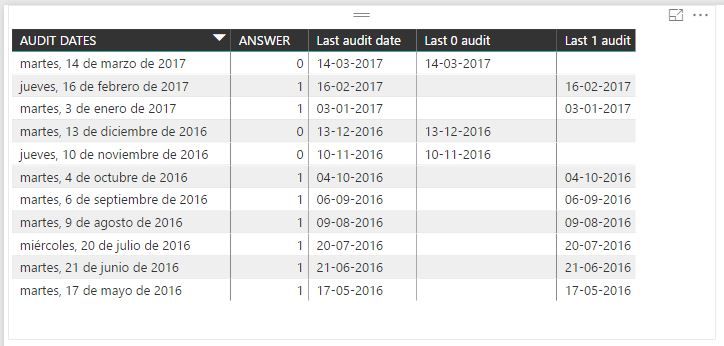
However I still have an issue, the results of "audit 0" and "audit 1" are reported ONLY when it was 0 or 1 respectively:

In the following sample, the column "Last 0 Audit" should report 13-12-2016 for the 2nd and 3rd row (03-01-2017 and 16-02-2017):


Captura.JPG


Any idea?

thank you!!!

@M4R10


In this scenario, you apply the filter to limit the table context into "Answer = 0", the measure will not return result when the current context is "Answer =1". You may apply IF condition to combine the "last audit 0" and "last audit 1" into one measure.


To calculate the consecutive appearance, please refer to my expression in following thread:


http://community.powerbi.com/t5/Desktop/Count-last-actual-consecutive-sorted-rows/m-p/149683


Regards,

Helpful resources

Announcements
New to Fabric survey Carousel

New to Fabric Survey

If you have recently started exploring Fabric, we'd love to hear how it's going. Your feedback can help with product improvements.

Power BI DataViz World Championships carousel

Power BI DataViz World Championships - June 2026

A new Power BI DataViz World Championship is coming this June! Don't miss out on submitting your entry.

Join our Fabric User Panel

Join our Fabric User Panel

Share feedback directly with Fabric product managers, participate in targeted research studies and influence the Fabric roadmap.

March Power BI Update Carousel

Power BI Community Update - March 2026

Check out the March 2026 Power BI update to learn about new features.