- Power BI forums
- Updates
- News & Announcements
- Get Help with Power BI
- Desktop
- Service
- Report Server
- Power Query
- Mobile Apps
- Developer
- DAX Commands and Tips
- Custom Visuals Development Discussion
- Health and Life Sciences
- Power BI Spanish forums
- Translated Spanish Desktop
- Power Platform Integration - Better Together!
- Power Platform Integrations (Read-only)
- Power Platform and Dynamics 365 Integrations (Read-only)
- Training and Consulting
- Instructor Led Training
- Dashboard in a Day for Women, by Women
- Galleries
- Community Connections & How-To Videos
- COVID-19 Data Stories Gallery
- Themes Gallery
- Data Stories Gallery
- R Script Showcase
- Webinars and Video Gallery
- Quick Measures Gallery
- 2021 MSBizAppsSummit Gallery
- 2020 MSBizAppsSummit Gallery
- 2019 MSBizAppsSummit Gallery
- Events
- Ideas
- Custom Visuals Ideas
- Issues
- Issues
- Events
- Upcoming Events
- Community Blog
- Power BI Community Blog
- Custom Visuals Community Blog
- Community Support
- Community Accounts & Registration
- Using the Community
- Community Feedback
Earn a 50% discount on the DP-600 certification exam by completing the Fabric 30 Days to Learn It challenge.
- Power BI forums
- Forums
- Get Help with Power BI
- Desktop
- Calculate % increase from last Period (Month)
- Subscribe to RSS Feed
- Mark Topic as New
- Mark Topic as Read
- Float this Topic for Current User
- Bookmark
- Subscribe
- Printer Friendly Page


- Mark as New
- Bookmark
- Subscribe
- Mute
- Subscribe to RSS Feed
- Permalink
- Report Inappropriate Content
Calculate % increase from last Period (Month)
Hi,
I would like to calculate the % increase of a measure from one month to another :
Actual LCR = CALCULATE(AVERAGE('Resource Actual'[Quantity]),'Resource Actual'[Category]="Cost Rate")
| Month 1 | Month 2 | Variance: Month 2 - Month 1 | % Variance: Variance / Month 1 |
| 10.00 | 12.00 | 2 | 20.00% |
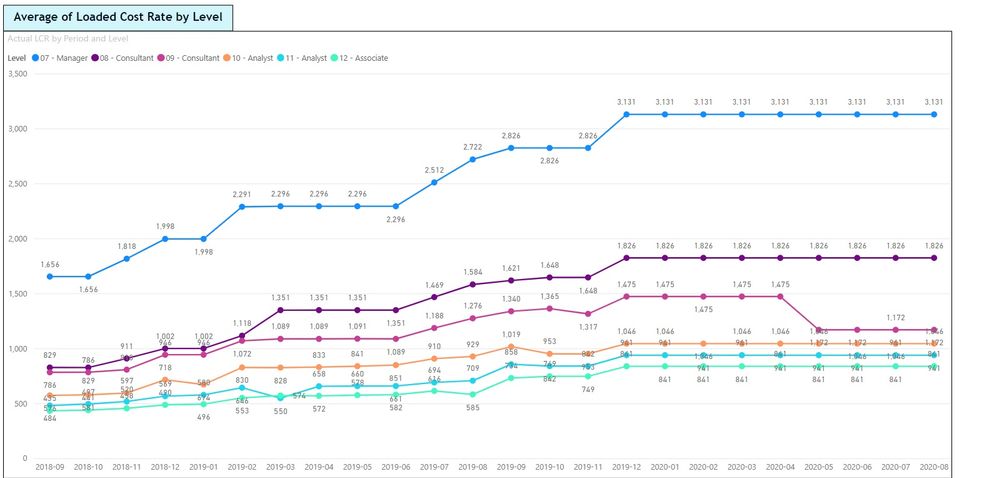
Solved! Go to Solution.

- Mark as New
- Bookmark
- Subscribe
- Mute
- Subscribe to RSS Feed
- Permalink
- Report Inappropriate Content
Wow, no kidding that your data model is complex. However, having a dim_date table is cruicial for any data model, because the dim_date table should be the main source to slice and calculate around your fact table, in this case, it is your period table.
Also, creating a dim_date table won't add complexity to your data model at all, because it will always be a one(dim_date) to many (other fact tables) relationship, and there is no ambiguity.
After you have the dim_date table, just write:
calculate(actual, previsoumonth(dim_date))
that should work.
Hope this helps


- Mark as New
- Bookmark
- Subscribe
- Mute
- Subscribe to RSS Feed
- Permalink
- Report Inappropriate Content
Those're actually two separate measures.
Measure 1: Last Months Actual LCR
Actual LCR LM =
VAR last_date = LASTDATE(ALL('Resource Actual'[Date Column]))
VAR current_date = LASTNONBLANK(DateDimension[Date],[Actual LCR])
VAR ly_date = NEXTDAY(PREVIOUSMONTH(current_date))
VAR date_context =
    DATESBETWEEN(
        DateDimension[Date]
        ,NEXTDAY(PREVIOUSMONTH(current_date))
        ,LASTDATE(current_date)
    )
VAR result = CALCULATE([Actual LCR],DATEADD(date_context,-1,MONTH))
RETURN
result
Measure 2: Variance
Variance = DIVIDE(
   [Actual LCR] - [Actual LCR LM]
   ,[Actual LCR LM]
) * SIGN([Actual LCR LM])
- Mark as New
- Bookmark
- Subscribe
- Mute
- Subscribe to RSS Feed
- Permalink
- Report Inappropriate Content
You've got the variance caluclation correct, you just need to actually calculate the previous month.
Actual LCR = CALCULATE(
   AVERAGE('Resource Actual'[Quantity])
   ,'Resource Actual'[Category] = "Cost Rate"
)

Actual LCR LM =
VAR last_date = LASTDATE(ALL('Resource Actual'[Date Column]))
VAR current_date = LASTNONBLANK(DateDimension[Date],[Actual LCR])
VAR ly_date = NEXTDAY(PREVIOUSMONTH(current_date))
VAR date_context =
    DATESBETWEEN(
        DateDimension[Date]
        ,NEXTDAY(PREVIOUSMONTH(current_date))
        ,LASTDATE(current_date)
    )
VAR result = CALCULATE([Actual LCR],DATEADD(date_context,-1,MONTH))
RETURN
result

Variance = DIVIDE(
   [Actual LCR] - [Actual LCR LM]
   ,[Actual LCR LM]
) * SIGN([Actual LCR LM])
This should get you what you want if not let me know.
- Mark as New
- Bookmark
- Subscribe
- Mute
- Subscribe to RSS Feed
- Permalink
- Report Inappropriate Content
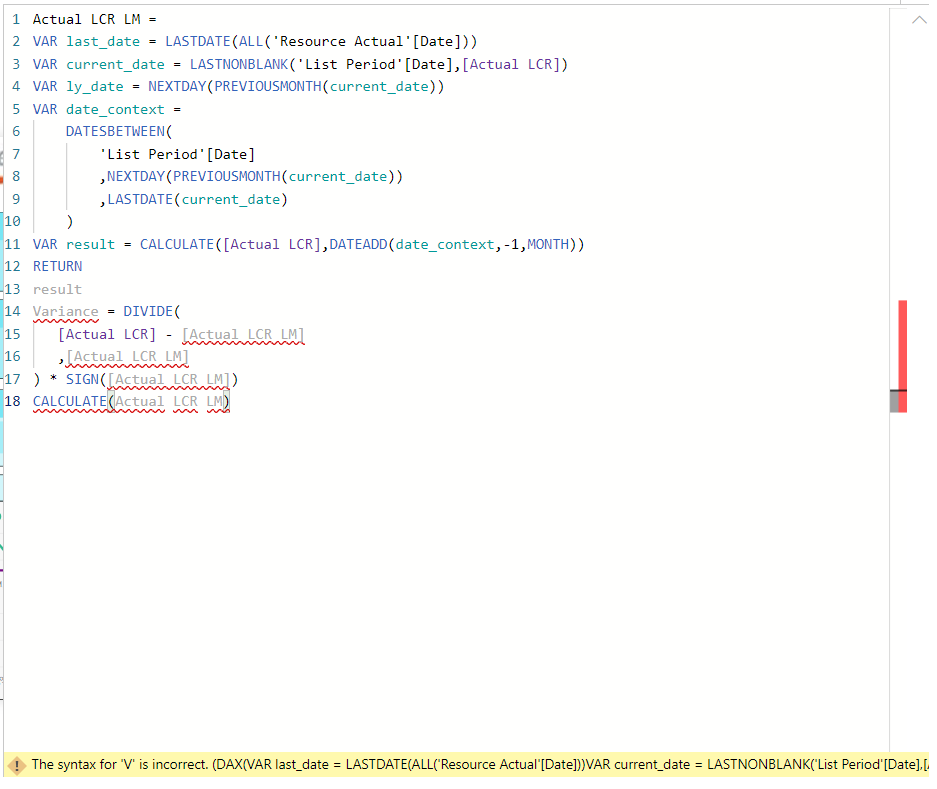
- Mark as New
- Bookmark
- Subscribe
- Mute
- Subscribe to RSS Feed
- Permalink
- Report Inappropriate Content
Those're actually two separate measures.
Measure 1: Last Months Actual LCR
Actual LCR LM =
VAR last_date = LASTDATE(ALL('Resource Actual'[Date Column]))
VAR current_date = LASTNONBLANK(DateDimension[Date],[Actual LCR])
VAR ly_date = NEXTDAY(PREVIOUSMONTH(current_date))
VAR date_context =
    DATESBETWEEN(
        DateDimension[Date]
        ,NEXTDAY(PREVIOUSMONTH(current_date))
        ,LASTDATE(current_date)
    )
VAR result = CALCULATE([Actual LCR],DATEADD(date_context,-1,MONTH))
RETURN
result
Measure 2: Variance
Variance = DIVIDE(
   [Actual LCR] - [Actual LCR LM]
   ,[Actual LCR LM]
) * SIGN([Actual LCR LM])
- Mark as New
- Bookmark
- Subscribe
- Mute
- Subscribe to RSS Feed
- Permalink
- Report Inappropriate Content
Try this:
var refMonth = PREVIOUSMONTH(Dim_date[Date])

return
CALCULATE(AVERAGE('Resource Actual'[Quantity]),
                           'Resource Actual'[Category]="Cost Rate",
                            refMonth)
- Mark as New
- Bookmark
- Subscribe
- Mute
- Subscribe to RSS Feed
- Permalink
- Report Inappropriate Content
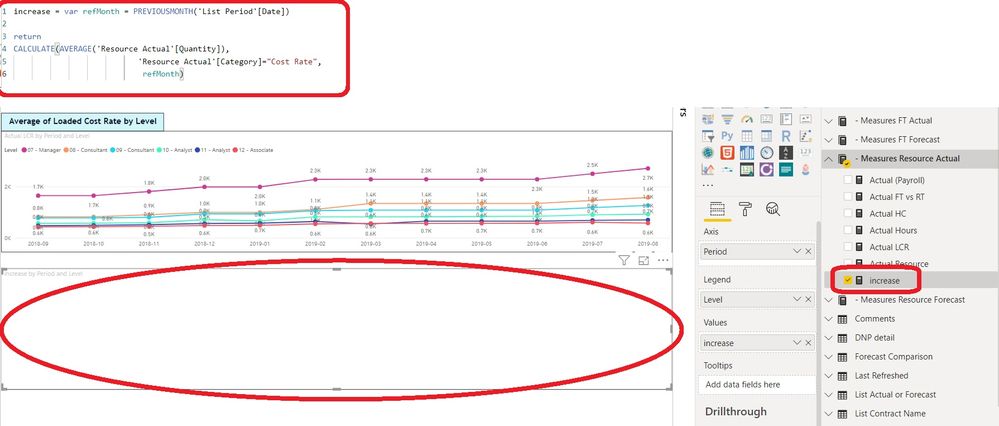
- Mark as New
- Bookmark
- Subscribe
- Mute
- Subscribe to RSS Feed
- Permalink
- Report Inappropriate Content
Let me know if the measure works after creating the dim_date table. if it does, can you please flag my reply as solution.
Thanks!
- Mark as New
- Bookmark
- Subscribe
- Mute
- Subscribe to RSS Feed
- Permalink
- Report Inappropriate Content
in order to have the time intelligence function to work you need to create a dim_date table, and join the date to your date in the List period table.
I use this code to create dim_date table. you can click on new table and copy the code in:
Dim_date =
var maxYear = YEAR(TODAY())+2
return
ADDCOLUMNS(FILTER(CALENDARAUTO(), YEAR([Date]) <= maxYear),
                                            "Calendar Year", YEAR([Date]),
                                            "Calendar Year Label", "CY "&YEAR([Date]),
                                            "Year-Month", FORMAT([Date], "yyyy-mm"),
                                            "Month-Day", FORMAT([Date], "mm-dd"),
                                            "Month Name", FORMAT([Date], "mmmm"),
                                            "Month Number", MONTH([Date]),
                                            "Weekday", FORMAT([Date],"dddd"),
                                            "Weeday Number", WEEKDAY([Date]),
                                            "Day", DAY([Date]),
                                            "Quarter" , "Q"&TRUNC((MONTH([Date]) - 1)/3 + 1)
                                            )
after you create the dim_table, change the list period[date] to dim_date[date], and it should work.
- Mark as New
- Bookmark
- Subscribe
- Mute
- Subscribe to RSS Feed
- Permalink
- Report Inappropriate Content
Hi @reuben521 ,
I can't create another table as the model has many relationships with the actual Period table. I would like to find another way. I only need to create a Measure that could calculate the following :
Actual LCR / LCR from previous month
As I already have the measure "Actual LCR" I need create another measure with this but adding or filtering by previous month so I can divide both.
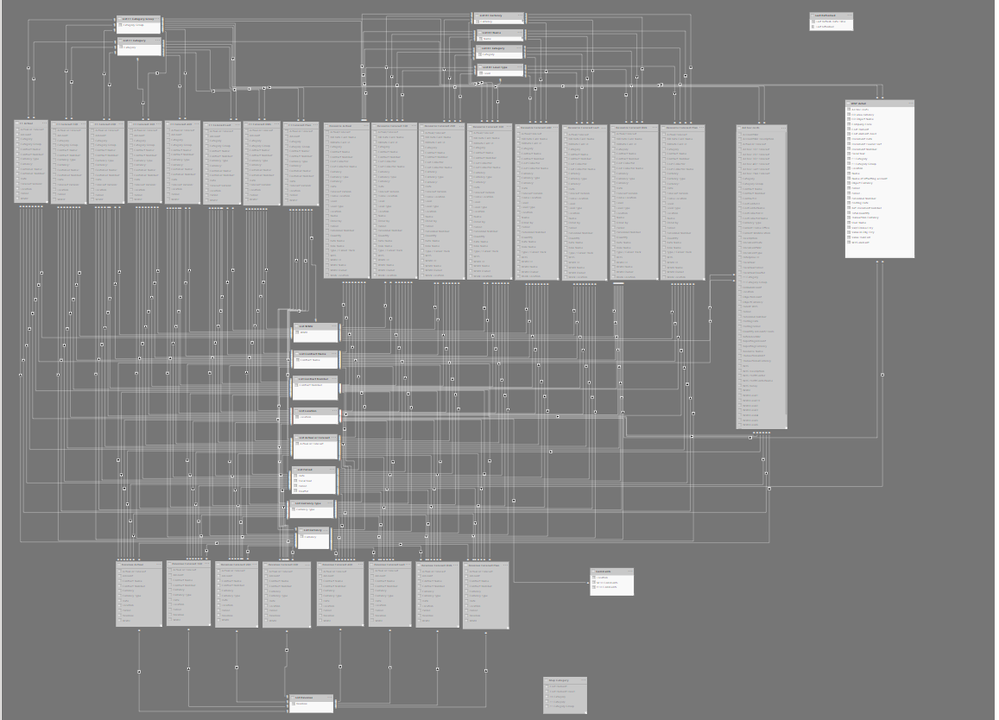
Thanks,
- Mark as New
- Bookmark
- Subscribe
- Mute
- Subscribe to RSS Feed
- Permalink
- Report Inappropriate Content
Wow, no kidding that your data model is complex. However, having a dim_date table is cruicial for any data model, because the dim_date table should be the main source to slice and calculate around your fact table, in this case, it is your period table.
Also, creating a dim_date table won't add complexity to your data model at all, because it will always be a one(dim_date) to many (other fact tables) relationship, and there is no ambiguity.
After you have the dim_date table, just write:
calculate(actual, previsoumonth(dim_date))
that should work.
Hope this helps

Helpful resources

Power BI Monthly Update - April 2024
Check out the April 2024 Power BI update to learn about new features.

| User | Count |
|---|---|
| 103 | |
| 92 | |
| 78 | |
| 73 | |
| 66 |


| User | Count |
|---|---|
| 110 | |
| 96 | |
| 88 | |
| 75 | |
| 71 |


