Fabric Data Days starts November 4th!
Advance your Data & AI career with 50 days of live learning, dataviz contests, hands-on challenges, study groups & certifications and more!
Get registered- Power BI forums
- Get Help with Power BI
- Desktop
- Service
- Report Server
- Power Query
- Mobile Apps
- Developer
- DAX Commands and Tips
- Custom Visuals Development Discussion
- Health and Life Sciences
- Power BI Spanish forums
- Translated Spanish Desktop
- Training and Consulting
- Instructor Led Training
- Dashboard in a Day for Women, by Women
- Galleries
- Data Stories Gallery
- Themes Gallery
- Contests Gallery
- QuickViz Gallery
- Quick Measures Gallery
- Visual Calculations Gallery
- Notebook Gallery
- Translytical Task Flow Gallery
- TMDL Gallery
- R Script Showcase
- Webinars and Video Gallery
- Ideas
- Custom Visuals Ideas (read-only)
- Issues
- Issues
- Events
- Upcoming Events
Get Fabric Certified for FREE during Fabric Data Days. Don't miss your chance! Request now
- Power BI forums
- Forums
- Get Help with Power BI
- Desktop
- Re: Calculate duration based on dates in different...
- Subscribe to RSS Feed
- Mark Topic as New
- Mark Topic as Read
- Float this Topic for Current User
- Bookmark
- Subscribe
- Printer Friendly Page


- Mark as New
- Bookmark
- Subscribe
- Mute
- Subscribe to RSS Feed
- Permalink
- Report Inappropriate Content
Calculate duration based on dates in different rows.
All,
I am attempting to see if Power BI is a good fit. And trying to get started on reporting. I have data from salesforce I reported in the query. I am looking for an easy way to show the duration between dates and report the value associated with it. In excel it is pretty starightforward, but looking for a more automated way in BI. Since Ihave to update the file and subtract from the current date for the first row. Any help will be greatly appreaciated. In excel I added the duration and just copied the Status column
| Edit Date | Old Value | New Value | Serial | duration | Status |
| 10/19/15 8:06 AM | Down for Maintenance | Fully Operational | 1 | 300.66 | Fully Operational |
| 10/14/15 9:11 AM | Fully Operational | Down for Maintenance | 1 | 4.954861111 | Down for Maintenance |
| 7/21/15 8:06 AM | Non-Operational | Fully Operational | 1 | 85.04513889 | Fully Operational |
| 7/15/15 12:35 PM | Fully Operational | Non-Operational | 1 | 5.813194444 | Non-Operational |
| 7/7/15 2:10 PM | Non-Operational | Fully Operational | 1 | 7.934027778 | Fully Operational |
| 7/6/15 5:09 PM | Fully Operational | Non-Operational | 1 | 0.875694444 | Non-Operational |
| 5/20/15 7:13 AM | Non-Operational | Fully Operational | 1 | 47.41388889 | Fully Operational |
| 5/18/15 8:42 AM | Fully Operational | Non-Operational | 1 | 1.938194444 | Non-Operational |
| 4/15/15 6:40 AM | Customer Situation | Fully Operational | 1 | 33.08472222 | Fully Operational |
| 4/14/15 4:36 PM | Non-Operational | Customer Situation | 1 | 0.586111111 | Customer Situation |
| 4/14/15 6:12 AM | Fully Operational | Non-Operational | 1 | 0.433333333 | Non-Operational |
| 3/26/15 7:36 PM | Non-Operational | Fully Operational | 1 | 18.44166667 | Fully Operational |
| 3/25/15 1:37 PM | Fully Operational | Non-Operational | 1 | 1.249305556 | Non-Operational |
| 7/20/16 8:42 PM | Reduced Throughput | Fully Operational | 2 | 25.14 | Fully Operational |
| 7/15/16 12:11 PM | Non-Operational | Reduced Throughput | 2 | 5.354861111 | Reduced Throughput |
| 7/15/16 7:54 AM | Fully Operational | Non-Operational | 2 | 0.178472222 | Non-Operational |
| 6/18/16 4:31 AM | Non-Operational | Fully Operational | 2 | 27.14097222 | Fully Operational |
| 6/17/16 5:42 AM | Fully Operational | Non-Operational | 2 | 0.950694444 | Non-Operational |
| 6/14/16 2:07 PM | Non-Operational | Fully Operational | 2 | 2.649305556 | Fully Operational |
| 6/10/16 7:27 AM | Fully Operational | Non-Operational | 2 | 4.277777778 | Non-Operational |
| 6/8/16 4:01 PM | Non-Operational | Fully Operational | 2 | 1.643055556 | Fully Operational |
| 6/7/16 1:05 PM | Fully Operational | Non-Operational | 2 | 1.122222222 | Non-Operational |
| 5/31/16 11:58 AM | Non-Operational | Fully Operational | 2 | 7.046527778 | Fully Operational |
| 5/25/16 6:57 AM | Fully Operational | Non-Operational | 2 | 6.209027778 | Non-Operational |
| 2/26/16 5:51 AM | Reduced Throughput | Fully Operational | 2 | 89.04583333 | Fully Operational |
| 2/25/16 5:50 AM | Non-Operational | Reduced Throughput | 2 | 1.000694444 | Reduced Throughput |
Solved! Go to Solution.
- Mark as New
- Bookmark
- Subscribe
- Mute
- Subscribe to RSS Feed
- Permalink
- Report Inappropriate Content
Hi @leroy773,
Based on your description, you want to compare your current row with previous row, right? If that is the case, firstly, go to query editor of Power BI Desktop and add an index column in your current table.
Secondly, add a new column and write DAX formula to compare date values of the rows.
Duration = DATEDIFF(Table5[Column1],IF(Table5[Index]=0,Table5[Column1],LOOKUPVALUE(Table5[Column1],Table5[Index],Table5[Index]-1)),HOUR)/24
For more details, you can review the example in the attached PBIX file.
Thanks,
Lydia Zhang


- Mark as New
- Bookmark
- Subscribe
- Mute
- Subscribe to RSS Feed
- Permalink
- Report Inappropriate Content
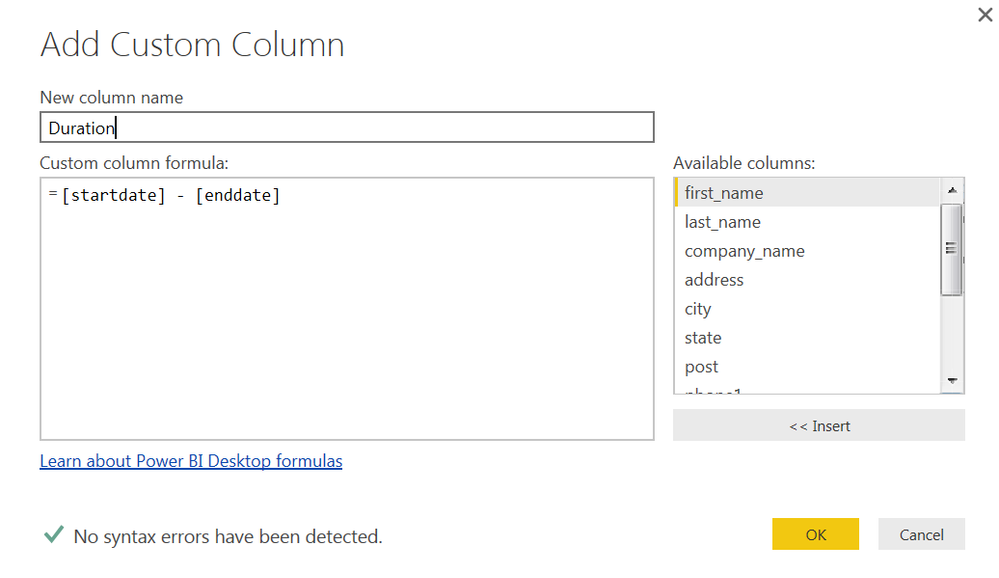
@leroy773 in power bi desktop easiest way to do is go to query editor, under Add Column tab -> Add Custom Coumn which will give you dialog box to enter power query. you can simply drag and drop your start and end date columns and subtract them. this will create a step in power bi desktop which will be applied each time you refresh the query. If your column type of start and end date is date/time then resulting column will also be date time.


- Mark as New
- Bookmark
- Subscribe
- Mute
- Subscribe to RSS Feed
- Permalink
- Report Inappropriate Content
Thanks Ankit...forgot that Power BI is not similar to Excel in Formula ease.
- Mark as New
- Bookmark
- Subscribe
- Mute
- Subscribe to RSS Feed
- Permalink
- Report Inappropriate Content
- Mark as New
- Bookmark
- Subscribe
- Mute
- Subscribe to RSS Feed
- Permalink
- Report Inappropriate Content
Hi @leroy773,
Based on your description, you want to compare your current row with previous row, right? If that is the case, firstly, go to query editor of Power BI Desktop and add an index column in your current table.
Secondly, add a new column and write DAX formula to compare date values of the rows.
Duration = DATEDIFF(Table5[Column1],IF(Table5[Index]=0,Table5[Column1],LOOKUPVALUE(Table5[Column1],Table5[Index],Table5[Index]-1)),HOUR)/24
For more details, you can review the example in the attached PBIX file.
Thanks,
Lydia Zhang


- Mark as New
- Bookmark
- Subscribe
- Mute
- Subscribe to RSS Feed
- Permalink
- Report Inappropriate Content
I would like to ask a question about the advice to add an index.
Is there an ordinal property of that; by which I mean - is the newly invented index definitely going to go from low (first row seen at top) to high (last row seen at bottom) ?
I ask because in the post - the date field is in reverse chronological order. So that the next date is Index +1 versus Index -1.
Also I ask because from the database perspective the definition of an index is that the value is guaranteed to be unique - but not necessarily sequential. Particularly if records get deleted - in a database that key/index value is never re-used. So that to tie one row to another row logically one doesn't use the index (key) value but rather a relevant value in one of the fields.
So in Power BI - if one of the records is deleted - does the index above it reset so that the +1 or -1 is always valid?
- Mark as New
- Bookmark
- Subscribe
- Mute
- Subscribe to RSS Feed
- Permalink
- Report Inappropriate Content
Will try my best to answer, for this report. I pull data from salesforce where the records will not be deleted. I am looking at history of status. The report in the query is sorted by serial number than by edit date. Each row has a single date field. Below is the latest iteration of the formula. I have updated the formula to calculate the difference between the dates in each row, based on the fact if the serial number in the next row matches the serial number in the current row.
Duration = if(LOOKUPVALUE('Instrument Status History'[Installed Product: Installed Product ID],'Instrument Status History'[Index],'Instrument Status History'[Index]+1)='Instrument Status History'[Installed Product: Installed Product ID],DATEDIFF(LOOKUPVALUE('Instrument Status History'[Edit Date],'Instrument Status History'[Index],'Instrument Status History'[Index]+1),'Instrument Status History'[Edit Date],DAY))
I am not trying to figure out a way to calculate today's date from the first row associated with serial number. Such that if the the last edit date was May 22nd, I would like to calculate today-may22nd and have it report. Working on that currently.
Then will need to work on a way of calculating percentage for each status for said time period to show in the graphical interface.
- Mark as New
- Bookmark
- Subscribe
- Mute
- Subscribe to RSS Feed
- Permalink
- Report Inappropriate Content
Is there a way in power BI to offset the calucation to the previous row. Currently duration shows up in the row, but would like to offset the calculation to show the duration in the previous row. Currently 69 is in the first row, but would like that to show up in the second and row.
| SN | Edit Date | Old | New | Index | Duration | |
1 | 8/16/2016 13:14 | Operational Status | Fully Operational | Non-Operational | 0 | 69 |
| 1 | 6/8/2016 7:24 | Operational Status | Reduced Throughput | Fully Operational | 1 | 8 |
| 1 | 5/31/2016 12:54 | Operational Status | Fully Operational | Reduced Throughput | 2 | 8 |
| 1 | 5/23/2016 9:35 | Operational Status | Reduced Throughput | Fully Operational | 3 | 7 |
| 1 | 5/16/2016 16:02 | Operational Status | Fully Operational | Reduced Throughput | 4 | 53 |
| 1 | 3/24/2016 9:14 | Operational Status | Non-Operational | Fully Operational | 5 | 0 |
- Mark as New
- Bookmark
- Subscribe
- Mute
- Subscribe to RSS Feed
- Permalink
- Report Inappropriate Content
I don't follow what you mean by 'calculate' ..... but Lydia gave method in post on how to join another row's value using LookupValue and (Index-1)
not sure if the right solution is -1 or +1 but in any case it is the concept to use
- Mark as New
- Bookmark
- Subscribe
- Mute
- Subscribe to RSS Feed
- Permalink
- Report Inappropriate Content
Thanks got everything working now, just need to fine tune the query
- Mark as New
- Bookmark
- Subscribe
- Mute
- Subscribe to RSS Feed
- Permalink
- Report Inappropriate Content
Thanks for the recommendation currently working with your proposal. Unfortunately datediff is not recognized. Checking the format of my dates, but continues to state un recognized.
- Mark as New
- Bookmark
- Subscribe
- Mute
- Subscribe to RSS Feed
- Permalink
- Report Inappropriate Content
Found my mistake for the datediff, was using it in power query instead of the BI. The datediff function is recognized but now fails for the start date cannot be greater than the end date. Still investigating.

Helpful resources

Fabric Data Days
Advance your Data & AI career with 50 days of live learning, contests, hands-on challenges, study groups & certifications and more!

Power BI Monthly Update - October 2025
Check out the October 2025 Power BI update to learn about new features.

FabCon Atlanta 2026
Join us at FabCon Atlanta, March 16-20, for the ultimate Fabric, Power BI, AI and SQL community-led event. Save $200 with code FABCOMM.


