Huge last-minute discounts for FabCon Vienna from September 15-18, 2025
Supplies are limited. Contact info@espc.tech right away to save your spot before the conference sells out.
Get your discount- Power BI forums
- Get Help with Power BI
- Desktop
- Service
- Report Server
- Power Query
- Mobile Apps
- Developer
- DAX Commands and Tips
- Custom Visuals Development Discussion
- Health and Life Sciences
- Power BI Spanish forums
- Translated Spanish Desktop
- Training and Consulting
- Instructor Led Training
- Dashboard in a Day for Women, by Women
- Galleries
- Data Stories Gallery
- Themes Gallery
- Contests Gallery
- Quick Measures Gallery
- Notebook Gallery
- Translytical Task Flow Gallery
- TMDL Gallery
- R Script Showcase
- Webinars and Video Gallery
- Ideas
- Custom Visuals Ideas (read-only)
- Issues
- Issues
- Events
- Upcoming Events
Score big with last-minute savings on the final tickets to FabCon Vienna. Secure your discount
- Power BI forums
- Forums
- Get Help with Power BI
- Desktop
- Re: Calculate distinct value only if additional co...
- Subscribe to RSS Feed
- Mark Topic as New
- Mark Topic as Read
- Float this Topic for Current User
- Bookmark
- Subscribe
- Printer Friendly Page


- Mark as New
- Bookmark
- Subscribe
- Mute
- Subscribe to RSS Feed
- Permalink
- Report Inappropriate Content
Calculate distinct value only if additional condition is true DAX formula
Hi,
I'm trying to count the number of resources that are assigned to a Project.
A simple distinct count wouldn't work because there are instances where a resource is assigned in the same period but on a different Project.
Say I have:
Resource ProjectNr Desired Result
Tool1 01 1
Tool1 01 0
Tool2 02 1
Tool3 03 1
Tool1 04 1
The desired result would be 4.
This needs to be a DAX formula and it needs to be a column that I can reference in a table.
The way I'd solve this in excel would be to create an "ID" out of the combination of Resource+ProjectNr Column and then only count the first occurrence:
A B =COUNTIF($A$1:$A1,$A1)=1)+0
Tool101 1
Tool101 0
Tool202 1
Tool303 1
Tool104 1
Solved! Go to Solution.


- Mark as New
- Bookmark
- Subscribe
- Mute
- Subscribe to RSS Feed
- Permalink
- Report Inappropriate Content
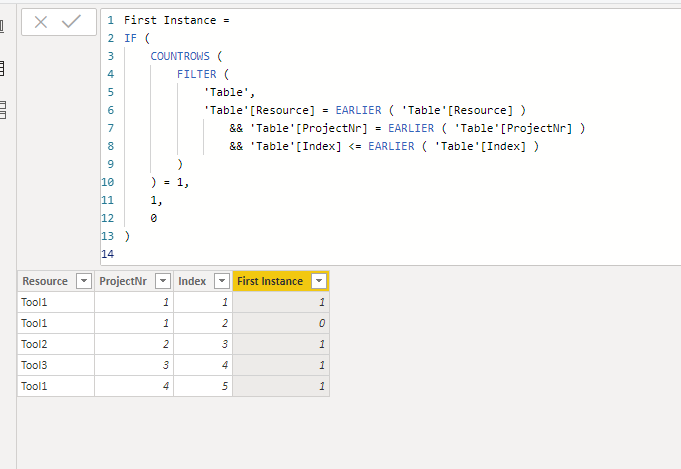
Hi @WorkHard ,
Try this:
1. Add an Index column in Power Query Editor.
2. Create a column.
First Instance =
IF (
    COUNTROWS (
        FILTER (
            'Table',
            'Table'[Resource] = EARLIER ( 'Table'[Resource] )
                && 'Table'[ProjectNr] = EARLIER ( 'Table'[ProjectNr] )
                && 'Table'[Index] <= EARLIER ( 'Table'[Index] )
        )
    ) = 1,
    1,
    0
)
Best Regards,
Icey
If this post helps, then please consider Accept it as the solution to help the other members find it more quickly.
- Mark as New
- Bookmark
- Subscribe
- Mute
- Subscribe to RSS Feed
- Permalink
- Report Inappropriate Content
Hi @WorkHard ,
Try this:
1. Add an Index column in Power Query Editor.
2. Create a column.
First Instance =
IF (
    COUNTROWS (
        FILTER (
            'Table',
            'Table'[Resource] = EARLIER ( 'Table'[Resource] )
                && 'Table'[ProjectNr] = EARLIER ( 'Table'[ProjectNr] )
                && 'Table'[Index] <= EARLIER ( 'Table'[Index] )
        )
    ) = 1,
    1,
    0
)
Best Regards,
Icey
If this post helps, then please consider Accept it as the solution to help the other members find it more quickly.
- Mark as New
- Bookmark
- Subscribe
- Mute
- Subscribe to RSS Feed
- Permalink
- Report Inappropriate Content
Thanks Icey,
This would work except I'm stuck down a rabbit hole trying to create an index column. I can't just use query editor to add an index column because I'm in Live mode that doesn't have a query.
Unsure how many more helper columns I need to create to get this to work. RANKX will rank the same number in my case which means I need to create another extra column as some sort of ID....
Update:
Thank you both for your help, I ended up using Icey's solution and created an index column using 2 additional columns:
First Column (RND) to create a random number for each row
Second Column (Index) to create an index number based on the random values
RND = RAND()


Index = RANKX('TableName',[RND],[RND],ASC,Dense)


- Mark as New
- Bookmark
- Subscribe
- Mute
- Subscribe to RSS Feed
- Permalink
- Report Inappropriate Content
Hi @WorkHard
Did you tried the measure I have post before?
Regards
Miguel Félix
Did I answer your question? Mark my post as a solution!
Proud to be a Super User!
Check out my blog: Power BI em Português- Mark as New
- Bookmark
- Subscribe
- Mute
- Subscribe to RSS Feed
- Permalink
- Report Inappropriate Content
Mfelix,
Yes but unfortunately a measure wouldn't work in my situation. I'm summarizing a table and I'm creating a UNION with another table (cache old data tabke) vs (live data table) and this numbering needs to be a column, not a measure.
- Mark as New
- Bookmark
- Subscribe
- Mute
- Subscribe to RSS Feed
- Permalink
- Report Inappropriate Content
If you can share more details or a mockup file I can try and help you achieve it.
Regards
Miguel Félix
Did I answer your question? Mark my post as a solution!
Proud to be a Super User!
Check out my blog: Power BI em Português- Mark as New
- Bookmark
- Subscribe
- Mute
- Subscribe to RSS Feed
- Permalink
- Report Inappropriate Content
Be aware that DAX measures are based on context so depending on the visualisation and columns or slicers filters you use you can get different results.
In this case you can do a measure (no need to have a column) similar to this
Count of tools = COUNTROWS( SUMMARIZETABLE(TABLE,Table[Project], "Tools", Distinct(Table[Tool]))
Made this measure by heart may need some adjustments. On cellphone not computer 😂
Regards
Miguel Félix
Did I answer your question? Mark my post as a solution!
Proud to be a Super User!
Check out my blog: Power BI em Português
Helpful resources

Power BI Monthly Update - August 2025
Check out the August 2025 Power BI update to learn about new features.

Fabric Community Update - August 2025
Find out what's new and trending in the Fabric community.


| User | Count |
|---|---|
| 84 | |
| 74 | |
| 48 | |
| 41 | |
| 40 |


