FabCon is coming to Atlanta
Join us at FabCon Atlanta from March 16 - 20, 2026, for the ultimate Fabric, Power BI, AI and SQL community-led event. Save $200 with code FABCOMM.
Register now!- Power BI forums
- Get Help with Power BI
- Desktop
- Service
- Report Server
- Power Query
- Mobile Apps
- Developer
- DAX Commands and Tips
- Custom Visuals Development Discussion
- Health and Life Sciences
- Power BI Spanish forums
- Translated Spanish Desktop
- Training and Consulting
- Instructor Led Training
- Dashboard in a Day for Women, by Women
- Galleries
- Data Stories Gallery
- Themes Gallery
- Contests Gallery
- QuickViz Gallery
- Quick Measures Gallery
- Visual Calculations Gallery
- Notebook Gallery
- Translytical Task Flow Gallery
- TMDL Gallery
- R Script Showcase
- Webinars and Video Gallery
- Ideas
- Custom Visuals Ideas (read-only)
- Issues
- Issues
- Events
- Upcoming Events
View all the Fabric Data Days sessions on demand. View schedule
- Power BI forums
- Forums
- Get Help with Power BI
- Desktop
- Re: Calculate an average for last 3 months
- Subscribe to RSS Feed
- Mark Topic as New
- Mark Topic as Read
- Float this Topic for Current User
- Bookmark
- Subscribe
- Printer Friendly Page


- Mark as New
- Bookmark
- Subscribe
- Mute
- Subscribe to RSS Feed
- Permalink
- Report Inappropriate Content
Calculate an average for last 3 months
Hello,
I want to calculate the following:
the average for the last 3 months and i want to project this data for the rest of the year.
For example: the data for the first 3 months is real data
jan feb mar apr may jun jul
10 20 30 20 20 20 20
I am using a date table
Could someone help me with this?
Solved! Go to Solution.


- Mark as New
- Bookmark
- Subscribe
- Mute
- Subscribe to RSS Feed
- Permalink
- Report Inappropriate Content
I am assuming you want to do this for Completed Months - so here it goes...
1) Create a COLUMN in your Calendar Table
Full Month =
IF (
    TODAY () >= EOMONTH ( 'Calendar'[Date], 0 ),
    "Full Month",
    "Incomplete Month"
)
2) And then this MEASURE
3 Completed Months Runnning Total Average =
DIVIDE (
    CALCULATE (
        [MEASURE], // or SUM ( Table[Column] ) //
        DATESINPERIOD (
            'Calendar'[Date],
            CALCULATE (
                LASTDATE ( 'Calendar'[Date] ),
                FILTER ( ALLSELECTED ( 'Calendar' ), 'Calendar'[Full Month] = "Full Month" )
            ),
            -3,
            MONTH
        )
    ),
    3,
    0
)
3) Finally create a MEASURE that will display the correct amount
3 Month Ave Projection Measure =
IF (
    MIN ( 'Calendar'[Full Month] ) = "Full Month",
    [MEASURE], // or SUM ( Table[Column] ) //
    [3 Completed Months Running Total Average]
)
You can now use this Final Measure in a Table Visual to display the real Total for completed Months
AND the current 3 Month Running Total Average for the future Months as projection.
Hope this helps! 
- Mark as New
- Bookmark
- Subscribe
- Mute
- Subscribe to RSS Feed
- Permalink
- Report Inappropriate Content
I am assuming you want to do this for Completed Months - so here it goes...
1) Create a COLUMN in your Calendar Table
Full Month =
IF (
    TODAY () >= EOMONTH ( 'Calendar'[Date], 0 ),
    "Full Month",
    "Incomplete Month"
)
2) And then this MEASURE
3 Completed Months Runnning Total Average =
DIVIDE (
    CALCULATE (
        [MEASURE], // or SUM ( Table[Column] ) //
        DATESINPERIOD (
            'Calendar'[Date],
            CALCULATE (
                LASTDATE ( 'Calendar'[Date] ),
                FILTER ( ALLSELECTED ( 'Calendar' ), 'Calendar'[Full Month] = "Full Month" )
            ),
            -3,
            MONTH
        )
    ),
    3,
    0
)
3) Finally create a MEASURE that will display the correct amount
3 Month Ave Projection Measure =
IF (
    MIN ( 'Calendar'[Full Month] ) = "Full Month",
    [MEASURE], // or SUM ( Table[Column] ) //
    [3 Completed Months Running Total Average]
)
You can now use this Final Measure in a Table Visual to display the real Total for completed Months
AND the current 3 Month Running Total Average for the future Months as projection.
Hope this helps!
- Mark as New
- Bookmark
- Subscribe
- Mute
- Subscribe to RSS Feed
- Permalink
- Report Inappropriate Content
Hi @Sean
Thanks for sharing this code. Was looking for this for a few days.
However I'm having an issue with the filter. I can't use the column FullMonth (Autocomplete only let me select the date field)
The error I get is (translated from Dutch) "a single value for the column 'FullMonth' in the table DimDate cannot be determinated. This can happen when the formula of the measurement... "
The FullMonth is a COLUMN in the Dimdate table, it's working the way it should.
My DAX for the MEASURE is:
CALCULATE (
    SUM('Ticket data'[hours_worked]);'Ticket data'[bms]="BMS";
    DATESINPERIOD (
        'Ticket data'[date_worked];
        CALCULATE(
            LASTDATE('DimDate'[Date]);
            FILTER( ALLSELECTED('DimDate'[Date]); 'DimDate'[FullMonth]="Full Month")
        );
        -3;
        MONTH
))
I hope you (or someone else) can help me wih this issue.
- Mark as New
- Bookmark
- Subscribe
- Mute
- Subscribe to RSS Feed
- Permalink
- Report Inappropriate Content
Figured it out. Had to use the DimDate table, not the column in the filter expression 😉 Thanks again! works like a charm!


- Mark as New
- Bookmark
- Subscribe
- Mute
- Subscribe to RSS Feed
- Permalink
- Report Inappropriate Content
Hi, I've made the measure to my dataset, but I get only blank 😞
Any idea where I go wrong?
# Completed Months Running Total Average =
DIVIDE (
    CALCULATE (
        SUM ( invoiceitem[# Stuks] );
        DATESINPERIOD (
            'date'[Date];
            CALCULATE (
                LASTDATE ('date'[Date] );
                FILTER ( ALLSELECTED ( 'date' ); 'date'[Volle maand] = "Volle Maand" )
            );
            -3;
            MONTH
        )
    );
    3,0
)
- Mark as New
- Bookmark
- Subscribe
- Mute
- Subscribe to RSS Feed
- Permalink
- Report Inappropriate Content
Solved: Had to take Orderdate, not date from date table
- Mark as New
- Bookmark
- Subscribe
- Mute
- Subscribe to RSS Feed
- Permalink
- Report Inappropriate Content
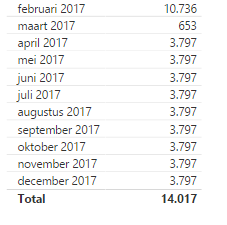
Thanks for your answer, it worked just fine. I have one more question:
How can i display a total that matches the data in the projection?
I want it to display a total for all the months showed in the table below.

- Mark as New
- Bookmark
- Subscribe
- Mute
- Subscribe to RSS Feed
- Permalink
- Report Inappropriate Content
You should be able to create a measure that calculates the average filtered to the first three months and then just use that in your projection. Something like
CALCULATE(AVERAGE([column1]),FILTER(table1,[month]<MONTH(TODAY())))
Follow on LinkedIn
@ me in replies or I'll lose your thread!!!
Instead of a Kudo, please vote for this idea
Become an expert!: Enterprise DNA
External Tools: MSHGQM
YouTube Channel!: Microsoft Hates Greg
Latest book!: DAX For Humans
DAX is easy, CALCULATE makes DAX hard...

Helpful resources

Power BI Monthly Update - November 2025
Check out the November 2025 Power BI update to learn about new features.

Fabric Data Days
Advance your Data & AI career with 50 days of live learning, contests, hands-on challenges, study groups & certifications and more!

FabCon Atlanta 2026
Join us at FabCon Atlanta, March 16-20, for the ultimate Fabric, Power BI, AI and SQL community-led event. Save $200 with code FABCOMM.


