I have a small question regarding YTD and MTD calculation with filters for weeks in Power BI:
I want to create a card which will show this years YTD vs last years YTD as a percentage, but for some reason, PBI only calculates YTD measure from the first date in the selected week. I have tried to bypass this problem with the following measures:
First Date in the Year = DATE(YEAR(MIN('Calendar'[Date]));1;1)
Latest Date = MAX('Calendar'[Date])
YTD Value = CALCULATE(SUM(Footfall[Total Entries]);FILTER('Calendar';'Calendar'[Date] >= [First Date in the Year] && 'Calendar'[Date] <= [Latest Date]))
For some reason, measure disregards the first part when calculating the YTD, so I am not sure how to fix this. Is there any way to bypass the filter, so my YTD measure would calculate measure from the first date in the year and up to the latest selected date in the filter?
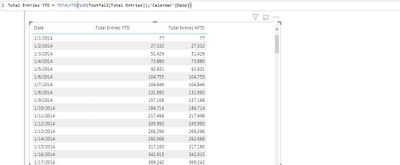
Thank you for your reply! I have this formula set up already, but it is not working properly. As you can see, first picture represents the table without any slicers:
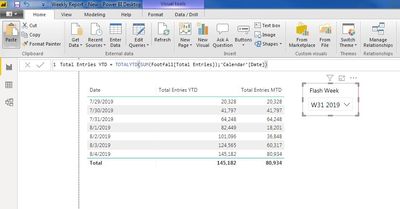
And this picture represents the same table with slicer for week: (as you can see, PBI recalculates YTD measure from the first date in the selected week, not from the January 1st)