Forum Discussion

Calculate Totals per Keyword
Hi everyone,
Please, can someone help me with the next challenge in Power BI?
I’ve got the next table:
and I want to calculate the amount per keyword:
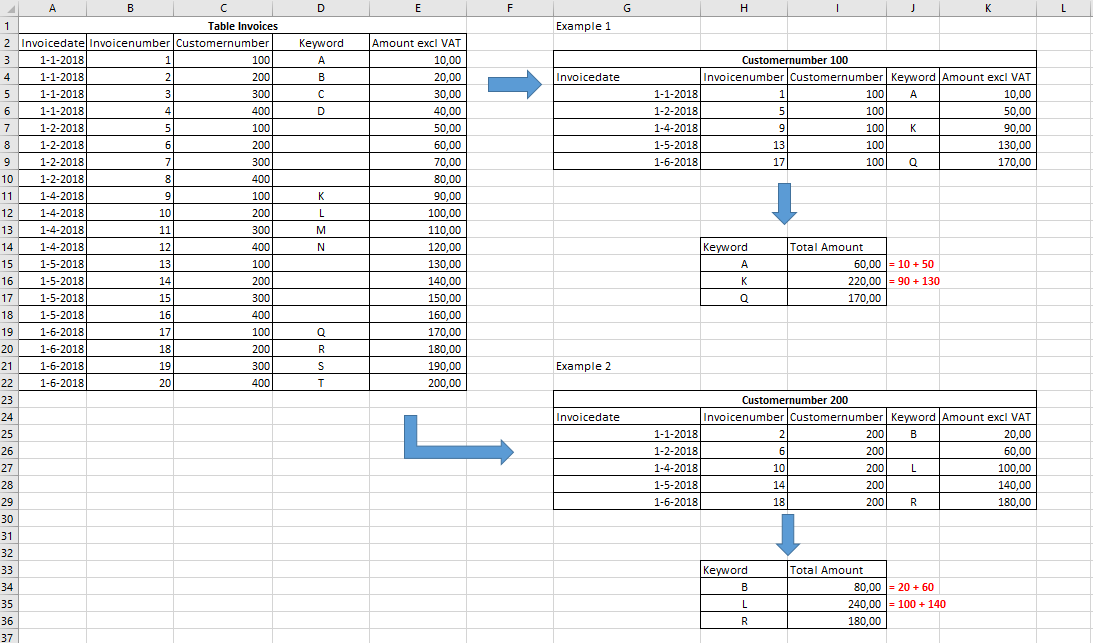
The challenge is to calculate all the amounts after a certain date to the following date with the next keyword.
Hopefully you understand what I mean by looking at the 2 examples.
When calculating in Power BI I’ve got the next report and this is not what I want :
Thanks in advance,
180608 Test Enterprise DNA - Amount per Keyword.xlsx 1 (12.2 KB)
Anonymous
Try this calculated column
Column = IF ( ISBLANK ( 'Table Invoices'[Keyword] ), CONCATENATEX ( TOPN ( 1, FILTER ( 'Table Invoices', 'Table Invoices'[Customernumber] = EARLIER ( 'Table Invoices'[Customernumber] ) && NOT ( ISBLANK ( 'Table Invoices'[Keyword] ) ) && 'Table Invoices'[Invoicedate] < EARLIER ( 'Table Invoices'[Invoicedate] ) ), [Invoicedate], DESC ), 'Table Invoices'[Keyword], ", " ), 'Table Invoices'[Keyword] )Anonymous
Sorry for late reply.
It works like this
1) The Filter part filters the table and grabs only rows with a) same customer number b) non blank key words c) where date is before the current row date
FILTER (
                'Table Invoices',
                'Table Invoices'[Customernumber] = EARLIER ( 'Table Invoices'[Customernumber] )
                    && NOT ( ISBLANK ( 'Table Invoices'[Keyword] ) )
                    && 'Table Invoices'[Invoicedate] < EARLIER ( 'Table Invoices'[Invoicedate] )
            )
2) TOPN filters this (already filtered) table further and grabs the row with the maximum date
3) from above steps we have a single row of all the Columns in the Table...But we need only "Key Word" column. So I used an ITERATOR to grab it...We could also have used other ITERATORS like MINX or MAXX.....or other techniques like selectcolumns as well
- Anonymous8 years ago
Thank you very much, Zubair_Muhammad, it clear things up for me. Thumbs up, :-)

11 Replies
- Zubair_Muhammad
Community Champion
HI Anonymous
Try this MEASURE
Measure = VAR mydate = MAX ( 'Table Invoices'[Invoicedate] ) VAR nextnonblankdate = CALCULATE ( MIN ( 'Table Invoices'[Invoicedate] ), FILTER ( ALLEXCEPT ( 'Table Invoices', 'Table Invoices'[Customernumber] ), 'Table Invoices'[Invoicedate] > mydate && NOT ( ISBLANK ( 'Table Invoices'[Keyword] ) ) ) ) RETURN SWITCH ( TRUE (), ISBLANK ( SELECTEDVALUE ( 'Table Invoices'[Keyword] ) ), BLANK (), ISBLANK ( nextnonblankdate ), SUM ( 'Table Invoices'[Amount excl VAT] ), CALCULATE ( SUM ( 'Table Invoices'[Amount excl VAT] ), FILTER ( ALLEXCEPT ( 'Table Invoices', 'Table Invoices'[Customernumber] ), 'Table Invoices'[Invoicedate] >= mydate && 'Table Invoices'[Invoicedate] < nextnonblankdate ) ) )- Zubair_Muhammad
- AnonymousNot applicable
Thanks for your feedback!
Your formula gives the following result:
The correct answer should be:
Maybe there is also a solution in Power Query?
Can you give it another try?
Thanks in advance,