cancel
Showing results for 
Search instead for 
Did you mean: 

The Power BI Data Visualization World Championships is back! Get ahead of the game and start preparing now! Learn more

Reply
Pinky0404
Helper III
Helper III

Calculate Ticket SLA

Hi All,


I’ve been requested to calculate the  tickets SLA  by  adding all the open tickets and tickets closed in last 30 days. I have columns "Date closed" and  "Ticket Status(inprogress, open, closed).  what could be the DAX formula to achieve this?


Thank you in advance for your help!!


Regards,

Pinky.


7 REPLIES 7
v-piga-msft
Resident Rockstar
Resident Rockstar

Hi @Pinky0404,


I'm a little confused about the mean of SLA?


Could you provide me some data sample and your expected output, so that we can help further investigate on it?


Best Regards,

Cherry

Community Support Team _ Cherry Gao
If this post helps, then please consider Accept it as the solution to help the other members find it more quickly.

Hi,


Thanks for responding. Here is the sample data. 


A.JPG
Average SLA :  Average number of days for all Open tickets and tickets closed in last 30 days based on the date submitted and date closed column. 


Open Tickets are all tickets other than Closed ones.


Thanks,

Pinky.


@Pinky0404 Hello,


Quick question - How should the final result look like ? Also last 30 days from the (current) today's date ?


Hi ,


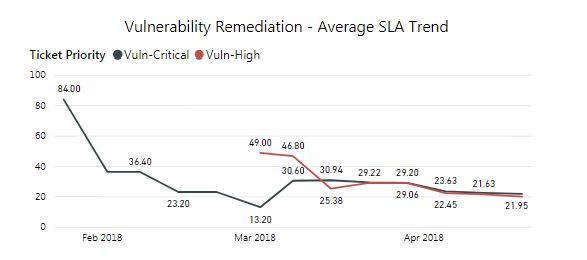
Thanks for your response. The output should be bascially a trend with date( i get this from the source file  export date) on X- axis and  the average  no. of days for  all open tickets plus  no. of days for 30 days closed tickets.

SLA Output.JPG


I used the below DAX formulas to get this trend which show  an average no. of days for all open and closed tickets.


SC = IFERROR(DATEDIFF(Footprint[Date Submitted],Footprint[Date Closed],DAY),Footprint[SO]) 

SO = Footprint[RD]- Footprint[Date Submitted]

RD = MAX(Footprint[Date])

SLA(closed) = IF(ISBLANK(Footprint[SC]),Footprint[SO],Footprint[SC])

Formula.JPG

Hope you are clear now!!


Thanks,

Pinky.


I feel like i got the soultion. But not sure if it is the right way to do.


Created the below DAx:


1)ALL Open = IF(Footprint[New status]<>"Closed",Footprint[SO])


2)Closed in LAst 30 days = IF((Footprint[Date Closed]> Footprint[RD]-30) && (Footprint[Date Closed]<=Footprint[RD]),"Closed 30 days","Null")


3)Days - Closed(30 days) = IF(Footprint[Closed in LAst 30 days] = "Closed 30 days",Footprint[SC])


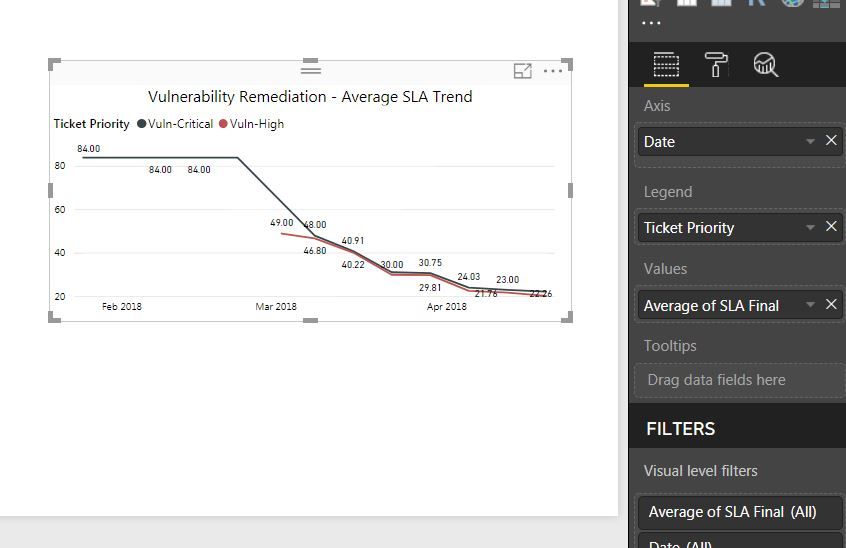
4)SLA Final = IF(ISBLANK(Footprint[ALL Open]),Footprint[Days - Closed(30 days)],Footprint[ALL Open])


Output:

SLA Output.JPG


Please let me know if i can achieve this in a more better way.


Thanks,

Pinky


Hi @Pinky0404,


Looks like you have created a lot of calculated columns. Found a bracket is missing in one of your measures


2)Closed in LAst 30 days = IF((Footprint[Date Closed]> (Footprint[RD]-30)) && (Footprint[Date Closed]<=Footprint[RD]),"Closed 30 days","Null")


Can you share your pbix file, I'll be able to write a measure that does the same

Please share me your email id.

Helpful resources

Announcements
November Power BI Update Carousel

Power BI Monthly Update - November 2025

Check out the November 2025 Power BI update to learn about new features.

Fabric Data Days Carousel

Fabric Data Days

Advance your Data & AI career with 50 days of live learning, contests, hands-on challenges, study groups & certifications and more!

FabCon Atlanta 2026 carousel

FabCon Atlanta 2026

Join us at FabCon Atlanta, March 16-20, for the ultimate Fabric, Power BI, AI and SQL community-led event. Save $200 with code FABCOMM.

Top Solution Authors
Top Kudoed Authors