Forum Discussion

 Helper V
Calculate Duration between Milestones
Hello Good Day
I have the below TABLE with 3 Columns --> Project, Activity & Date.
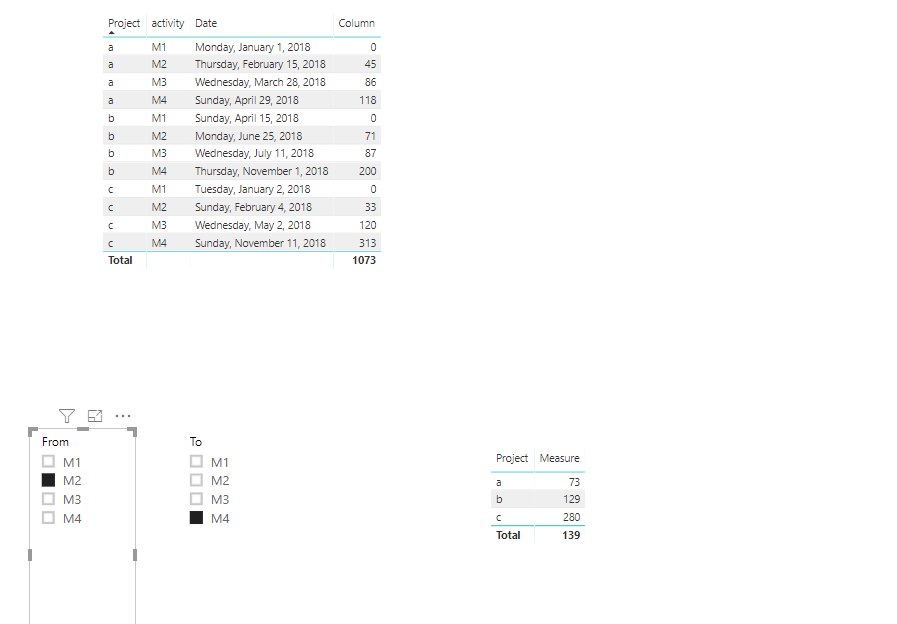
Query 1: Calculate the duration for each activity from Milestone 1 per Project. See RESULT Column
Query 2: I will need to work out a way for a user to select two different milestones from probably 2 x Drop Down Lists i.e. Select Milestone Option 1 & Milestone Option 2 - but it should calculate the duration between those milestones.
Cheers!!
Hi hackfifi ,
Here I create one sample for your reference.
Q1: To create a calculated column as below.
Column =
VAR M1date =
    CALCULATE (
        MAX ( 'Table1'[Date] ),
        FILTER ( ALLEXCEPT ( Table1, Table1[Project] ), Table1[activity] = "M1" )
    )
RETURN
    DATEDIFF ( M1date, 'Table1'[Date], DAY )
Q2:
1. Create two calculated table.
between1 = DISTINCT(Table1[activity])
between2 = DISTINCT(Table1[activity])
2. Create a meausre to get the reuslt we need.
Measure =
VAR startdate =
    CALCULATE (
        MAX ( 'Table1'[Date] ),
        FILTER (
            ALLEXCEPT ( Table1, Table1[Project] ),
            Table1[activity] = SELECTEDVALUE ( between1[From] )
        )
    )
VAR todate =
    CALCULATE (
        MAX ( 'Table1'[Date] ),
        FILTER (
            ALLEXCEPT ( Table1, Table1[Project] ),
            Table1[activity] = SELECTEDVALUE ( between2[To] )
        )
    )
RETURN
    DATEDIFF ( startdate, todate, DAY )
For more details, please check the pbix as attached.
Regards,
Frank
Hi hackfifi ,
To use a new measure to work on it.
Measure 2 =
VAR startdate =
    CALCULATE (
        MAX ( 'Table1'[Date] ),
        FILTER (
            ALL ( Table1 ),
            Table1[Project] = SELECTEDVALUE ( Projects[Project] )
                && Table1[activity] = SELECTEDVALUE ( between1[From] )
        )
    )
VAR todate =
    CALCULATE (
        MAX ( 'Table1'[Date] ),
        FILTER (
            ALL ( Table1 ),
            Table1[Project] = SELECTEDVALUE ( Projects[Project] )
                && Table1[activity] = SELECTEDVALUE ( between2[To] )
        )
    )
RETURN
    DATEDIFF ( startdate, todate, DAY )
Regards,
Frank
7 Replies
 v-frfei-msft
Community Support
Hi hackfifi ,
Here I create one sample for your reference.
Q1: To create a calculated column as below.
Column =
VAR M1date =
    CALCULATE (
        MAX ( 'Table1'[Date] ),
        FILTER ( ALLEXCEPT ( Table1, Table1[Project] ), Table1[activity] = "M1" )
    )
RETURN
    DATEDIFF ( M1date, 'Table1'[Date], DAY )
Q2:
1. Create two calculated table.
between1 = DISTINCT(Table1[activity])
between2 = DISTINCT(Table1[activity])
2. Create a meausre to get the reuslt we need.
Measure =
VAR startdate =
    CALCULATE (
        MAX ( 'Table1'[Date] ),
        FILTER (
            ALLEXCEPT ( Table1, Table1[Project] ),
            Table1[activity] = SELECTEDVALUE ( between1[From] )
        )
    )
VAR todate =
    CALCULATE (
        MAX ( 'Table1'[Date] ),
        FILTER (
            ALLEXCEPT ( Table1, Table1[Project] ),
            Table1[activity] = SELECTEDVALUE ( between2[To] )
        )
    )
RETURN
    DATEDIFF ( startdate, todate, DAY )
For more details, please check the pbix as attached.
Regards,
Frank
 hackfifi
Thanks Mate v-frfei-msft - Works like a charm!
- hackfifi
v-frfei-msft - another query.
so i actually have a MASTER "Project" table. In this case a table "Project" with a,b,c
but even if i create a relationship between Table "Project" & Table1, the filter do not seem to work. Any workaround for this?
i would attach the below PBIX file, but i am not exactly sure how to!- hackfifi
v-frfei-msft - Frank: Did you have a chance to look into this?