Forum Discussion

COUNT does not work properly
Good
When I use the COUNT function, the result that appears to me is:

However, if we go to the table, we find that:
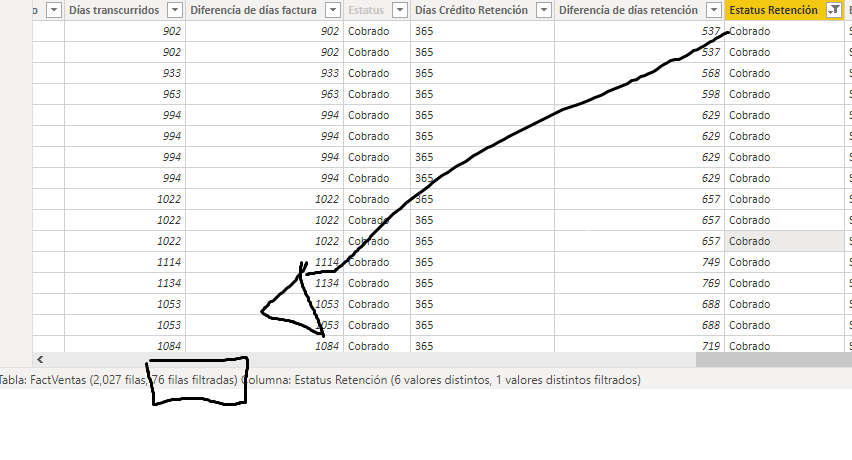
So with the rest of the elements. The elements of that column, I have them in the following table "DimStRet"

Hi Anonymous ,
To my knowledge, the filters in "Data view" won't affect the results in "Report view". It's used to check the result of measures.
Best regards
Icey
If this post helps, then consider Accepting it as the solution to help other members find it faster.

4 Replies
 PaulDBrownCommunity Champion
Anonymous
Can you please post the measure?
- AnonymousNot applicable
Estatus Retención = IF(FactVentas[Diferencía de días retención]>0 && FactVentas[Estado Retención] = "NO", "Reclamar", IF(FactVentas[Diferencía de días retención] > - 10 && FactVentas[Estado Retención] = "NO" && FactVentas[Cobro Parcial] = "No tiene", "Por vencer", IF(FactVentas[Estado Retención]= "Sin retencion", "No retiene", IF(FactVentas[Estado Retención] = "Parcial" && FactVentas[Diferencía de días retención] > 0 && FactVentas[Cobro Parcial] = "Si", "Reclamar", IF(FactVentas[Diferencía de días retención]<0 && FactVentas[Estado Retención] = "NO" && FactVentas[Cobro Parcial] = "No tiene", "Esperar", IF(FactVentas[Estado Retención]= "Si","Cobrado", IF(FactVentas[Estado Retención] = "No" && FactVentas[Diferencía de días retención] > -30 && FactVentas[Cobro Parcial] = "Si", "Por vencer", if(FactVentas[Diferencía de días retención] > -275 && FactVentas[Cobro Parcial] = "No" && FactVentas[Estado Retención] = "No", "Retención L", "Esperar"))))))))- PaulDBrownCommunity Champion
Anonymous
I meant the COUNT measure. The measure you posted returns a string, does it not?
- IceyCommunity Support
Hi Anonymous ,
To my knowledge, the filters in "Data view" won't affect the results in "Report view". It's used to check the result of measures.
Best regards
Icey
If this post helps, then consider Accepting it as the solution to help other members find it faster.