cancel
Showing results for 
Search instead for 
Did you mean: 

The Power BI Data Visualization World Championships is back! Get ahead of the game and start preparing now! Learn more

Reply
Anonymous
Not applicable

COUNT and SUM only if has no zeros

Hi guys,


I need a dax measure to show if STATE has achieved 100% of delivery for product A,B,C


My column "Delivered" is an calculated measure. 1 means delivered and 0 means failed. and I need a new column on the state level.


I have the table below:

DATESTATEPRODUCTDELIVERED (DAX MEASURE)
27-JulNSWA1
27-JulNSWB1
27-JulNSWC0
27-JulVICA1
27-JulVICB1
27-JulVICC1


I need this new dax measure showing VIC as 1 (achieved) and NSW as 0 (failed)  and ten sum all the values with 1.


STATENEW DAX MEASURE
NSW0
VIC1


thanks in advance

1 ACCEPTED SOLUTION
Icey
Community Support
Community Support

Hi @Anonymous ,


Try this:

Measure =
SUMX (
    ADDCOLUMNS (
        'Table',
        "NEW DAX MEASURE", SWITCH ( 'Table'[STATE], "VIC", 1, "NSW", 0 )
    ),
    [NEW DAX MEASURE]
)


Best Regards,

Icey


If this post helps, then please consider Accept it as the solution to help the other members find it more quickly.

View solution in original post

3 REPLIES 3
Icey
Community Support
Community Support

Hi @Anonymous ,


Try this:

Measure =
SUMX (
    ADDCOLUMNS (
        'Table',
        "NEW DAX MEASURE", SWITCH ( 'Table'[STATE], "VIC", 1, "NSW", 0 )
    ),
    [NEW DAX MEASURE]
)


Best Regards,

Icey


If this post helps, then please consider Accept it as the solution to help the other members find it more quickly.

AlB
Community Champion
Community Champion

Hi @Anonymous 

Assuming Delivered is a calculated column in the your table,  you could:

1. Place Table1[State] in the rows of a table visual

2. Create this measure and place it in the visual

NewMeasure3 = 
SUMX (
    DISTINCT ( Table3[State] ),
    IF ( CALCULATE ( COUNT ( Table3[Product] ), Table3[Delivered] = 0 ) > 0, 0, 1 )
)

Please mark the question solved when done and consider giving kudos if posts are helpful.

Contact me privately for support with any larger-scale BI needs, tutoring, etc.

Cheers 

SU18_powerbi_badge


BI_Jo
Resolver III
Resolver III

Hi
 
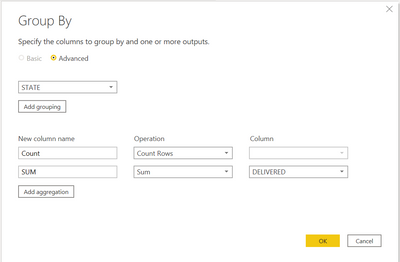
You could create a new table using 'group by' in Power Query Editor:

BI_Jo_0-1601905373447.png


And then create a measure on the table:

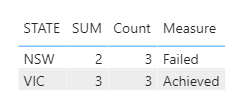
Measure = if(sum('Table'[SUM]) = sum('Table'[Count]),"Achieved","Failed")

Which will give you this:

BI_Jo_1-1601905475796.png

Jo

Helpful resources

Announcements
November Power BI Update Carousel

Power BI Monthly Update - November 2025

Check out the November 2025 Power BI update to learn about new features.

Fabric Data Days Carousel

Fabric Data Days

Advance your Data & AI career with 50 days of live learning, contests, hands-on challenges, study groups & certifications and more!

FabCon Atlanta 2026 carousel

FabCon Atlanta 2026

Join us at FabCon Atlanta, March 16-20, for the ultimate Fabric, Power BI, AI and SQL community-led event. Save $200 with code FABCOMM.

Top Solution Authors
Top Kudoed Authors