Join us at FabCon Atlanta from March 16 - 20, 2026, for the ultimate Fabric, Power BI, AI and SQL community-led event. Save $200 with code FABCOMM.
Register now!Get Fabric Certified for FREE during Fabric Data Days. Don't miss your chance! Request now
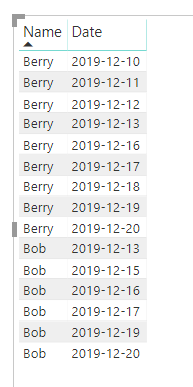
I have a table with Names and Dates. This table shows me that a person completed the request total for a given day. I'd like to create a measure to count the streak of days they meet requests.
For example: below shows two people - Berry and Bob.
Berry had a streak from 2019-12-10 to 2019-12-13 so I'd like to see the streak column count 1,2,3,4 and then because there is no record for Berry on 2019-12-14 the streak ends. A new streak would begin on the date that Berry has a record (in this case 2019-12-16).
Here is the expected result that I just created in Excel - streak of days in a row:
Any help on this would be really appreciated. This one has me stumped.
Thanks, Ben
Solved! Go to Solution.
Hi @Anonymous ,
I have created a sample for your reference, please check the following steps as below.
1. Insert an index column in power query.
2. Then we can create the calculated columns to work on it.
Column =
VAR ind = 'Table'[Index] - 1
VAR lastd =
CALCULATE ( MAX ( 'Table'[Date] ), FILTER ( 'Table', 'Table'[Index] = ind ) )
VAR ld = 'Table'[Date] - 1
RETURN
IF ( lastd = ld, 1, BLANK () )
Column 2 =
var ind = 'Table'[Index]
var lastindex = CALCULATE(MAX('Table'[Index]),FILTER('Table','Table'[Column]=BLANK() && 'Table'[Index]<ind))
return
IF('Table'[Column]<>BLANK(),lastindex,'Table'[Index])
countrows =
CALCULATE (
COUNTROWS ( 'Table' ),
FILTER (
'Table',
'Table'[Name] = EARLIER ( 'Table'[Name] )
&& 'Table'[Column 2] = EARLIER ( 'Table'[Column 2] )
&& 'Table'[Index] <= EARLIER ( 'Table'[Index] )
)
)
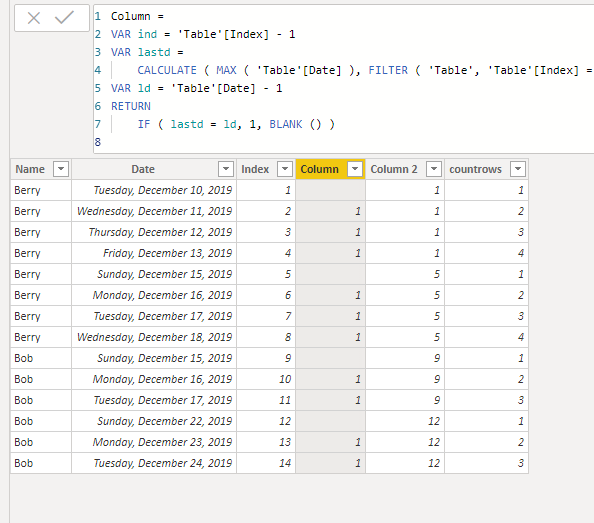
Pbix as attached.
here is a video on how to calculate a streak without having to do anything wiht calculated columns.. all of the logic is in the measure itself:
Hi @Anonymous ,
I have created a sample for your reference, please check the following steps as below.
1. Insert an index column in power query.
2. Then we can create the calculated columns to work on it.
Column =
VAR ind = 'Table'[Index] - 1
VAR lastd =
CALCULATE ( MAX ( 'Table'[Date] ), FILTER ( 'Table', 'Table'[Index] = ind ) )
VAR ld = 'Table'[Date] - 1
RETURN
IF ( lastd = ld, 1, BLANK () )
Column 2 =
var ind = 'Table'[Index]
var lastindex = CALCULATE(MAX('Table'[Index]),FILTER('Table','Table'[Column]=BLANK() && 'Table'[Index]<ind))
return
IF('Table'[Column]<>BLANK(),lastindex,'Table'[Index])
countrows =
CALCULATE (
COUNTROWS ( 'Table' ),
FILTER (
'Table',
'Table'[Name] = EARLIER ( 'Table'[Name] )
&& 'Table'[Column 2] = EARLIER ( 'Table'[Column 2] )
&& 'Table'[Index] <= EARLIER ( 'Table'[Index] )
)
)
Pbix as attached.
You might be able to adapt Cthulhu for this purpose:
Check out the November 2025 Power BI update to learn about new features.
Advance your Data & AI career with 50 days of live learning, contests, hands-on challenges, study groups & certifications and more!