cancel
Showing results forย 
Search instead forย 
Did you mean:ย 

The Power BI Data Visualization World Championships is back! Get ahead of the game and start preparing now! Learn more

Reply
DarylRob
Helper I
Helper I

Bookmark based on value of field when using row level security

So I'm using role level security to give only data to each user that accesses the dashboard but I have two options "Product A only" & "Product A & B"

So I have various cards I only want to display when the user logged in is "Product A & B"

I can set up the bookmarks but is there a way to show a bookmark based on a data field?


1 ACCEPTED SOLUTION
v-yanjiang-msft
Community Support
Community Support

Hi @DarylRob ,

According to your description, here's my solution.

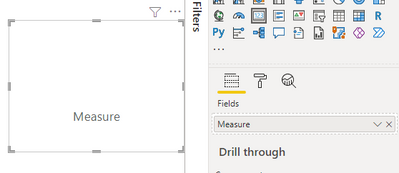
1.Create a measure.

Measure = ""

Put the measure in a card visual.

vkalyjmsft_0-1644828442967.png

Turn off the Category label, get a blank visual.

vkalyjmsft_1-1644828516799.png

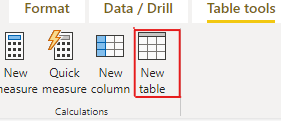
2.Create a new table by the below formula.

vkalyjmsft_2-1644829493795.png

Table 2 = UNION ( ROW ( "Card Color", "#FFFFFF00" ), ROW ( "Card Color", "White" ) )

 Get this table.

vkalyjmsft_3-1644829546442.png

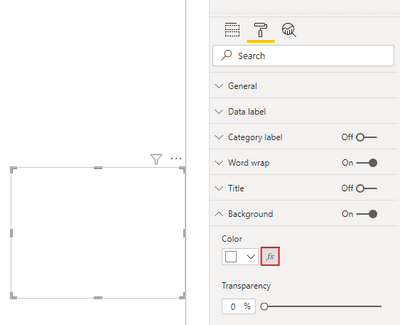
3.Select the fx tab beside the Color option under the Backgroud ribbon.

vkalyjmsft_4-1644829643129.png

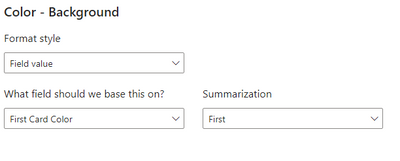
Select the Card color column from the new table in the color field.

vkalyjmsft_5-1644829793094.png

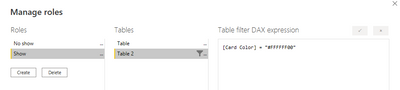
4.In Manage roles, create two roles like below.

vkalyjmsft_6-1644830020897.png

vkalyjmsft_7-1644830033664.png

5.Put the blank card upon the fact card you want to display.

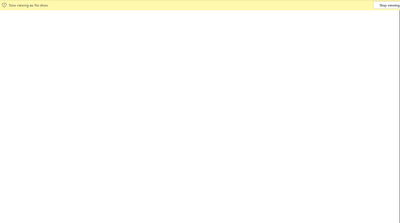
When you view as No show, there's nothing.

vkalyjmsft_9-1644830241663.png

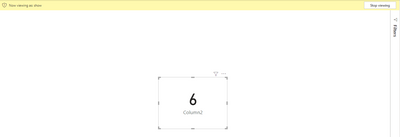
When you view as Show, the fact card display.

vkalyjmsft_10-1644830272954.png


I attach my sample below for reference.


Best Regards,
Community Support Team _ kalyj

If this post helps, then please consider Accept it as the solution to help the other members find it more quickly.


View solution in original post

3 REPLIES 3
v-yanjiang-msft
Community Support
Community Support

Hi @DarylRob ,

According to your description, here's my solution.

1.Create a measure.

Measure = ""

Put the measure in a card visual.

vkalyjmsft_0-1644828442967.png

Turn off the Category label, get a blank visual.

vkalyjmsft_1-1644828516799.png

2.Create a new table by the below formula.

vkalyjmsft_2-1644829493795.png

Table 2 = UNION ( ROW ( "Card Color", "#FFFFFF00" ), ROW ( "Card Color", "White" ) )

 Get this table.

vkalyjmsft_3-1644829546442.png

3.Select the fx tab beside the Color option under the Backgroud ribbon.

vkalyjmsft_4-1644829643129.png

Select the Card color column from the new table in the color field.

vkalyjmsft_5-1644829793094.png

4.In Manage roles, create two roles like below.

vkalyjmsft_6-1644830020897.png

vkalyjmsft_7-1644830033664.png

5.Put the blank card upon the fact card you want to display.

When you view as No show, there's nothing.

vkalyjmsft_9-1644830241663.png

When you view as Show, the fact card display.

vkalyjmsft_10-1644830272954.png


I attach my sample below for reference.


Best Regards,
Community Support Team _ kalyj

If this post helps, then please consider Accept it as the solution to help the other members find it more quickly.


amitchandak
Super User
Super User

@DarylRob , You to create a table with these two values and email ID, what each email can be shown.

Then you can create role

[email] = userprincipalname()


that will filter one of the two or both based on login


How to use Row Level Security (RLS): https://youtu.be/NfdIA0uS6Nk

Share with Power BI Enthusiasts: Full Power BI Video (20 Hours) YouTube
Microsoft Fabric Series 60+ Videos YouTube
Microsoft Fabric Hindi End to End YouTube

But how do I hide a card for certain users?

Helpful resources

Announcements
Power BI DataViz World Championships

Power BI Dataviz World Championships

The Power BI Data Visualization World Championships is back! Get ahead of the game and start preparing now!

December 2025 Power BI Update Carousel

Power BI Monthly Update - December 2025

Check out the December 2025 Power BI Holiday Recap!

FabCon Atlanta 2026 carousel

FabCon Atlanta 2026

Join us at FabCon Atlanta, March 16-20, for the ultimate Fabric, Power BI, AI and SQL community-led event. Save $200 with code FABCOMM.