Join us at FabCon Atlanta from March 16 - 20, 2026, for the ultimate Fabric, Power BI, AI and SQL community-led event. Save $200 with code FABCOMM.
Register now!Get Fabric Certified for FREE during Fabric Data Days. Don't miss your chance! Request now
Hi All,
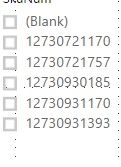
I see a blank value appear on the slicer from a dimension column (i manually created the Dimension table) only when i connect it to the fact table in the data model.
This is causing an issue in my measure on the Fact table. Is there a reason for the Blank to appear on my slicer ?
How can i avoid it ?
Thank you.
Solved! Go to Solution.
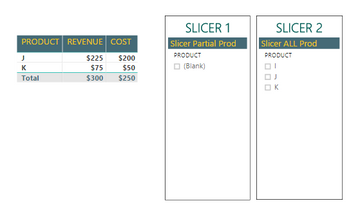
@sd782 it might be because you have values in your fact table thar are not in the slicer.
See the following example.
As J and K are not on Slicer 1 it is automatically showing a blank. It doesnt happen for Slicer 2 as it includes all the Prod. in fact table.
In this situation you need to be careful if you filter the visualization or page by removing the blank because it will "remove" J and K from the table.
@sd782 it might be because you have values in your fact table thar are not in the slicer.
See the following example.
As J and K are not on Slicer 1 it is automatically showing a blank. It doesnt happen for Slicer 2 as it includes all the Prod. in fact table.
In this situation you need to be careful if you filter the visualization or page by removing the blank because it will "remove" J and K from the table.
@BordalosThank you for your inputs. I was able recreate and verify what you said.
Can you create another product table with just those products and use that for slicer 1 and use the base table for slicer 2?
What about using a page level filter for products marking it as is not blank?
Check out the November 2025 Power BI update to learn about new features.
Advance your Data & AI career with 50 days of live learning, contests, hands-on challenges, study groups & certifications and more!