Don't miss your chance to take the Fabric Data Engineer (DP-600) exam for FREE! Find out how by attending the DP-600 session on April 23rd (pacific time), live or on-demand.
Learn moreNext up in the FabCon + SQLCon recap series: The roadmap for Microsoft SQL and Maximizing Developer experiences in Fabric. All sessions are available on-demand after the live show. Register now
Hello guys,
I hope you are well.
I'm looking to retrieve some excel files from a sharepoint folder to combine them.
I've started to use the function SharePoint.Files but it scans all the files on sharepoint before getting anything. There are hundreds thousands of files so it's too slow to use it.
Do you know if there is a better way to get a direct access to the folder avoiding PBi to scan all the files on sharepoint ?
Many thanks for your help,
You can try to change Sharepoint.Files() to SharePoint.Contents() to see if that works better for you. Or you can add a Filter step on the FolderPath before you start combining files.
If this works for you, please mark it as the solution. Kudos are appreciated too. Please let me know if not.
Regards,
Pat
To learn more about Power BI, follow me on Twitter or subscribe on YouTube.
Hello @mahoneypat and thank you.
Using SharePoint.Contents() instead of Sharepoint.Files() seems to be a good idea.
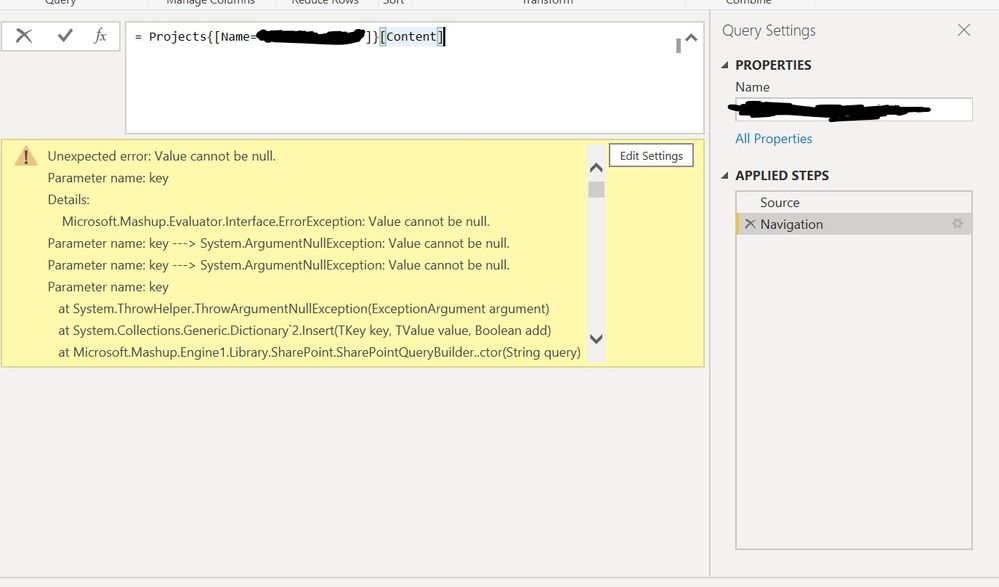
Nevertheless, when I try to open the folder I have this error :
Do you know how to fix this ?
Regards,
Not sure. That should work. Remember that M is case sensitive. Does your [Name = <yourfoldername>] part match case too?
Here one tip to help troubleshoot. Connect again and navigate where you see your folder and a hyperlink of "Table" next to it. Click to the right of the hyperlink (not on it) to preview the contents. Is it empty (null)? If so, put a file there and try again.
If this works for you, please mark it as the solution. Kudos are appreciated too. Please let me know if not.
Regards,
Pat
To learn more about Power BI, follow me on Twitter or subscribe on YouTube.
Thank you @mahoneypat,
It took me a lot of time to identify the issue. The error was caused because one of the folder name contained a special character, in this case it was "&".
If you have recently started exploring Fabric, we'd love to hear how it's going. Your feedback can help with product improvements.
A new Power BI DataViz World Championship is coming this June! Don't miss out on submitting your entry.
Experience the highlights from FabCon & SQLCon, available live and on-demand starting April 14th.
| User | Count |
|---|---|
| 48 | |
| 40 | |
| 40 | |
| 20 | |
| 16 |
| User | Count |
|---|---|
| 70 | |
| 67 | |
| 32 | |
| 27 | |
| 26 |