cancel
Showing results for 
Search instead for 
Did you mean: 

Vote for your favorite vizzies from the Power BI Dataviz World Championship submissions. Vote now!

Reply
efowler
Helper II
Helper II

Best method to visually show "Case file resolution" time

Hello,


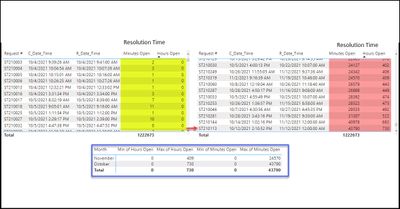
I have built a report for a call center to track case files time to resolution (created date/time - Resolved date/time).  I am having some trouble visually displaying this because there is such a wide range of time to resolution.   Specfically there are signific cases in which the case file is resolved in less than 1 hour and there are some that are resolved in hundreads of hours.  This creates an issue for displaying "average' time to resolution. 


Any ideas on how to better display a visual in this situation?   Is there a way to exclude the top 20% and bottom 20% in the calculation to trim off the cases that remain open extremely long times or that are closed in less than X minutes? Case file time to resolution.jpg

1 ACCEPTED SOLUTION
rsbin
Community Champion
Community Champion

@efowler,

There are a number of ways you can down this "statistics" rabbit hole.

Median may be a better measure than average when you have a wide variance. 

A custom "Box and Whisker" visual is one that I have used as well when I encounter a situation such as yours.

Yes, I'm sure there is a way to exclude "outliers", but someone with more expertise will have to help you with that.

Hope this helps.

Regards,

View solution in original post

3 REPLIES 3
rsbin
Community Champion
Community Champion

@efowler,

There are a number of ways you can down this "statistics" rabbit hole.

Median may be a better measure than average when you have a wide variance. 

A custom "Box and Whisker" visual is one that I have used as well when I encounter a situation such as yours.

Yes, I'm sure there is a way to exclude "outliers", but someone with more expertise will have to help you with that.

Hope this helps.

Regards,

Thanks for the suggestion on the Box and Whiskers visual.... I am going to use that for now. 


It would be nice to be able to overlay a KPI/Target into the Box and Whiskers visual.. 

rsbin
Community Champion
Community Champion

@efowler,

You can try to add your KPI to the Tooltips, or create your own custom Tooltip page.

Lots of videos on the subject....have at it.


Regards,


P.S.  Please give Kudos if you like a response provided to you.  Thx.

Helpful resources

Announcements
Power BI DataViz World Championships

Power BI Dataviz World Championships

Vote for your favorite vizzies from the Power BI World Championship submissions!

Sticker Challenge 2026 Carousel

Join our Community Sticker Challenge 2026

If you love stickers, then you will definitely want to check out our Community Sticker Challenge!

January Power BI Update Carousel

Power BI Monthly Update - January 2026

Check out the January 2026 Power BI update to learn about new features.

FabCon Atlanta 2026 carousel

FabCon Atlanta 2026

Join us at FabCon Atlanta, March 16-20, for the ultimate Fabric, Power BI, AI and SQL community-led event. Save $200 with code FABCOMM.