cancel
Showing results for 
Search instead for 
Did you mean: 

Get Fabric Certified for FREE during Fabric Data Days. Don't miss your chance! Request now

Reply
huguest
Advocate II
Advocate II

Bar chart axis to adjust based on slicer

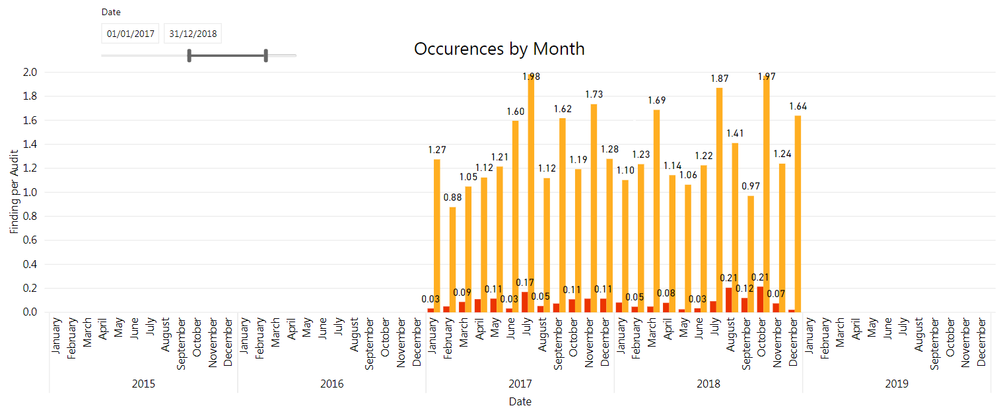
I have a simple bar chart where the x-axis is a Date, and I have a slicer for the user to select the desired Date range.  When I select a date range, the data is only displayed for the selected period, but the x-axis still covers the entire date range of my data model (with no bars for the months that are outside of the selected range).  Can I get the axix to match the date slicer?


*I can uncheck the "Show items with no data" to kind of achieve that but there are instances where I have months with "0" within the selected range and I would what those to appear on the axis.


Thank you!

dateslicer.png

1 ACCEPTED SOLUTION
Anonymous
Not applicable

Hi, If you are using a Calendar table in your model, with values that extend beyond the range of data you have, and you use the data from the calendar table on your axis, then the range of dates on the axis will depend on whether you have 'show items with no data' checked.  If you check 'show items with no data, then the complete date range will be included, if you uncheck it, it will show just the range of dates for which you have data.   You can still see the values which are 0 on the chart, within the date range selected, even if you de-select 'show items with no data.  It shouldn't hide dates on the axis which have zeroes. 


Let me know if this helps

View solution in original post

1 REPLY 1
Anonymous
Not applicable

Hi, If you are using a Calendar table in your model, with values that extend beyond the range of data you have, and you use the data from the calendar table on your axis, then the range of dates on the axis will depend on whether you have 'show items with no data' checked.  If you check 'show items with no data, then the complete date range will be included, if you uncheck it, it will show just the range of dates for which you have data.   You can still see the values which are 0 on the chart, within the date range selected, even if you de-select 'show items with no data.  It shouldn't hide dates on the axis which have zeroes. 


Let me know if this helps

Helpful resources

Announcements
November Power BI Update Carousel

Power BI Monthly Update - November 2025

Check out the November 2025 Power BI update to learn about new features.

Fabric Data Days Carousel

Fabric Data Days

Advance your Data & AI career with 50 days of live learning, contests, hands-on challenges, study groups & certifications and more!

FabCon Atlanta 2026 carousel

FabCon Atlanta 2026

Join us at FabCon Atlanta, March 16-20, for the ultimate Fabric, Power BI, AI and SQL community-led event. Save $200 with code FABCOMM.

Top Solution Authors
Top Kudoed Authors