Forum Discussion

Azure Data Catalog Integration?
- 11 years ago
Hi all,
From the Azure Data Catalog FAQ: You can think of Azure Data Catalog as an evolution of the Data Catalog. Azure Data Catalog delivers similar capabilities for data source publishing and discovery, but is focused on broader scenarios and not dependent on Office 365. Shortly after the Azure Data Catalog becomes generally available the two catalogs will merge into a single service.
Please let me know if this answers your question and gives you the information you need.
Edit: This is Matthew from the Azure Data Catalog team, so please feel free to ask questions if you have them. You can also visit the Azure Data Catalog forum ( https://social.msdn.microsoft.com/Forums/azure/en-US/home?forum=azuredatacatalog ) for questions specific to ADC.


From PowerQuery, you can access Azure Market Place to get data.

Regards

Right now Azure Data Catalog does not have much to do with Power BI Data Catalog. Right now the only way to see data from Azure Data Catalog is Excel. I would hope that the two products get integrated somehow at some point so that we can crowd source the meta data for the published PQs and at the same time be able to consume that Azure Data Catalog datasets which would almost behave like a data virtualization scenario.
Imagine, not having to have any drivers for any data sources and just letting Azure Data Catalog take care of the plumbing. Right now it's more of a dream than reality but if we could get a sigle data source to connect to for all corporate data and a single place to manage all corporate data security, I think this product would take the market by storm.
- timrodman11 years agoHelper I
I just watched a video on Azure Data Catalog and it looks pretty cool. It looks like you can open direcly in SSRS, not just Excel (click here).
Do you know the answer to these questions about Azure Data Catalog:
- When it opens in Excel, does it function as if you connected to SSAS?
- Can you organize the data sets into folders/subfolders?
- andre11 years agoMemorable Member
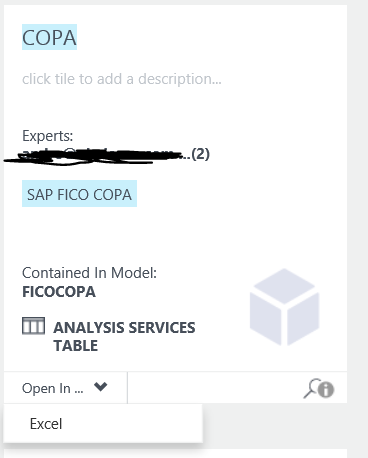
I just tried it again and the only option that I see to view the data is Excel as you can see in the image below.
When you click on Excel, an ODC file is generated and that's what Excel uses to connect to the data set and explore it in a Pivot Table. You don't need folders/subfolders because the tool is more of a portal with search capabilities but I guess you could use Tags as folders/subfolders.
- timrodman11 years agoHelper I
Sorry, I just realized that the SSRS option in the video must be for when SSRS is actually the data source, not the consuming application.