Forum Discussion

Average quarterly data by month
Hi,
I been asking around for hlep on this issue in the past fews days but couldn't get a solution.
Below is the powerbi pbix file download link.
I have two sales data tables as below.
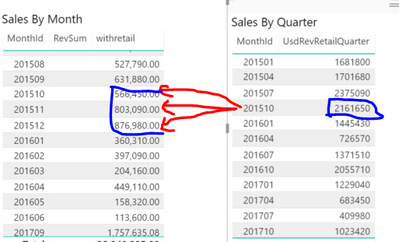
I would like to average the quarterly Data by monty (right table, on MonthId 201510, sale data 2161650/3=720550), and add this number to left table accordingly.
Final look should be something like:
MonthId TotalSales
201510 1287000(566450+720550)
201511 1523640(803090+720550)
201512 1597530(876980+720550)
So far I tried
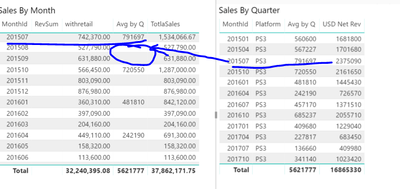
Avg by Q = CALCULATE(sum('Retail_Quarter'[USD Net Rev])/3,ALL('CalendarMonthYear'[MonthBeginDate]))
but this only fill in the averaged quarter data into the first month of each quarter as below.
Hi siwyan_1,
Based on your mode, there are many months have no values. This could be the cause. So we need to provide proper context in the visuals. Maybe you can do it like this, adding [Year] and [Quarter].
Avg by Q 2 =
CALCULATE (
    AVERAGEX (
        SUMMARIZE ( Quarter, FiscalYMD[Quarter], "TOTAL", SUM ( Quarter[USD Net Rev] ) ),
        [TOTAL] / 3
    ),
    ALLEXCEPT ( FiscalYMD, FiscalYMD[Year], FiscalYMD[Quarter] )
)
Best Regards,
Dale
2 Replies
 v-jiascu-msft
Microsoft Employee
Hi siwyan_1,
Based on your mode, there are many months have no values. This could be the cause. So we need to provide proper context in the visuals. Maybe you can do it like this, adding [Year] and [Quarter].
Avg by Q 2 =
CALCULATE (
    AVERAGEX (
        SUMMARIZE ( Quarter, FiscalYMD[Quarter], "TOTAL", SUM ( Quarter[USD Net Rev] ) ),
        [TOTAL] / 3
    ),
    ALLEXCEPT ( FiscalYMD, FiscalYMD[Year], FiscalYMD[Quarter] )
)
Best Regards,
Dale
- v-jiascu-msft