FabCon is coming to Atlanta
Join us at FabCon Atlanta from March 16 - 20, 2026, for the ultimate Fabric, Power BI, AI and SQL community-led event. Save $200 with code FABCOMM.
Register now!- Power BI forums
- Get Help with Power BI
- Desktop
- Service
- Report Server
- Power Query
- Mobile Apps
- Developer
- DAX Commands and Tips
- Custom Visuals Development Discussion
- Health and Life Sciences
- Power BI Spanish forums
- Translated Spanish Desktop
- Training and Consulting
- Instructor Led Training
- Dashboard in a Day for Women, by Women
- Galleries
- Data Stories Gallery
- Themes Gallery
- Contests Gallery
- QuickViz Gallery
- Quick Measures Gallery
- Visual Calculations Gallery
- Notebook Gallery
- Translytical Task Flow Gallery
- TMDL Gallery
- R Script Showcase
- Webinars and Video Gallery
- Ideas
- Custom Visuals Ideas (read-only)
- Issues
- Issues
- Events
- Upcoming Events
Get Fabric Certified for FREE during Fabric Data Days. Don't miss your chance! Request now
- Power BI forums
- Forums
- Get Help with Power BI
- Desktop
- Re: Average of delta between two distinct counts
- Subscribe to RSS Feed
- Mark Topic as New
- Mark Topic as Read
- Float this Topic for Current User
- Bookmark
- Subscribe
- Printer Friendly Page

- Mark as New
- Bookmark
- Subscribe
- Mute
- Subscribe to RSS Feed
- Permalink
- Report Inappropriate Content
Average of delta between two distinct counts
Hello All,
I'm relatively new to Power BI and have a question about the correct approach to getting a desired value.
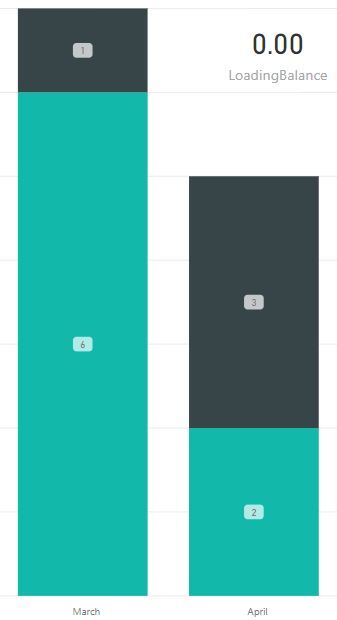
Below is a screenshot of some data I loaded to a stacked bar chart. I'd like to create a card that reflects the average monthly delta between the two separate groups in the chart. I can't figure out how to do this with calculated columns and/or measures.
The basic math is shown below, I just don't know how to do it in DAX / Power BI.
Any help would be appreciated!


- Mark as New
- Bookmark
- Subscribe
- Mute
- Subscribe to RSS Feed
- Permalink
- Report Inappropriate Content
@Anonymous,
You may refer to measure below.
Measure =
AVERAGEX ( Table1, Table1[Group 1] - Table1[Group 2] )
If this post helps, then please consider Accept it as the solution to help the other members find it more quickly.
- Mark as New
- Bookmark
- Subscribe
- Mute
- Subscribe to RSS Feed
- Permalink
- Report Inappropriate Content
@v-chuncz-msft Thank you for the quick response.
I followed your instructions, and added count( in front of each group as these are columns with date values and just looking for count. Unfortunately I'm not getting the correct values in the math and am not clear as to why.
The below formula should return 2 since 6-1 = 5, 2-3 = -1 and the average of 5 & -1 = 2.
LoadingBalance = AVERAGEX( Projects, COUNT(Projects[Group1]) - COUNT(Projects[Group2]) )
But as you can see from the card that I overlayed on the graph it is returning 0. Not clear as to why. Any help would be appreciated.
- Mark as New
- Bookmark
- Subscribe
- Mute
- Subscribe to RSS Feed
- Permalink
- Report Inappropriate Content
@Anonymous,
You may check link below.
http://community.powerbi.com/t5/Desktop/Change-table-visualization-total/m-p/323290#M144103
If this post helps, then please consider Accept it as the solution to help the other members find it more quickly.
- Mark as New
- Bookmark
- Subscribe
- Mute
- Subscribe to RSS Feed
- Permalink
- Report Inappropriate Content
@v-chuncz-msft & @nickchobotar,
Thank you both for your help on this. I've got some other visualizations that have taken priority at the moment so will have to get back to tackling this once those are complete. I will look at both of your responses to see what I can come up with. @nickchobotar I did try to create a quick excel file to reflect the issues I'm having but couldn't quite get there. Seems as though I need to troubleshoot my file a bit more.
Regards,
Eric


- Mark as New
- Bookmark
- Subscribe
- Mute
- Subscribe to RSS Feed
- Permalink
- Report Inappropriate Content
@Anonymous
With the COUNT() you are taking an averarge of 0 by saying give me 2 - 2. Just skip the COUNT.
AVERAGEX( Projects, Projects[Group1] - Projects[Group2] )
N -
- Mark as New
- Bookmark
- Subscribe
- Mute
- Subscribe to RSS Feed
- Permalink
- Report Inappropriate Content
@nickchobotar thanks for the input.
When I don't include the COUNT function I get a returned value in the hundreds (which is why I assumed it was adding the dates vs. a count of them). Thoughts?

- Mark as New
- Bookmark
- Subscribe
- Mute
- Subscribe to RSS Feed
- Permalink
- Report Inappropriate Content
@Anonymous
Not sure. You thinnk you could post a data sample here.
N -
- Mark as New
- Bookmark
- Subscribe
- Mute
- Subscribe to RSS Feed
- Permalink
- Report Inappropriate Content
Unfortunately I'm pulling from my companies SQL servers and all the data is confidential. I'll see if I can build a quick sample version with excel to see if it does the same thing though.
Regards,
Eric
- Mark as New
- Bookmark
- Subscribe
- Mute
- Subscribe to RSS Feed
- Permalink
- Report Inappropriate Content
@Anonymous Sounds like a plan
Helpful resources

Power BI Monthly Update - November 2025
Check out the November 2025 Power BI update to learn about new features.

Fabric Data Days
Advance your Data & AI career with 50 days of live learning, contests, hands-on challenges, study groups & certifications and more!

FabCon Atlanta 2026
Join us at FabCon Atlanta, March 16-20, for the ultimate Fabric, Power BI, AI and SQL community-led event. Save $200 with code FABCOMM.


