cancel
Showing results for 
Search instead for 
Did you mean: 

The Power BI Data Visualization World Championships is back! Get ahead of the game and start preparing now! Learn more

Reply
Wedding55
Helper II
Helper II

Automatic Cumulated Delta

Hello,


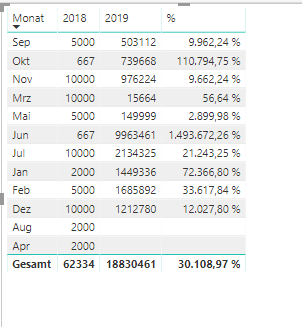
i created the following table (please do not consider the chronology).


20190816_table4.png

I calculated the column "%"  with the follwing measure:


% = IF(ISBLANK(Tabelle1[2019 J]);BLANK();DIVIDE(Tabelle1[2019 J]-Tabelle1[2018 J];Tabelle1[2018 J]))
 
I have two questions:
 
1. Now i want a second colum hat calculate the cumulated the delta. If August of the new year is blank then calculate the sum from 2019 September - Dezember and compare it with the sum from 2018 September - Dezember. If only April is blank then compare the sum from September - August etc. Do you understand the logic?
 

2. It is possible to avoid the calculation for the entire figures? It only make sense when both years are full.


Thanks in advance.


4 REPLIES 4
v-xuding-msft
Community Support
Community Support

Hi @Wedding55 ,

Could you tell me if your problem has been solved? If it is, kindly mark the helpful answer as a solution if you feel that makes sense. Welcome to share your own solution. More people will benefit from here.


Best Regards,

Xue Ding

If this post helps, then please consider Accept it as the solution to help the other members find it more quickly.

Best Regards,
Xue Ding
If this post helps, then please consider Accept it as the solution to help the other members find it more quickly.

Hi Xue Ding,


sorry for the delay. I havent had time to test it. I will try to test it the next days.


Best Regards

Henning


Hi Xue Ding,


sorry for the delay. It works good in your file. In my file i have one column with the turnover from the last 3 finacial years. I sort them in different columns with the measure:


= CALCULATE(Sum('Übersicht'[Umsatz]);DATESBETWEEN('Übersicht'[Datum];"01.07.2017";"30.06.2018"))


So i have a column for each fiscal year. I can´t work with them in your meausre. I think beacuse its already calculated or what do you think?


Thanks in advance


Best Regards

v-xuding-msft
Community Support
Community Support

Hi @Wedding55 ,

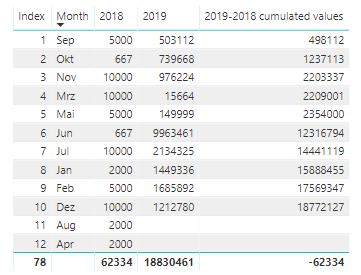
For the scenario, I created a measure to implement. You can download my sample and have a try.

  • create an index column based on the column of month in Power Query
  • create a measure 
2019-2018 cumulated values = 
var a = CALCULATE(MAX('Table'[Index]),FILTER('Table','Table'[2019] = BLANK()))
var new = CALCULATE(SUM('Table'[2019]),FILTER(ALL('Table'),'Table'[Index] <= MAX('Table'[Index]) && 'Table'[Index] > a  ))
var last =  CALCULATE(SUM('Table'[2018]),FILTER(ALL('Table'),'Table'[Index] <= MAX('Table'[Index]) && MAX('Table'[2019]) <> BLANK()))
return
new - last
4.PNG

Is this what you want? If not, please share more details and post a dummy file. Then we can help you as soon as possible.


Best Regards,

Xue Ding

If this post helps, then please consider Accept it as the solution to help the other members find it more quickly.

Best Regards,
Xue Ding
If this post helps, then please consider Accept it as the solution to help the other members find it more quickly.
Helpful resources

Announcements
Power BI DataViz World Championships

Power BI Dataviz World Championships

The Power BI Data Visualization World Championships is back! Get ahead of the game and start preparing now!

December 2025 Power BI Update Carousel

Power BI Monthly Update - December 2025

Check out the December 2025 Power BI Holiday Recap!

FabCon Atlanta 2026 carousel

FabCon Atlanta 2026

Join us at FabCon Atlanta, March 16-20, for the ultimate Fabric, Power BI, AI and SQL community-led event. Save $200 with code FABCOMM.